
基于SpringBoot的桂林旅游景点导游平台
目录
前言
一、技术栈
二、系统功能介绍
用户信息管理
景点类型管理
景点信息管理
线路推荐管理
用户注册
线路推荐
论坛交流
三、核心代码
1、登录模块
2、文件上传模块
3、代码封装
前言
随着信息技术在管理上越来越深入而广泛的应用,管理信息系统的实施在技术上已逐步成熟。本文介绍了桂林旅游景点导游平台的开发全过程。通过分析桂林旅游景点导游平台管理的不足,创建了一个计算机管理桂林旅游景点导游平台的方案。文章介绍了桂林旅游景点导游平台的系统分析部分,包括可行性分析等,系统设计部分主要介绍了系统功能设计和数据库设计。
本桂林旅游景点导游平台有管理员和用户。管理员有个人中心,用户管理,景点类型管理,景点信息管理,线路推荐管理,预定信息管理,论坛交流,系统管理等。用户可以收藏景点预定线路,预定景点。因而具有一定的实用性。本站是一个B/S模式系统,采用Spring Boot框架,MYSQL数据库设计开发,充分保证系统的稳定性。系统具有界面清晰、操作简单,功能齐全的特点,使得桂林旅游景点导游平台管理工作系统化、规范化。
本系统的使用使管理人员从繁重的工作中解脱出来,实现无纸化办公,能够有效的提高桂林旅游景点导游平台管理效率。
一、技术栈
末尾获取源码
SpringBoot+Vue+JS+ jQuery+Ajax...
二、系统功能介绍
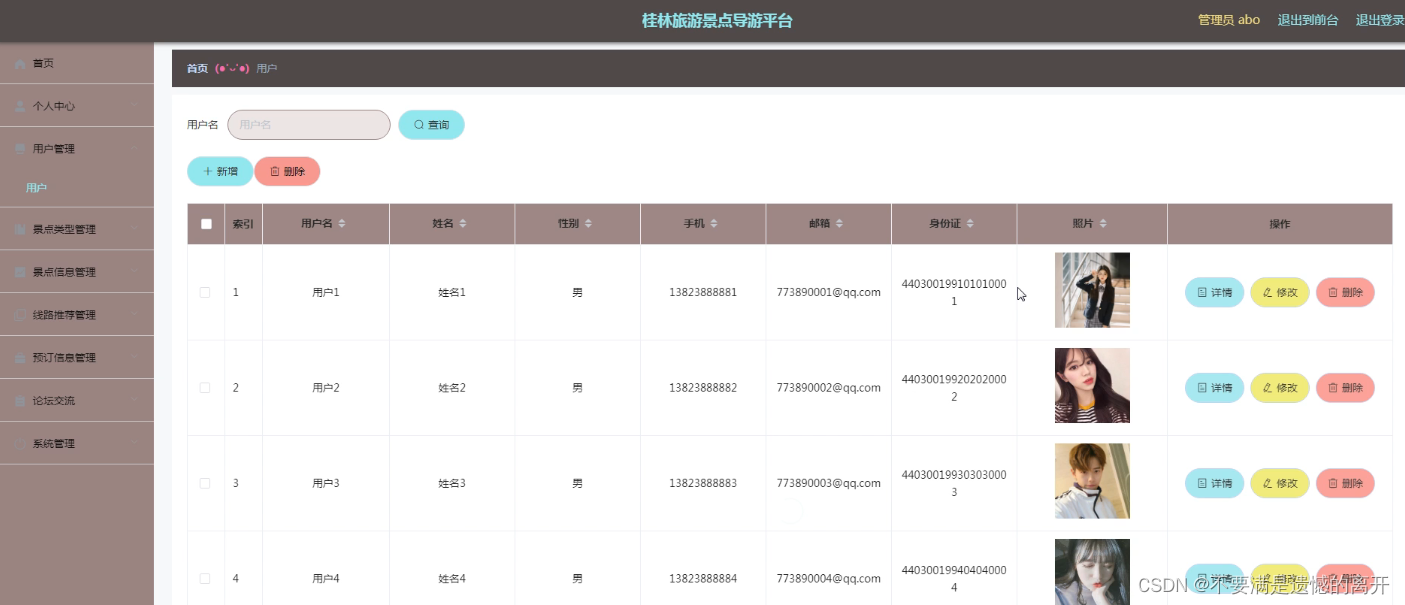
用户信息管理
桂林旅游景点导游平台的系统管理员可以管理用户,可以对用户信息添加修改删除以及查询操作。
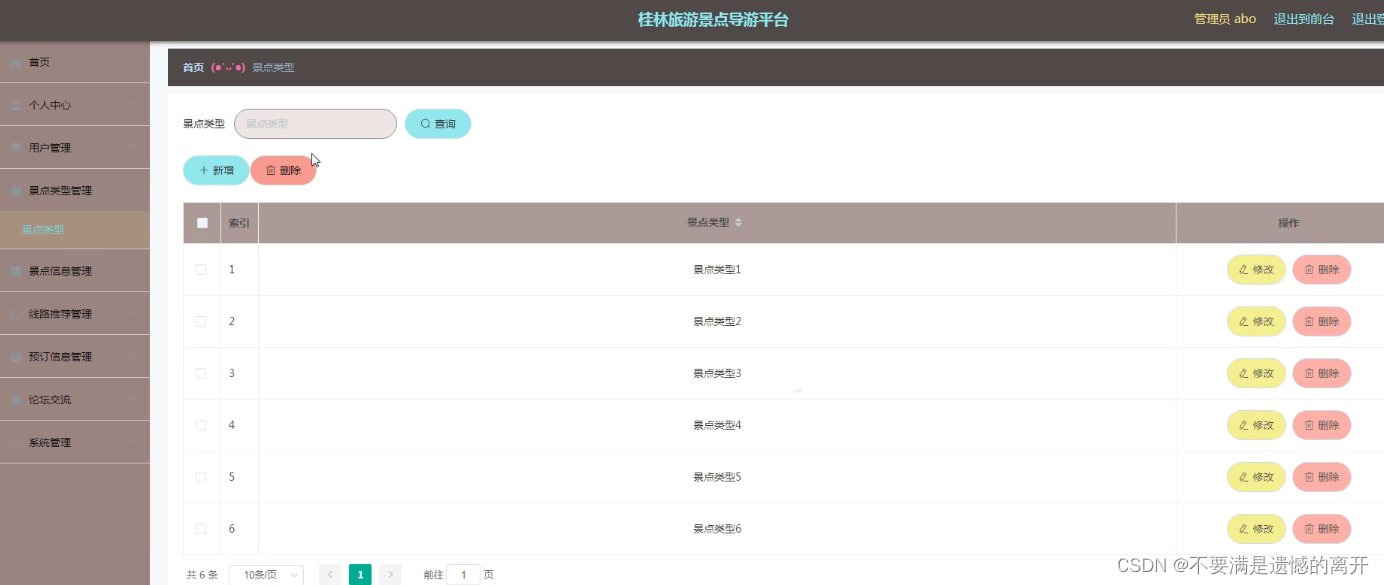
景点类型管理
系统管理员可以查看对景点类型进行添加,修改,删除以及查询操作。
景点信息管理
系统管理员可以对景点信息进行添加,修改,删除以及查询操作。

线路推荐管理
系统管理员可以对线路推荐进行添加修改删除操作。

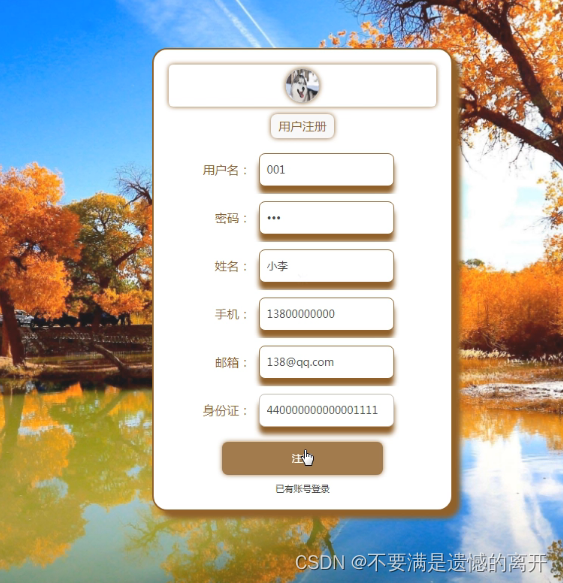
用户注册
用户需要注册信息。
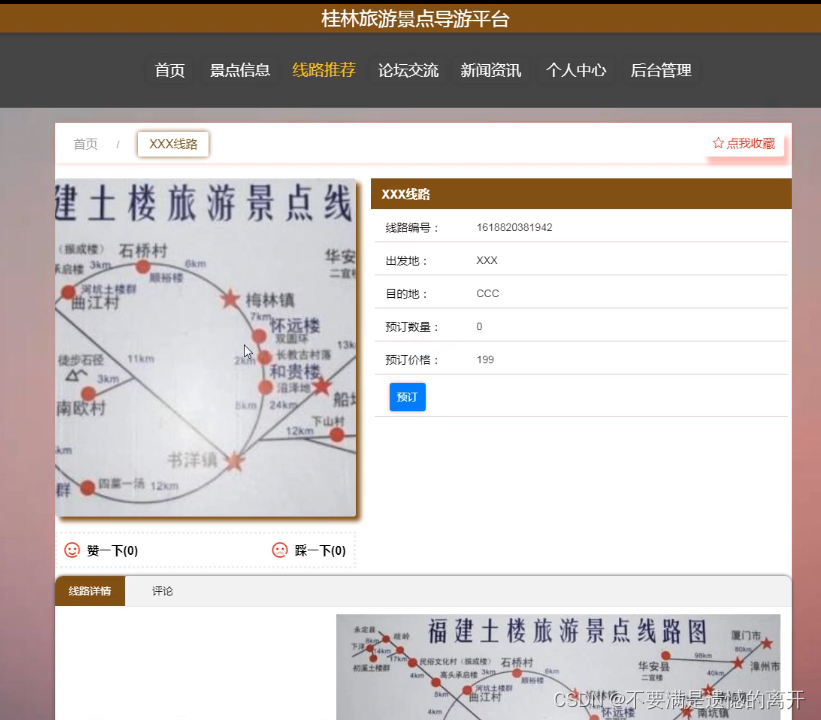
线路推荐
用户登录后,就可以看到线路推荐,可以对推荐线路进行预定。
论坛交流
用户登录可以在论坛交流。

三、核心代码
1、登录模块
package com.controller;import java.util.Arrays;
import java.util.Calendar;
import java.util.Date;
import java.util.Map;import javax.servlet.http.HttpServletRequest;import org.springframework.beans.factory.annotation.Autowired;
import org.springframework.stereotype.Controller;
import org.springframework.web.bind.annotation.GetMapping;
import org.springframework.web.bind.annotation.PathVariable;
import org.springframework.web.bind.annotation.PostMapping;
import org.springframework.web.bind.annotation.RequestBody;
import org.springframework.web.bind.annotation.RequestMapping;
import org.springframework.web.bind.annotation.RequestParam;
import org.springframework.web.bind.annotation.ResponseBody;
import org.springframework.web.bind.annotation.RestController;import com.annotation.IgnoreAuth;
import com.baomidou.mybatisplus.mapper.EntityWrapper;
import com.entity.TokenEntity;
import com.entity.UserEntity;
import com.service.TokenService;
import com.service.UserService;
import com.utils.CommonUtil;
import com.utils.MD5Util;
import com.utils.MPUtil;
import com.utils.PageUtils;
import com.utils.R;
import com.utils.ValidatorUtils;/*** 登录相关*/
@RequestMapping("users")
@RestController
public class UserController{@Autowiredprivate UserService userService;@Autowiredprivate TokenService tokenService;/*** 登录*/@IgnoreAuth@PostMapping(value = "/login")public R login(String username, String password, String captcha, HttpServletRequest request) {UserEntity user = userService.selectOne(new EntityWrapper<UserEntity>().eq("username", username));if(user==null || !user.getPassword().equals(password)) {return R.error("账号或密码不正确");}String token = tokenService.generateToken(user.getId(),username, "users", user.getRole());return R.ok().put("token", token);}/*** 注册*/@IgnoreAuth@PostMapping(value = "/register")public R register(@RequestBody UserEntity user){
//    	ValidatorUtils.validateEntity(user);if(userService.selectOne(new EntityWrapper<UserEntity>().eq("username", user.getUsername())) !=null) {return R.error("用户已存在");}userService.insert(user);return R.ok();}/*** 退出*/@GetMapping(value = "logout")public R logout(HttpServletRequest request) {request.getSession().invalidate();return R.ok("退出成功");}/*** 密码重置*/@IgnoreAuth@RequestMapping(value = "/resetPass")public R resetPass(String username, HttpServletRequest request){UserEntity user = userService.selectOne(new EntityWrapper<UserEntity>().eq("username", username));if(user==null) {return R.error("账号不存在");}user.setPassword("123456");userService.update(user,null);return R.ok("密码已重置为:123456");}/*** 列表*/@RequestMapping("/page")public R page(@RequestParam Map<String, Object> params,UserEntity user){EntityWrapper<UserEntity> ew = new EntityWrapper<UserEntity>();PageUtils page = userService.queryPage(params, MPUtil.sort(MPUtil.between(MPUtil.allLike(ew, user), params), params));return R.ok().put("data", page);}/*** 列表*/@RequestMapping("/list")public R list( UserEntity user){EntityWrapper<UserEntity> ew = new EntityWrapper<UserEntity>();ew.allEq(MPUtil.allEQMapPre( user, "user")); return R.ok().put("data", userService.selectListView(ew));}/*** 信息*/@RequestMapping("/info/{id}")public R info(@PathVariable("id") String id){UserEntity user = userService.selectById(id);return R.ok().put("data", user);}/*** 获取用户的session用户信息*/@RequestMapping("/session")public R getCurrUser(HttpServletRequest request){Long id = (Long)request.getSession().getAttribute("userId");UserEntity user = userService.selectById(id);return R.ok().put("data", user);}/*** 保存*/@PostMapping("/save")public R save(@RequestBody UserEntity user){
//    	ValidatorUtils.validateEntity(user);if(userService.selectOne(new EntityWrapper<UserEntity>().eq("username", user.getUsername())) !=null) {return R.error("用户已存在");}userService.insert(user);return R.ok();}/*** 修改*/@RequestMapping("/update")public R update(@RequestBody UserEntity user){
//        ValidatorUtils.validateEntity(user);userService.updateById(user);//全部更新return R.ok();}/*** 删除*/@RequestMapping("/delete")public R delete(@RequestBody Long[] ids){userService.deleteBatchIds(Arrays.asList(ids));return R.ok();}
}
2、文件上传模块
package com.controller;import java.io.File;
import java.io.FileNotFoundException;
import java.io.IOException;
import java.util.Arrays;
import java.util.Date;
import java.util.HashMap;
import java.util.List;
import java.util.Map;
import java.util.Random;
import java.util.UUID;import org.apache.commons.io.FileUtils;
import org.apache.commons.lang3.StringUtils;
import org.springframework.beans.factory.annotation.Autowired;
import org.springframework.http.HttpHeaders;
import org.springframework.http.HttpStatus;
import org.springframework.http.MediaType;
import org.springframework.http.ResponseEntity;
import org.springframework.util.ResourceUtils;
import org.springframework.web.bind.annotation.PathVariable;
import org.springframework.web.bind.annotation.RequestBody;
import org.springframework.web.bind.annotation.RequestMapping;
import org.springframework.web.bind.annotation.RequestParam;
import org.springframework.web.bind.annotation.RestController;
import org.springframework.web.multipart.MultipartFile;import com.annotation.IgnoreAuth;
import com.baomidou.mybatisplus.mapper.EntityWrapper;
import com.entity.ConfigEntity;
import com.entity.EIException;
import com.service.ConfigService;
import com.utils.R;/*** 上传文件映射表*/
@RestController
@RequestMapping("file")
@SuppressWarnings({"unchecked","rawtypes"})
public class FileController{@Autowiredprivate ConfigService configService;/*** 上传文件*/@RequestMapping("/upload")public R upload(@RequestParam("file") MultipartFile file,String type) throws Exception {if (file.isEmpty()) {throw new EIException("上传文件不能为空");}String fileExt = file.getOriginalFilename().substring(file.getOriginalFilename().lastIndexOf(".")+1);File path = new File(ResourceUtils.getURL("classpath:static").getPath());if(!path.exists()) {path = new File("");}File upload = new File(path.getAbsolutePath(),"/upload/");if(!upload.exists()) {upload.mkdirs();}String fileName = new Date().getTime()+"."+fileExt;File dest = new File(upload.getAbsolutePath()+"/"+fileName);file.transferTo(dest);FileUtils.copyFile(dest, new File("C:\\Users\\Desktop\\jiadian\\springbootl7own\\src\\main\\resources\\static\\upload"+"/"+fileName));if(StringUtils.isNotBlank(type) && type.equals("1")) {ConfigEntity configEntity = configService.selectOne(new EntityWrapper<ConfigEntity>().eq("name", "faceFile"));if(configEntity==null) {configEntity = new ConfigEntity();configEntity.setName("faceFile");configEntity.setValue(fileName);} else {configEntity.setValue(fileName);}configService.insertOrUpdate(configEntity);}return R.ok().put("file", fileName);}/*** 下载文件*/@IgnoreAuth@RequestMapping("/download")public ResponseEntity<byte[]> download(@RequestParam String fileName) {try {File path = new File(ResourceUtils.getURL("classpath:static").getPath());if(!path.exists()) {path = new File("");}File upload = new File(path.getAbsolutePath(),"/upload/");if(!upload.exists()) {upload.mkdirs();}File file = new File(upload.getAbsolutePath()+"/"+fileName);if(file.exists()){/*if(!fileService.canRead(file, SessionManager.getSessionUser())){getResponse().sendError(403);}*/HttpHeaders headers = new HttpHeaders();headers.setContentType(MediaType.APPLICATION_OCTET_STREAM);    headers.setContentDispositionFormData("attachment", fileName);    return new ResponseEntity<byte[]>(FileUtils.readFileToByteArray(file),headers, HttpStatus.CREATED);}} catch (IOException e) {e.printStackTrace();}return new ResponseEntity<byte[]>(HttpStatus.INTERNAL_SERVER_ERROR);}}
3、代码封装
package com.utils;import java.util.HashMap;
import java.util.Map;/*** 返回数据*/
public class R extends HashMap<String, Object> {private static final long serialVersionUID = 1L;public R() {put("code", 0);}public static R error() {return error(500, "未知异常,请联系管理员");}public static R error(String msg) {return error(500, msg);}public static R error(int code, String msg) {R r = new R();r.put("code", code);r.put("msg", msg);return r;}public static R ok(String msg) {R r = new R();r.put("msg", msg);return r;}public static R ok(Map<String, Object> map) {R r = new R();r.putAll(map);return r;}public static R ok() {return new R();}public R put(String key, Object value) {super.put(key, value);return this;}
}
相关文章:
基于SpringBoot的桂林旅游景点导游平台
目录 前言 一、技术栈 二、系统功能介绍 用户信息管理 景点类型管理 景点信息管理 线路推荐管理 用户注册 线路推荐 论坛交流 三、核心代码 1、登录模块 2、文件上传模块 3、代码封装 前言 随着信息技术在管理上越来越深入而广泛的应用,管理信息系统的实…...

【小程序 - 加强】自定义组件、使用npm包、全局数据共享、分包_05
目录 一、自定义组件 1. 组件的创建与引用 1.1 创建组件 1.2 引用组件 1.2.1 局部引用组件 1.2.2 全局引用组件 1.2.3 全局引用 VS 局部引用 1.2.4 组件和页面的区别 2. 样式 2.1 组件样式隔离 2.2 组件样式隔离的注意点 2.3 修改组件的样式隔离选项 2.4 styleIso…...
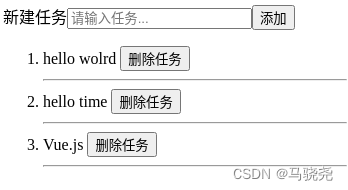
Vue.js3学习篇--Vue模板应用
目录 一,模板基础 1.模板插值 (1)基础插值 (2)HTML代码插值 (3)标签属性插值 2.模板指令 (1)定义 (2)指令参数 二.条件渲染 1.使用v-if指令渲染 2.使…...
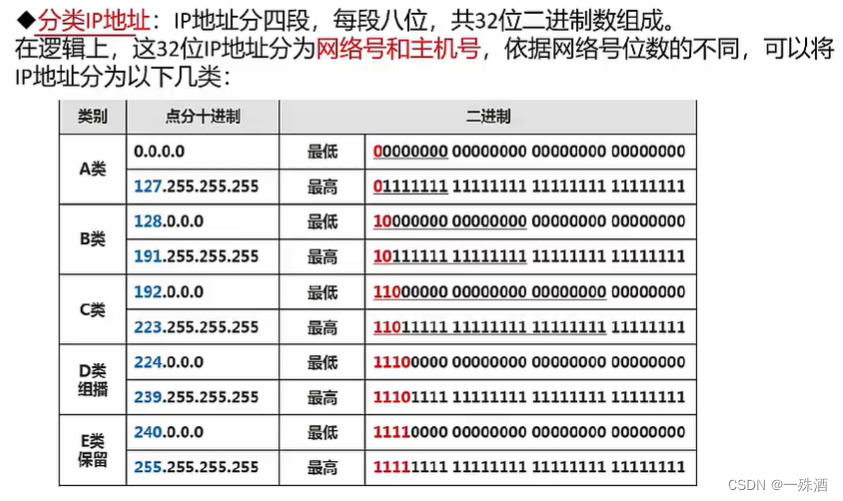
【软考】5.2 传输介质/通信方式/IP地址/子网划分
《传输介质》 双绞线:网线;传输距离在100m以内 无屏蔽双绞线:UTP;可靠性相对较低屏蔽双绞线:STP;屏蔽怕干扰;可靠性相对较高;一般用于对传输可靠性要求很高的场合 网线:…...

软件测试银行项目网上支付接口调用测试实例
公司最近有一个网站商城项目要开始开发了,这几天老板和几个同事一起开着需求会议, 讨论了接下来的业务规划和需求策略,等技术需求一下来还要讨论技术需求, 确认后再慢慢的进入开发阶段,趁着闲暇时间新造的人想总结一…...

w806 adc 中断扫描通道采集
用到了该芯片adc 扫描4个adc 通道,官方的死循环等待非常浪费时间,这里改用adc 中断采集方式,记录一下 int32_t adcFilterSum[4]{0}; int32_t detec_adc_value[4]{0};//mV int16_t detec_convt_ok[4]{0};/*is OK*/ ADC_HandleTypeDef hadc;vo…...

使用CSS的Positions布局打造响应式网页
在当今移动互联网的时代,响应式网页设计已经成为了一个必备的技能。通过使用CSS Positions布局,我们可以轻松地实现一个响应式的网页,使网页能够在不同的屏幕尺寸下自动适应。本文将介绍如何使用CSS Positions布局来打造一个响应式网页&#…...
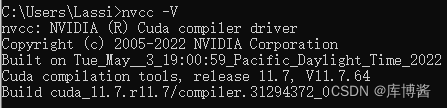
模型训练环境相关(CUDA、PyTorch)
模型训练环境相关(CUDA、PyTorch) 1. 查看当前 GPU 所能支持的最高版本的 CUDA2. 如何判断是否安装了 CUDA3. 安装 PyTorch3.1 创建虚拟环境3.2 激活并进入虚拟环境3.3 安装 PyTorch 1. 查看当前 GPU 所能支持的最高版本的 CUDA 打开 NVIDIA 控制面板&a…...

链动2+1模式:社交电商行业的新型商业模式与营销手段
链动21模式是近年来在社交电商行业中崭露头角的一种新型商业模式和营销手段。在经历了多年的发展之后,社交电商行业已经进入了一个竞争激烈、用户获取成本高昂的阶段。在这个阶段,如何迅速吸引用户并增加他们的留存率和复购率成为了亟待解决的问题。 为了…...
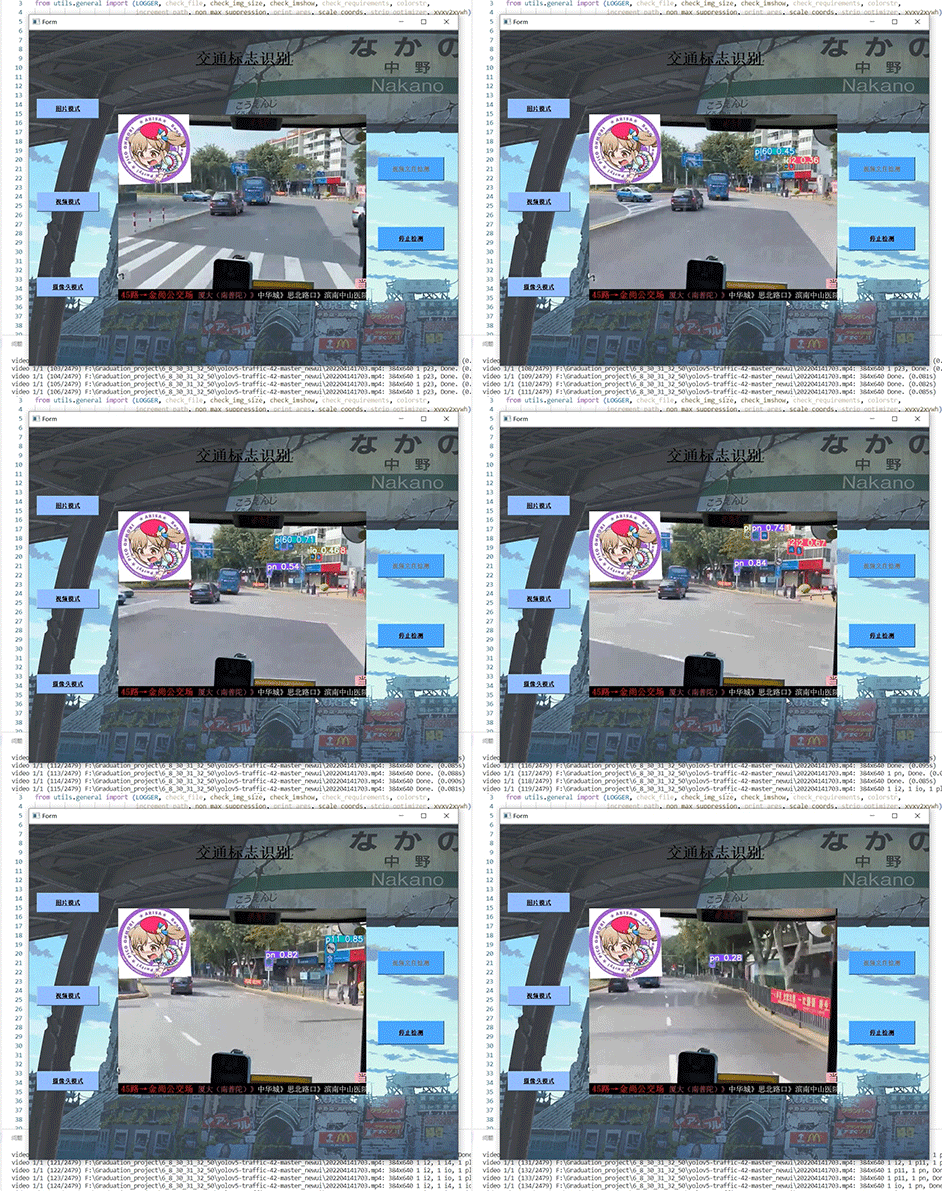
竞赛选题 深度学习 opencv python 实现中国交通标志识别
文章目录 0 前言1 yolov5实现中国交通标志检测2.算法原理2.1 算法简介2.2网络架构2.3 关键代码 3 数据集处理3.1 VOC格式介绍3.2 将中国交通标志检测数据集CCTSDB数据转换成VOC数据格式3.3 手动标注数据集 4 模型训练5 实现效果5.1 视频效果 6 最后 0 前言 🔥 优质…...
-- fskv - kv数据库,掉电不丢数据)
LuatOS-SOC接口文档(air780E)-- fskv - kv数据库,掉电不丢数据
示例 -- 本库的目标是替代fdb库 -- 1. 兼容fdb的函数 -- 2. 使用fdb的flash空间,启用时也会替代fdb库 -- 3. 功能上与EEPROM是类似的 fskv.init() fskv.set("wendal", 1234) log.info("fskv", "wendal", fskv.get("wendal"))--[[ fs…...

一篇文章教你Pytest快速入门和基础讲解,一定要看!
前言 目前有两种纯测试的测试框架,pytest和unittestunittest应该是广为人知,而且也是老框架了,很多人都用来做自动化,无论是UI还是接口pytest是基于unittest开发的另一款更高级更好用的单元测试框架出去面试也好,跟别…...
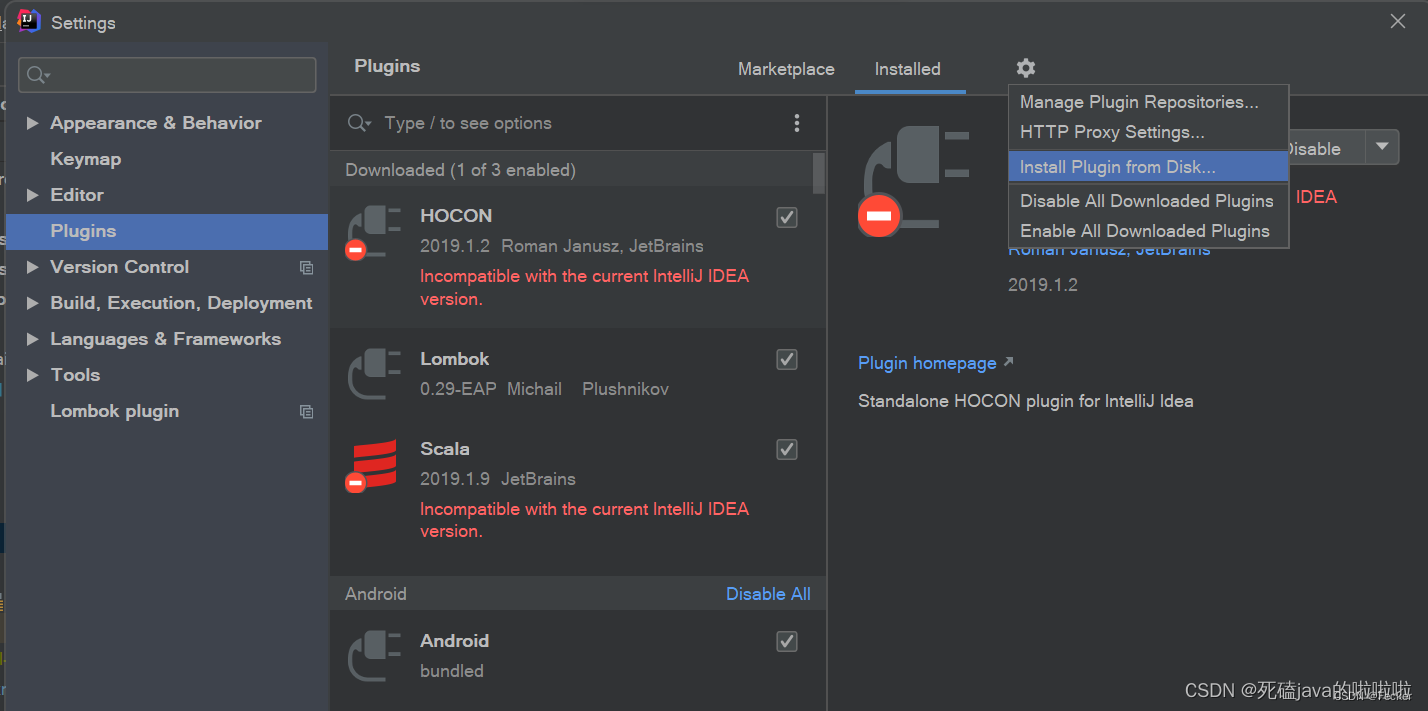
SpringBoot项目:Cannot find declaration to go to
SpringBoot项目get,set方法总报Cannot find declaration to go to 搜了很多答案,没解决 后来仔细一想,原来是我的idea软件重装了,lombok插件没重新安装导致。 安装步骤: 1、下载地址:https://plugins.jetbrains.com…...

【高并发】多线程和高并发提纲
文章目录 三大源头两个主要问题三大解决方案 最近正在面试,对多线程和高并发相关问题整理了一个简单的提纲。 个人感觉这三大部分由底向上,足够引出对并发编程中大部分问题的讨论~ 三大源头 线程切换带来的原子性问题。 原子操作:利用CPU提…...

vue.js处理数组对象中某个字段是否变为两个字段
一、场景: 产品要求做一个时间步骤条,使用目前后端已返回的数据进行操作实现。时间步骤条要求日期和时间分开显示且相同日期只显示第一个日期。 图左边为实现效果,右边为后台返回的接口。接口中current字段表示当前到达第几步,从…...
)
从零开始的C++(补充三的内容)
auto:在编译阶段根据数据的类型确认auto所代表的类型,并将auto换成对应的类型。 特点: 1、auto所能代表的类型必须是在编译阶段就能确认的。 2、auto修饰的变量必须初始化,否则编译器无法判断auto的实际类型。 3、auto会根据第一个数据来…...
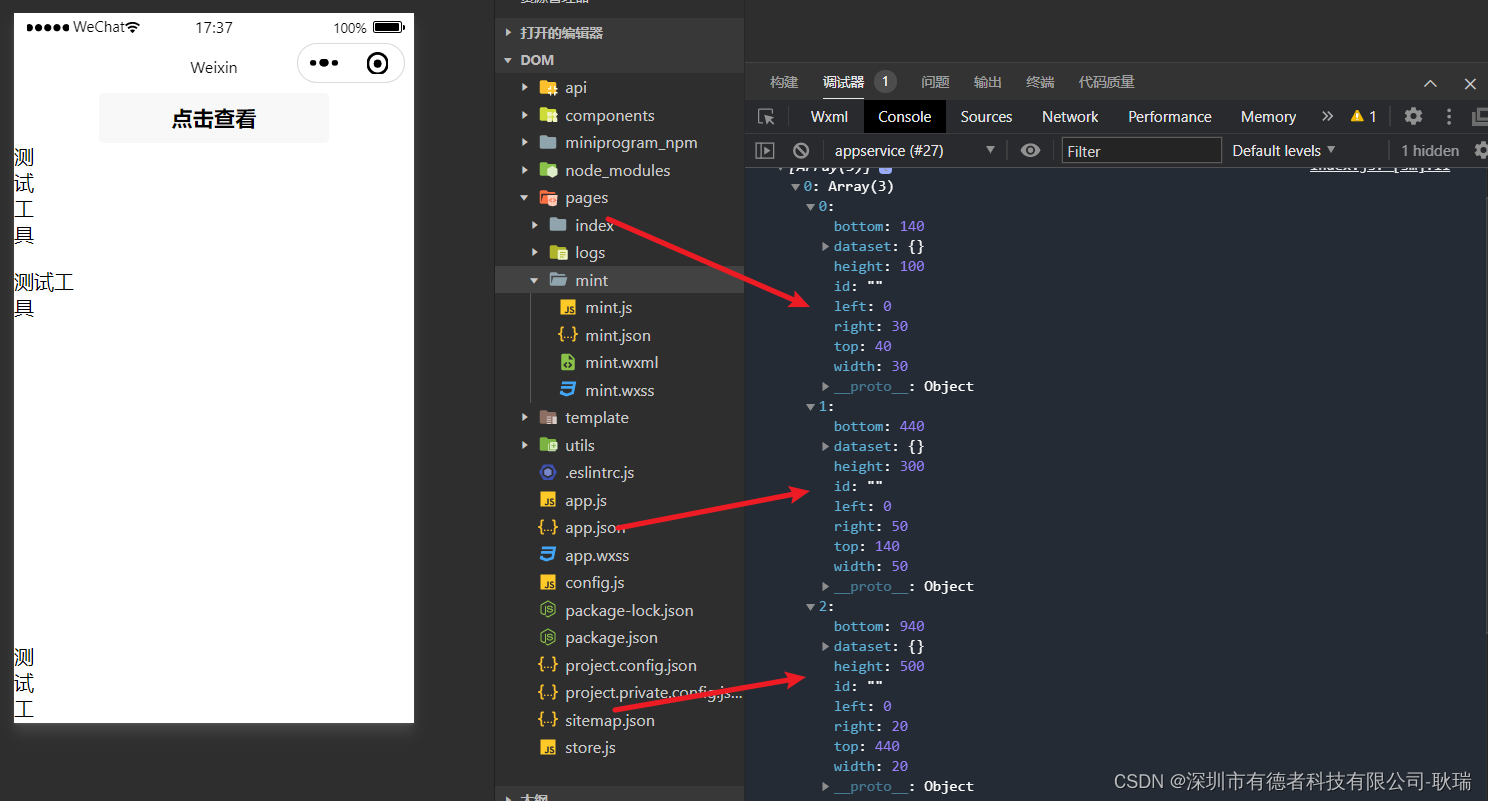
微信小程序通过createSelectorQuery获取元素 高度,宽度与界面距离
小程序官方有提供给我们一个 const query wx.createSelectorQuery() 函数 我们可以先编写这样一段代码 wxml <view><button bindtap"getDom">点击查看</button><view class "textIn" style "height: 100px;width: 30px;&quo…...

MySQL-事务
MySQL-事务 1.什么是事务 举例:想象炒菜的过程。 洗菜切菜炒菜装盘 我相信缺少任何任何一个步骤,都不完美!!!可以将炒菜的过程理解为一个事务,是一组操作的集合,而MySQL中的事务也是如此。但…...

自动定时删除磁盘文件的脚本(从文件日期最早的开始删)
#!/bin/bash# 指定的挂载点 MOUNTPOINT"/media/vm/MyDisk512GB"# 设置磁盘大小的限制 (例如:800G) LIMIT$((800 * 1024 * 1024)) # 单位是KB# 获取挂载点的已使用空间 USED_SPACE$(df -kP "$MOUNTPOINT" | tail -1 | awk {print $3})echo &quo…...

拆解CPU的基本结构和运行原理
CPU的基本结构 CPU是一个计算系统的核心 南北桥芯片将CPU与外设连接起来 CPU执行流程 CPU的电路基础 组合电路基本原理 时序电路基本原理 多核成为主流 汇编语言和寄存器 中断的基本原理 中断的产生 中断服务程序 CPU 做为计算机的总司令官,它管理着计算…...

Chapter03-Authentication vulnerabilities
文章目录 1. 身份验证简介1.1 What is authentication1.2 difference between authentication and authorization1.3 身份验证机制失效的原因1.4 身份验证机制失效的影响 2. 基于登录功能的漏洞2.1 密码爆破2.2 用户名枚举2.3 有缺陷的暴力破解防护2.3.1 如果用户登录尝试失败次…...
JavaSec-RCE
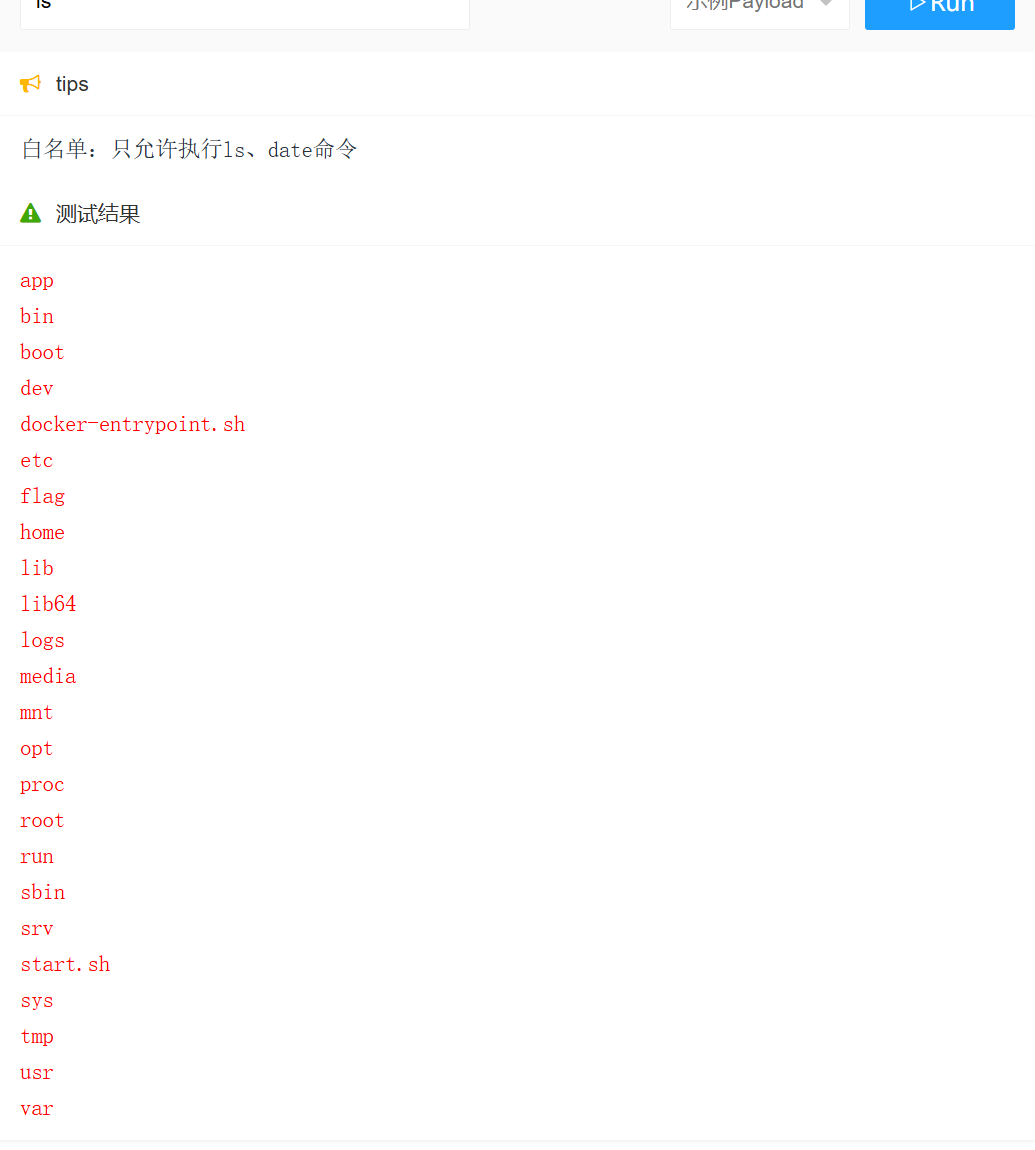
简介 RCE(Remote Code Execution),可以分为:命令注入(Command Injection)、代码注入(Code Injection) 代码注入 1.漏洞场景:Groovy代码注入 Groovy是一种基于JVM的动态语言,语法简洁,支持闭包、动态类型和Java互操作性,…...
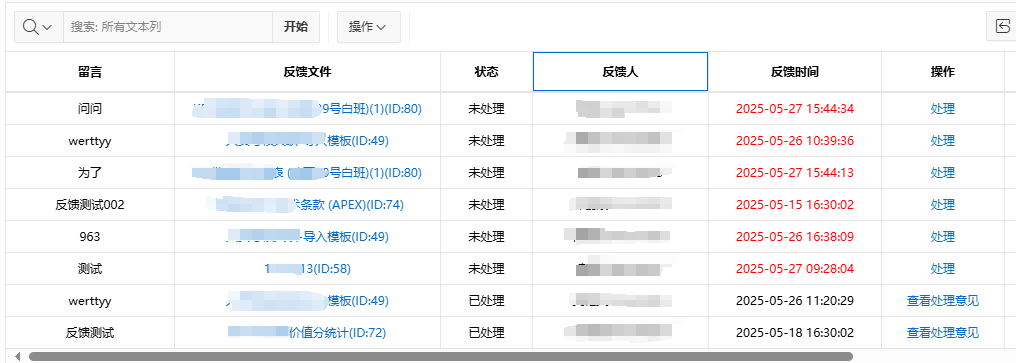
【Oracle APEX开发小技巧12】
有如下需求: 有一个问题反馈页面,要实现在apex页面展示能直观看到反馈时间超过7天未处理的数据,方便管理员及时处理反馈。 我的方法:直接将逻辑写在SQL中,这样可以直接在页面展示 完整代码: SELECTSF.FE…...
CocosCreator 之 JavaScript/TypeScript和Java的相互交互
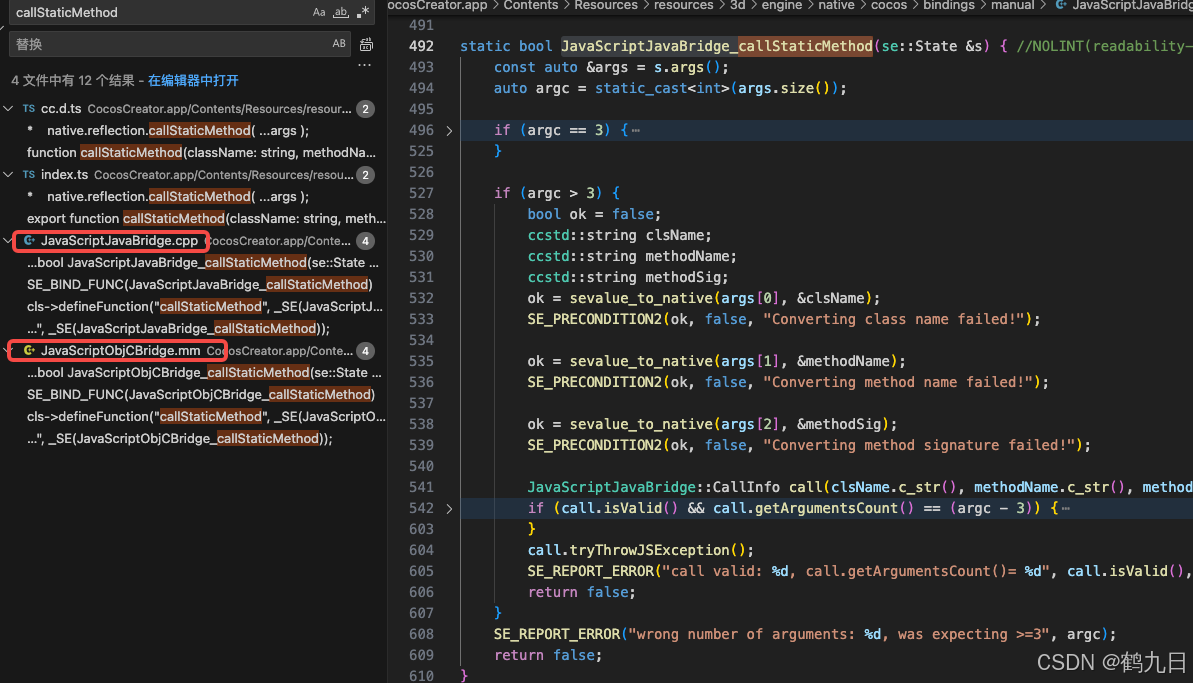
引擎版本: 3.8.1 语言: JavaScript/TypeScript、C、Java 环境:Window 参考:Java原生反射机制 您好,我是鹤九日! 回顾 在上篇文章中:CocosCreator Android项目接入UnityAds 广告SDK。 我们简单讲…...
高危文件识别的常用算法:原理、应用与企业场景
高危文件识别的常用算法:原理、应用与企业场景 高危文件识别旨在检测可能导致安全威胁的文件,如包含恶意代码、敏感数据或欺诈内容的文档,在企业协同办公环境中(如Teams、Google Workspace)尤为重要。结合大模型技术&…...
GC1808高性能24位立体声音频ADC芯片解析
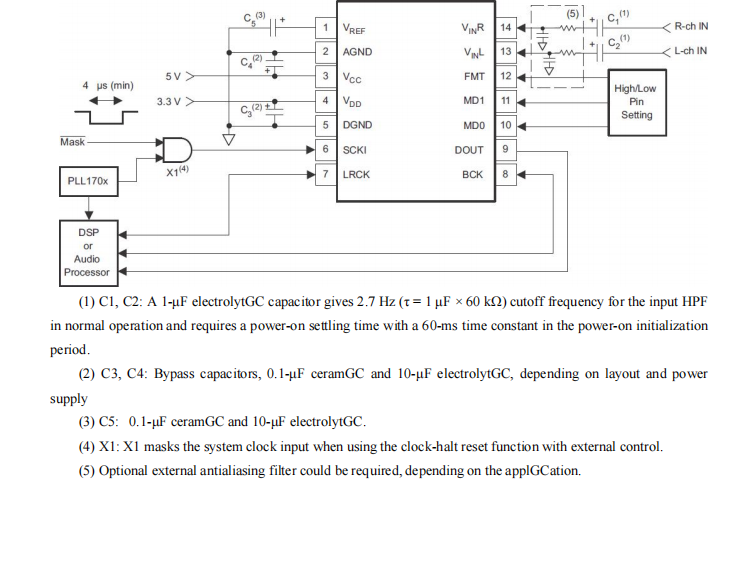
1. 芯片概述 GC1808是一款24位立体声音频模数转换器(ADC),支持8kHz~96kHz采样率,集成Δ-Σ调制器、数字抗混叠滤波器和高通滤波器,适用于高保真音频采集场景。 2. 核心特性 高精度:24位分辨率,…...

视觉slam十四讲实践部分记录——ch2、ch3
ch2 一、使用g++编译.cpp为可执行文件并运行(P30) g++ helloSLAM.cpp ./a.out运行 二、使用cmake编译 mkdir build cd build cmake .. makeCMakeCache.txt 文件仍然指向旧的目录。这表明在源代码目录中可能还存在旧的 CMakeCache.txt 文件,或者在构建过程中仍然引用了旧的路…...

第八部分:阶段项目 6:构建 React 前端应用
现在,是时候将你学到的 React 基础知识付诸实践,构建一个简单的前端应用来模拟与后端 API 的交互了。在这个阶段,你可以先使用模拟数据,或者如果你的后端 API(阶段项目 5)已经搭建好,可以直接连…...

GAN模式奔溃的探讨论文综述(一)
简介 简介:今天带来一篇关于GAN的,对于模式奔溃的一个探讨的一个问题,帮助大家更好的解决训练中遇到的一个难题。 论文题目:An in-depth review and analysis of mode collapse in GAN 期刊:Machine Learning 链接:...

【深尚想】TPS54618CQRTERQ1汽车级同步降压转换器电源芯片全面解析
1. 元器件定义与技术特点 TPS54618CQRTERQ1 是德州仪器(TI)推出的一款 汽车级同步降压转换器(DC-DC开关稳压器),属于高性能电源管理芯片。核心特性包括: 输入电压范围:2.95V–6V,输…...