
GRE_MGRE综合实验
目录
1、R5为ISP,只能进行IP地址配置,其所有地址均配为公有IP地址。
IP配置
配置公网全网通
2、(1)R1和R5间使用PPP的PAP认证,R5为主认证方。
PAP认证
(2)R2与R5之间使用ppp的CHAP认证,R5为主认证方。
(3)R3与R5之间使用HDLC封装。
3、R1、R2、R3构建一个MGRE环境,R1为中心站点,R1、R4间为点到点的GRE。
构建隧道
配置NHRP
查看
配置GRE隧道
4、整个私有网络基于RIP全网可达。
RIP配置
开启R1Tunnel0/0/0口的伪广播功能
关闭水平分割
5、所有PC设置私有IP为源IP,可以访问R5环回,实现全网通。
easy IP配置

1、R5为ISP,只能进行IP地址配置,其所有地址均配为公有IP地址。
IP配置
R1:
<Huawei>sys
Enter system view, return user view with Ctrl+Z.
[Huawei]sysname R1
[R1]int g0/0/0
[R1-GigabitEthernet0/0/0]ip add 192.168.1.1 24
Mar 29 2024 16:47:26-08:00 R1 %%01IFNET/4/LINK_STATE(l)[0]:The line protocol IP
on the interface GigabitEthernet0/0/0 has entered the UP state.
[R1-GigabitEthernet0/0/0]q
[R1]int s4/0/0
[R1-Serial4/0/0]ip add 15.1.1.1 24
[R1-Serial4/0/0]q
[R1]dis ip int b
*down: administratively down
^down: standby
(l): loopback
(s): spoofing
The number of interface that is UP in Physical is 3
The number of interface that is DOWN in Physical is 3
The number of interface that is UP in Protocol is 3
The number of interface that is DOWN in Protocol is 3Interface                         IP Address/Mask      Physical   Protocol
GigabitEthernet0/0/0              192.168.1.1/24       up         up
GigabitEthernet0/0/1              unassigned           down       down
GigabitEthernet0/0/2              unassigned           down       down
NULL0                             unassigned           up         up(s)
Serial4/0/0                       15.1.1.1/24          up         up
Serial4/0/1                       unassigned           down       down
[R1]
R2:
<Huawei>sys
Enter system view, return user view with Ctrl+Z.
[Huawei]sysname R2
[R2]int g0/0/0
[R2-GigabitEthernet0/0/0]ip add 192.168.2.2 24
Mar 29 2024 16:49:49-08:00 R2 %%01IFNET/4/LINK_STATE(l)[0]:The line protocol IP
on the interface GigabitEthernet0/0/0 has entered the UP state.
[R2-GigabitEthernet0/0/0]q
[R2]int s4/0/0
[R2-Serial4/0/0]ip add 25.1.1.2 24
[R2-Serial4/0/0]q
[R2]dis ip int b
*down: administratively down
^down: standby
(l): loopback
(s): spoofing
The number of interface that is UP in Physical is 3
The number of interface that is DOWN in Physical is 3
The number of interface that is UP in Protocol is 3
The number of interface that is DOWN in Protocol is 3Interface                         IP Address/Mask      Physical   Protocol
GigabitEthernet0/0/0              192.168.2.2/24       up         up
GigabitEthernet0/0/1              unassigned           down       down
GigabitEthernet0/0/2              unassigned           down       down
NULL0                             unassigned           up         up(s)
Serial4/0/0                       25.1.1.2/24          up         up
Serial4/0/1                       unassigned           down       down
[R2]
R3:
<Huawei>sys
Enter system view, return user view with Ctrl+Z.
[Huawei]sysname R3
[R3]int g0/0/0
[R3-GigabitEthernet0/0/0]ip add 192.168.3.3 24
[R3-GigabitEthernet0/0/0]
Mar 29 2024 16:52:19-08:00 R3 %%01IFNET/4/LINK_STATE(l)[0]:The line protocol IP
on the interface GigabitEthernet0/0/0 has entered the UP state.
[R3-GigabitEthernet0/0/0]q
[R3]int s4/0/0
[R3-Serial4/0/0]ip add 35.1.1.3 24
[R3-Serial4/0/0]q
[R3]dis ip int b
*down: administratively down
^down: standby
(l): loopback
(s): spoofing
The number of interface that is UP in Physical is 3
The number of interface that is DOWN in Physical is 3
The number of interface that is UP in Protocol is 3
The number of interface that is DOWN in Protocol is 3Interface                         IP Address/Mask      Physical   Protocol
GigabitEthernet0/0/0              192.168.3.3/24       up         up
GigabitEthernet0/0/1              unassigned           down       down
GigabitEthernet0/0/2              unassigned           down       down
NULL0                             unassigned           up         up(s)
Serial4/0/0                       35.1.1.3/24          up         up
Serial4/0/1                       unassigned           down       down
[R3]
R4:
<Huawei>sys
Enter system view, return user view with Ctrl+Z.
[Huawei]sysname R4
[R4]int g0/0/0
[R4-GigabitEthernet0/0/0]ip add 45.1.1.4 24
Mar 29 2024 16:54:35-08:00 R4 %%01IFNET/4/LINK_STATE(l)[0]:The line protocol IP
on the interface GigabitEthernet0/0/0 has entered the UP state.
[R4-GigabitEthernet0/0/0]q
[R4]int g0/0/1
[R4-GigabitEthernet0/0/1]ip add 192.168.4.4 24
Mar 29 2024 16:54:52-08:00 R4 %%01IFNET/4/LINK_STATE(l)[1]:The line protocol IP
on the interface GigabitEthernet0/0/1 has entered the UP state.
[R4-GigabitEthernet0/0/1]q
[R4]dis ip int b
*down: administratively down
^down: standby
(l): loopback
(s): spoofing
The number of interface that is UP in Physical is 3
The number of interface that is DOWN in Physical is 1
The number of interface that is UP in Protocol is 3
The number of interface that is DOWN in Protocol is 1Interface                         IP Address/Mask      Physical   Protocol
GigabitEthernet0/0/0              45.1.1.4/24          up         up
GigabitEthernet0/0/1              192.168.4.4/24       up         up
GigabitEthernet0/0/2              unassigned           down       down
NULL0                             unassigned           up         up(s)
[R4]
ISP:
<Huawei>sys
Enter system view, return user view with Ctrl+Z.
[Huawei]sysname ISP
[ISP]int s4/0/1
[ISP-Serial4/0/1]ip add 15.1.1.5 24
[ISP-Serial4/0/1]
Mar 29 2024 16:56:20-08:00 ISP %%01IFNET/4/LINK_STATE(l)[0]:The line protocol PP
P IPCP on the interface Serial4/0/1 has entered the UP state.
[ISP-Serial4/0/1]q
[ISP]int s3/0/1
[ISP-Serial3/0/1]ip add 25.1.1.5 24
[ISP-Serial3/0/1]
Mar 29 2024 16:56:43-08:00 ISP %%01IFNET/4/LINK_STATE(l)[1]:The line protocol PP
P IPCP on the interface Serial3/0/1 has entered the UP state.
[ISP-Serial3/0/1]q
[ISP]int s4/0/0
[ISP-Serial4/0/0]ip add 35.1.1.5 24
[ISP-Serial4/0/0]
Mar 29 2024 16:57:01-08:00 ISP %%01IFNET/4/LINK_STATE(l)[2]:The line protocol PP
P IPCP on the interface Serial4/0/0 has entered the UP state.
[ISP-Serial4/0/0]q
[ISP]int g0/0/0
[ISP-GigabitEthernet0/0/0]ip add 45.1.1.5 24
Mar 29 2024 16:57:47-08:00 ISP %%01IFNET/4/LINK_STATE(l)[3]:The line protocol IPon the interface GigabitEthernet0/0/0 has entered the UP state.
[ISP-GigabitEthernet0/0/0]q
[ISP]int LoopBack 0
[ISP-LoopBack0]ip add 5.5.5.5 24
[ISP-LoopBack0]q
[ISP]dis ip int b
*down: administratively down
^down: standby
(l): loopback
(s): spoofing
The number of interface that is UP in Physical is 6
The number of interface that is DOWN in Physical is 3
The number of interface that is UP in Protocol is 6
The number of interface that is DOWN in Protocol is 3Interface                         IP Address/Mask      Physical   Protocol
GigabitEthernet0/0/0              45.1.1.5/24          up         up
GigabitEthernet0/0/1              unassigned           down       down
GigabitEthernet0/0/2              unassigned           down       down
LoopBack0                         5.5.5.5/24           up         up(s)
NULL0                             unassigned           up         up(s)
Serial3/0/0                       unassigned           down       down
Serial3/0/1                       25.1.1.5/24          up         up
Serial4/0/0                       35.1.1.5/24          up         up
Serial4/0/1                       15.1.1.5/24          up         up
[ISP]
PC1:

PC2:

PC3:

PC4:

配置公网全网通
R1:
[R1]ip route-static 0.0.0.0 0 15.1.1.5R2:
[R2]ip route-static 0.0.0.0 0 25.1.1.5R3:
[R3]ip route-static 0.0.0.0 0 35.1.1.5R4:
[R4]ip route-static 0.0.0.0 0 45.1.1.5
2、(1)R1和R5间使用PPP的PAP认证,R5为主认证方。
PAP认证
ISP为主认证方,所以在ISP上配置账户:
R5:
[ISP]aaa
[ISP-aaa]local-user a1 password cipher a12345
Info: Add a new user.
[ISP-aaa]local-user a1 service-type ppp
[ISP-aaa]q
[ISP]int s4/0/1
[ISP-Serial4/0/1]ppp authentication-mode pap
R1:
[R1]int s4/0/0
[R1-Serial4/0/0]ppp pap local-user a1 password cipher a12345
验证:
[R1-Serial4/0/0]shutdown
Mar 29 2024 18:12:22-08:00 R1 %%01PPP/4/PHYSICALDOWN(l)[0]:On the interface Seri
al4/0/0, PPP link was closed because the status of the physical layer was Down. [R1-Serial4/0/0]
Mar 29 2024 18:12:22-08:00 R1 %%01IFNET/4/LINK_STATE(l)[1]:The line protocol PPPon the interface Serial4/0/0 has entered the DOWN state.
[R1-Serial4/0/0]
Mar 29 2024 18:12:22-08:00 R1 %%01IFNET/4/LINK_STATE(l)[2]:The line protocol PPPIPCP on the interface Serial4/0/0 has entered the DOWN state.
[R1-Serial4/0/0]
Mar 29 2024 18:12:22-08:00 R1 %%01IFPDT/4/IF_STATE(l)[3]:Interface Serial4/0/0 h
as turned into DOWN state.
[R1-Serial4/0/0]undo shutdown
[R1-Serial4/0/0]
Mar 29 2024 18:12:31-08:00 R1 %%01IFPDT/4/IF_STATE(l)[4]:Interface Serial4/0/0 h
as turned into UP state.
[R1-Serial4/0/0]
Mar 29 2024 18:12:34-08:00 R1 %%01IFNET/4/LINK_STATE(l)[5]:The line protocol PPPon the interface Serial4/0/0 has entered the UP state.
[R1-Serial4/0/0]
Mar 29 2024 18:12:34-08:00 R1 %%01IFNET/4/LINK_STATE(l)[6]:The line protocol PPPIPCP on the interface Serial4/0/0 has entered the UP state.
[R1-Serial4/0/0]
(2)R2与R5之间使用ppp的CHAP认证,R5为主认证方。
依然是R5为主,故在R5上配置账户:
R5:
[ISP]aaa
[ISP-aaa]local-user b1 password cipher b12345
Info: Add a new user.
[ISP-aaa]local-user b1 service-type ppp
[ISP-aaa]q
[ISP-Serial3/0/1]ppp authentication-mode chap
R2:
[R2]int s4/0/0
[R2-Serial4/0/0]ppp chap user b1
[R2-Serial4/0/0]ppp chap password cipher b12345
验证:
[R2-Serial4/0/0]shutdown
Mar 29 2024 18:17:41-08:00 R2 %%01PPP/4/PHYSICALDOWN(l)[0]:On the interface Seri
al4/0/0, PPP link was closed because the status of the physical layer was Down. [R2-Serial4/0/0]
Mar 29 2024 18:17:41-08:00 R2 %%01IFNET/4/LINK_STATE(l)[1]:The line protocol PPPon the interface Serial4/0/0 has entered the DOWN state.
[R2-Serial4/0/0]
Mar 29 2024 18:17:41-08:00 R2 %%01IFNET/4/LINK_STATE(l)[2]:The line protocol PPPIPCP on the interface Serial4/0/0 has entered the DOWN state.
[R2-Serial4/0/0]
Mar 29 2024 18:17:41-08:00 R2 %%01IFPDT/4/IF_STATE(l)[3]:Interface Serial4/0/0 h
as turned into DOWN state.
[R2-Serial4/0/0]undo shutdown
[R2-Serial4/0/0]
Mar 29 2024 18:17:50-08:00 R2 %%01IFPDT/4/IF_STATE(l)[4]:Interface Serial4/0/0 h
as turned into UP state.
[R2-Serial4/0/0]
Mar 29 2024 18:17:53-08:00 R2 %%01IFNET/4/LINK_STATE(l)[5]:The line protocol PPPon the interface Serial4/0/0 has entered the UP state.
[R2-Serial4/0/0]
Mar 29 2024 18:17:54-08:00 R2 %%01IFNET/4/LINK_STATE(l)[6]:The line protocol PPPIPCP on the interface Serial4/0/0 has entered the UP state.
[R2-Serial4/0/0]
(3)R3与R5之间使用HDLC封装。
R5:
[ISP]int s4/0/0
[ISP-Serial4/0/0]link-protocol hdlc
Warning: The encapsulation protocol of the link will be changed. Continue? [Y/N]
:y
Mar 29 2024 18:22:40-08:00 ISP %%01IFNET/4/CHANGE_ENCAP(l)[14]:The user performe
d the configuration that will change the encapsulation protocol of the link and
then selected Y.
[ISP-Serial4/0/0]
[ISP-Serial4/0/0]
Mar 29 2024 18:22:40-08:00 ISP %%01PPP/4/PHYSICALDOWN(l)[15]:On the interface Se
rial4/0/0, PPP link was closed because the status of the physical layer was Down
.
[ISP-Serial4/0/0]
Mar 29 2024 18:22:40-08:00 ISP %%01IFNET/4/LINK_STATE(l)[16]:The line protocol P
PP on the interface Serial4/0/0 has entered the DOWN state.
[ISP-Serial4/0/0]
Mar 29 2024 18:22:40-08:00 ISP %%01IFNET/4/LINK_STATE(l)[17]:The line protocol P
PP IPCP on the interface Serial4/0/0 has entered the DOWN state.
[ISP-Serial4/0/0]
Mar 29 2024 18:22:40-08:00 ISP %%01IFPDT/4/IF_STATE(l)[18]:Interface Serial4/0/0has turned into DOWN state.
[ISP-Serial4/0/0]
Mar 29 2024 18:22:41-08:00 ISP %%01IFPDT/4/IF_STATE(l)[19]:Interface Serial4/0/0has turned into UP state.
[ISP-Serial4/0/0]
Mar 29 2024 18:22:41-08:00 ISP %%01IFNET/4/LINK_STATE(l)[20]:The line protocol I
P on the interface Serial4/0/0 has entered the UP state.
[ISP-Serial4/0/0]
R3:
[R3]int s4/0/0
[R3-Serial4/0/0]link-protocol hdlc
Warning: The encapsulation protocol of the link will be changed. Continue? [Y/N]
:y
Mar 29 2024 18:23:02-08:00 R3 %%01IFNET/4/CHANGE_ENCAP(l)[0]:The user performed
the configuration that will change the encapsulation protocol of the link and th
en selected Y.
[R3-Serial4/0/0]
Mar 29 2024 18:23:02-08:00 R3 %%01PPP/4/PHYSICALDOWN(l)[1]:On the interface Seri
al4/0/0, PPP link was closed because the status of the physical layer was Down. [R3-Serial4/0/0]
Mar 29 2024 18:23:02-08:00 R3 %%01IFNET/4/LINK_STATE(l)[2]:The line protocol PPPon the interface Serial4/0/0 has entered the DOWN state.
[R3-Serial4/0/0]
Mar 29 2024 18:23:02-08:00 R3 %%01IFNET/4/LINK_STATE(l)[3]:The line protocol PPPIPCP on the interface Serial4/0/0 has entered the DOWN state.
[R3-Serial4/0/0]
Mar 29 2024 18:23:02-08:00 R3 %%01IFPDT/4/IF_STATE(l)[4]:Interface Serial4/0/0 h
as turned into DOWN state.
[R3-Serial4/0/0]
Mar 29 2024 18:23:03-08:00 R3 %%01IFPDT/4/IF_STATE(l)[5]:Interface Serial4/0/0 h
as turned into UP state.
[R3-Serial4/0/0]
Mar 29 2024 18:23:03-08:00 R3 %%01IFNET/4/LINK_STATE(l)[6]:The line protocol IP
on the interface Serial4/0/0 has entered the UP state.
[R3-Serial4/0/0]
验证:


3、R1、R2、R3构建一个MGRE环境,R1为中心站点,R1、R4间为点到点的GRE。
构建隧道
首先配置MGRE隧道:
R1:
[R1]int Tunnel 0/0/0
[R1-Tunnel0/0/0]ip add 10.1.2.1 24
[R1-Tunnel0/0/0]tunnel-protocol gre p2mp
[R1-Tunnel0/0/0]source 15.1.1.1
Mar 29 2024 18:33:05-08:00 R1 %%01IFNET/4/LINK_STATE(l)[0]:The line protocol IP
on the interface Tunnel0/0/0 has entered the UP state.
[R1-Tunnel0/0/0]
R2:
[R2]int Tunnel 0/0/0
[R2-Tunnel0/0/0]ip add 10.1.2.2 24
[R2-Tunnel0/0/0]tunnel-protocol gre p2mp
[R2-Tunnel0/0/0]source s4/0/0
Mar 29 2024 18:35:02-08:00 R2 %%01IFNET/4/LINK_STATE(l)[0]:The line protocol IP
on the interface Tunnel0/0/0 has entered the UP state.
R3:
[R3]int Tunnel 0/0/0
[R3-Tunnel0/0/0]ip add 10.1.2.3 24
[R3-Tunnel0/0/0]tunnel-protocol gre p2mp
[R3-Tunnel0/0/0]source s4/0/0
Mar 29 2024 18:36:12-08:00 R3 %%01IFNET/4/LINK_STATE(l)[0]:The line protocol IP
on the interface Tunnel0/0/0 has entered the UP state.
[R3-Tunnel0/0/0]
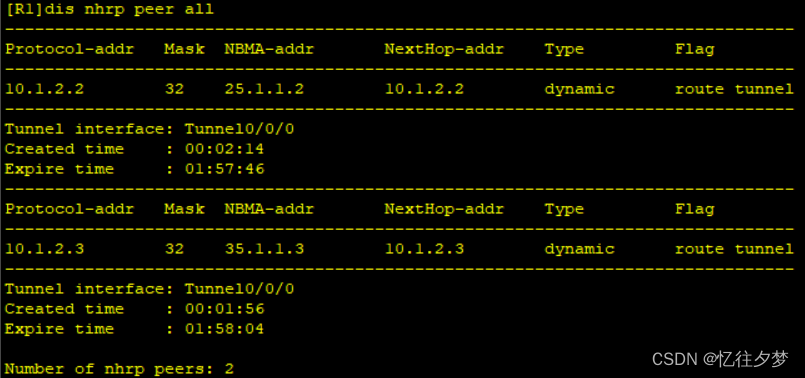
配置NHRP
R1:
[R1-Tunnel0/0/0]nhrp network-id 100R2:
[R2-Tunnel0/0/0]nhrp network-id 100
[R2-Tunnel0/0/0]nhrp entry 10.1.2.1 15.1.1.1 register
R3:
[R3-Tunnel0/0/0]nhrp network-id 100
[R3-Tunnel0/0/0]nhrp entry 10.1.2.1 15.1.1.1 register
查看
配置GRE隧道
R1:
[R1]int Tunnel 0/0/1
[R1-Tunnel0/0/1]ip add 10.1.1.1 24
[R1-Tunnel0/0/1]tunnel-protocol gre
[R1-Tunnel0/0/1]source 15.1.1.1
[R1-Tunnel0/0/1]destination 45.1.1.4
R4:
[R4]int Tunnel 0/0/1
[R4-Tunnel0/0/1]ip add 10.1.1.2 24
[R4-Tunnel0/0/1]tunnel-protocol gre
[R4-Tunnel0/0/1]source 45.1.1.4
[R4-Tunnel0/0/1]destination 15.1.1.1
R1:

R4:

4、整个私有网络基于RIP全网可达。
RIP配置
R1:
[R1]rip 1
[R1-rip-1]version 2
[R1-rip-1]undo summary
[R1-rip-1]network 192.168.1.0
[R1-rip-1]network 10.0.0.0
[R1-rip-1]
R2:
[R2]rip 1
[R2-rip-1]v 2
[R2-rip-1]undo summary
[R2-rip-1]network 192.168.2.0
[R2-rip-1]network 10.0.0.0
R3:
[R3]rip 1
[R3-rip-1]version 2
[R3-rip-1]undo summary
[R3-rip-1]network 192.168.3.0
[R3-rip-1]network 10.0.0.0
R4:
[R4]rip 1
[R4-rip-1]v 2
[R4-rip-1]undo summary
[R4-rip-1]network 192.168.4.0
[R4-rip-1]network 10.0.0.0
开启R1Tunnel0/0/0口的伪广播功能
[R1-Tunnel0/0/0]nhrp entry multicast dynamic 关闭水平分割
水平分割 --- 从哪个接口学到的路由信息将不再从这个接口发出去。
故使用rip的路由器不能发送其他主机的路由信息,要实现全网通,我们就得关闭该功能。
R1:
[R1-Tunnel0/0/0]undo rip split-horizon R2:
[R2-Tunnel0/0/0]undo rip split-horizon R3:
[R3-Tunnel0/0/0]undo rip split-horizon 至此,R2和R3就能学习到其他的路由信息。
R2 ping 一下R3后再查看 NHRP表(因为两台路由器间没有发包可能不会更新NHRP表):
R2:

R3:

5、所有PC设置私有IP为源IP,可以访问R5环回,实现全网通。
easy IP配置
R1:
[R1]acl 2000
[R1-acl-basic-2000]rule permit source 192.168.1.0 0.0.0.255
[R1-acl-basic-2000]q
[R1]int s4/0/0
[R1-Serial4/0/0]nat outbound 2000
检验:

R2:
[R2]acl 2000
[R2-acl-basic-2000]rule permit source 192.168.2.0 0.0.0.255
[R2-acl-basic-2000]q
[R2]int s4/0/0
[R2-Serial4/0/0]nat outbound 2000
检验:

R3:
[R3]acl 2000
[R3-acl-basic-2000]rule permit source 192.168.3.0 0.0.0.255
[R3-acl-basic-2000]q
[R3]int s4/0/0
[R3-Serial4/0/0]nat outbound 2000
检验:

R4:
[R4]acl 2000
[R4-acl-basic-2000]rule permit source 192.168.4.0 0.0.0.255
[R4-acl-basic-2000]q
[R4]int g0/0/0
[R4-GigabitEthernet0/0/0]nat outbound 2000
检验:

相关文章:
GRE_MGRE综合实验
目录 1、R5为ISP,只能进行IP地址配置,其所有地址均配为公有IP地址。 IP配置 配置公网全网通 2、(1)R1和R5间使用PPP的PAP认证,R5为主认证方。 PAP认证 (2)R2与R5之间使用ppp的CHAP认证&am…...

把组合损失中的权重设置为可学习参数
目前的需求是:有一个模型,准备使用组合损失,其中有2个或者多个损失函数。准备对其进行加权并线性叠加。但想让这些权重进行自我学习,更新迭代成最优加权组合。 目录 1、构建组合损失类 2、调用组合损失类 3、为其构建优化器 …...

用Bat启动jar程序
前情提要:在使用冰蝎、哥斯拉等一些列工具时(PS:一系列需要利用Java环境并打开的jar),我就在想能不能写一段代码点一下,就能打开程序而不用去输入命令 echo off echo 程序启动中... start javaw -noverif…...
网站维护页404源码
网站维护页404源码,布局简洁,上传即可使用。 网站维护页404源码...
jmeter链路压测
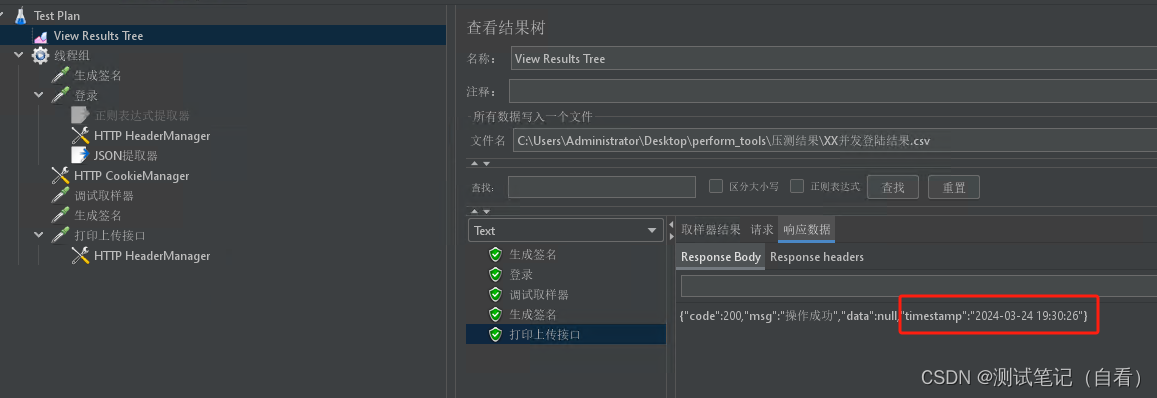
比如登录后返回token,业务打印上传的操作需要用到token 线程组中添加登录请求,并执行 1、添加登录并执行,查看结果 2、结果树中下拉选择正则表达式,将token参数和值复制粘贴到下方,将token值改为(.*?)࿰…...
香港服务器怎么看是CN2 GT线路还是CN2 GIA线路?
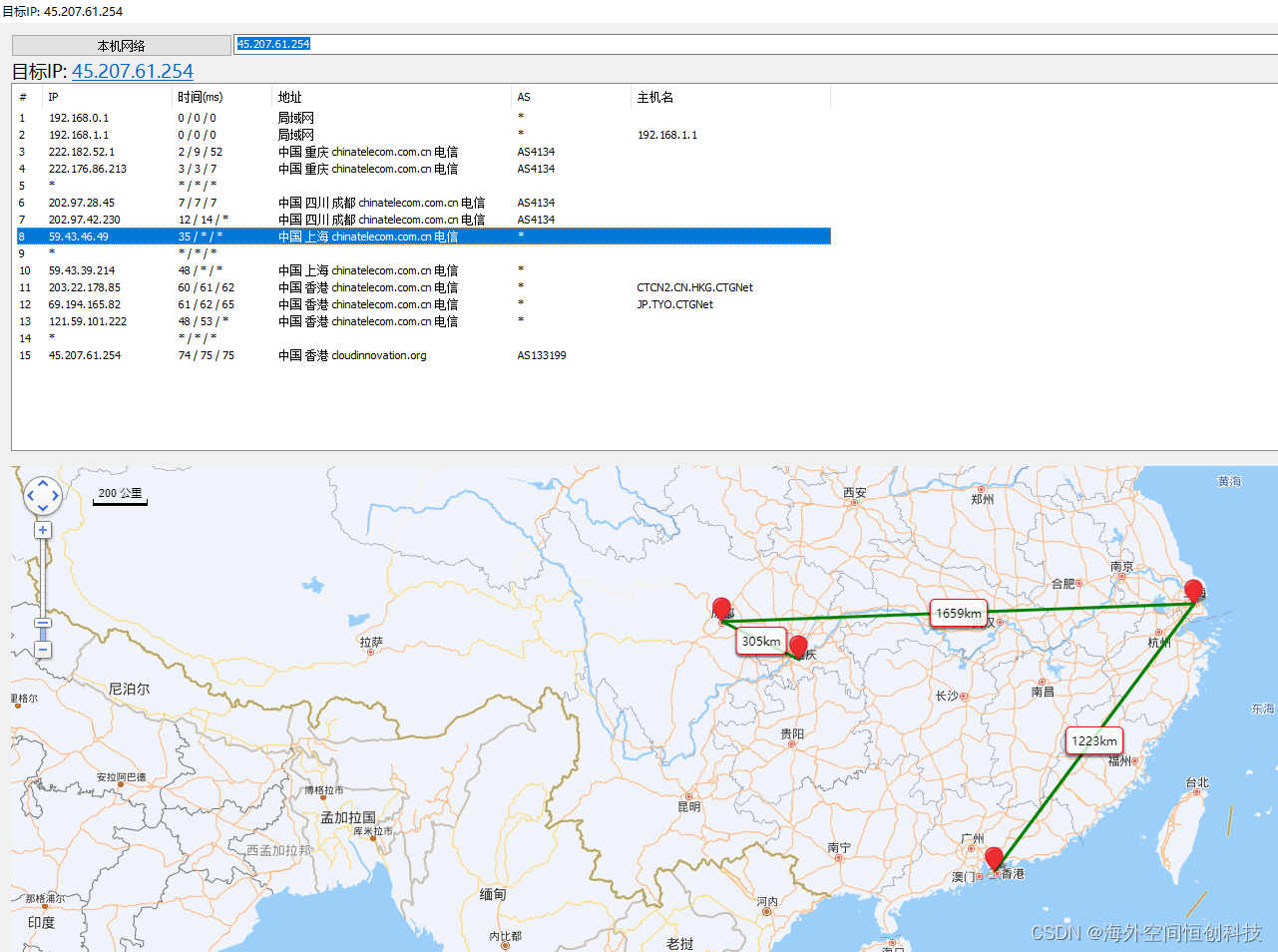
不知道有没有小伙伴们注意过,很多人在租用香港服务器的时候都习惯性选择 CN2 线路?仿佛香港服务器是否采用 CN2 线路成为个人企业选择香港服务器的一个标准。其实,香港服务器有CN2、优化直连(163)、BGP多线(包含了国际和国内线路),…...

CrossOver软件2024免费 最新版本详细介绍 CrossOver软件好用吗 Mac电脑玩Windows游戏
CrossOver是一款由CodeWeavers公司开发的软件,它可以在Mac和Linux等操作系统上运行Windows软件,而无需在计算机上安装Windows操作系统。这款软件的核心技术是Wine,它是一种在Linux和macOS等操作系统上运行Windows应用程序的开源软件。 Cross…...

harbor api v2.0
harbor api v2.0 v2.0 v2.0 “harbor api v2.0”与原来区别较大,此处harbor也做了https。另外,通过接口拿到的数据也是只能默认1页10个,所以脚本根据实际情况一页页的抓取数据 脚本主要用于统计repo、image,以及所有镜像的tag数&…...

Vue 表单数据双向绑定 v-mode
每一个Vue项目,每一个系统,肯定涉及到表单的双向数据绑定问题,这一部分是 vue 的重中之重,不是因为知识点复杂,而是因为只要参与 vue 项目的开发,那么就必不可少。 单项绑定 :数据变࿰…...
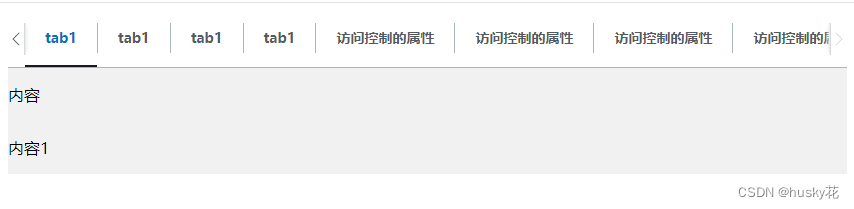
tab切换组件,可横向自适应滑动
示例图: 注:需要引入Jquery <!DOCTYPE html> <html><head><meta charset"utf-8"><title></title><style>.tabs-box {width: 100%;height: auto;}.tab-header-box {display: flex;overflow: hidden…...

设计模式---单例模式
目录 一、五种单例模式的实现方式 1.饿汉模式 2.饿汉枚举类型 3.懒汉式 4.双检锁懒汉式 5.内部类懒汉式 二、JDK 中单例的体现 一、五种单例模式的实现方式 1.饿汉模式 public class Singleton1 implements Serializable {private Singleton1() {if (INSTANCE ! null) {thro…...
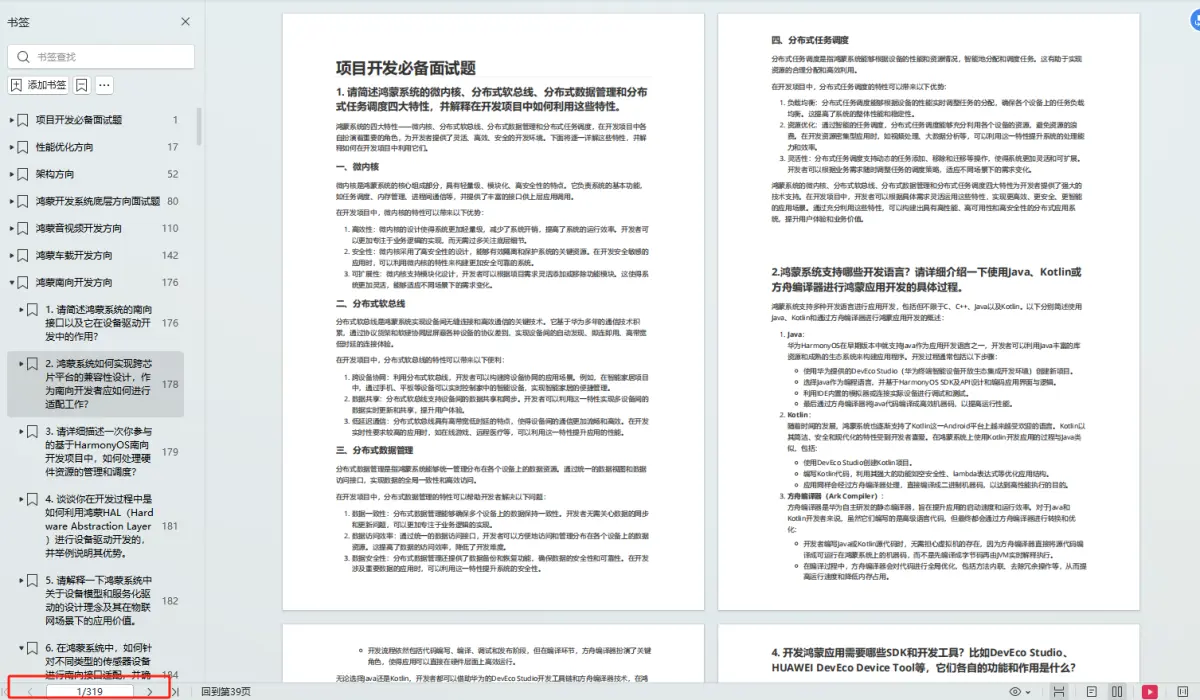
HarmonyOS 应用开发之启动/停止本地PageAbility
启动本地PageAbility PageAbility相关的能力通过featureAbility提供,启动本地Ability通过featureAbility中的startAbility接口实现。 表1 featureAbility接口说明 接口名接口描述startAbility(parameter: StartAbilityParameter)启动Ability。startAbilityForRes…...
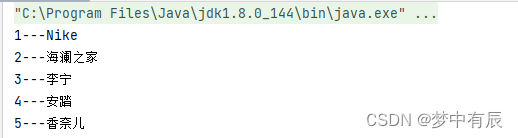
BaseDao封装增删改查
文章目录 什么是BaseDao操作代码增删改查询单个数据查询多个数据 总结 什么是BaseDao BaseDao是: 数据库里负责增加,删除,修改,查询 具体来说是一种接口代码,公共方法的接口类。 在dao层新建basedao,其他dao层接口继承basedao 相…...

Redis入门到实战-第十三弹
Redis入门到实战 Redis中JSON数据类型常见操作官网地址Redis概述JSON常见操作更新计划 Redis中JSON数据类型常见操作 完整命令参考官网 官网地址 声明: 由于操作系统, 版本更新等原因, 文章所列内容不一定100%复现, 还要以官方信息为准 https://redis.io/Redis概述 Redis是…...

深度学习InputStreamReader类
咦咦咦,各位小可爱,我是你们的好伙伴——bug菌,今天又来给大家普及Java SE相关知识点了,别躲起来啊,听我讲干货还不快点赞,赞多了我就有动力讲得更嗨啦!所以呀,养成先点赞后阅读的好…...

2023年后端面试总结
备注:这篇文章是我在2023年年初在自己的网站上写的,最近在迁移技术文章,我感觉这个也是和咱程序员相关,所以今天就决定把它迁移过来。 .......................................................................分割线..........…...

axios实现前后端通信报错Unsupported Media
使用axios向SpringBoot的后端使用post请求发送数据,发现报错Unsupported Media,最终解决方案如下: 检查变量名字是否一样,即前端传给后端的json数据键名要与后端接收的对象的成员变量名字一致检查Content-Type,post请…...

网络套接字补充——TCP网络编程
六、TCP网络编程 6.1IP地址字符串和整数之间的转换接口 //字符串转整数接口 #include <sys/socket.h> #include <netinet/in.h> #include <arpa/inet.h> int inet_aton(const char *cp, struct in_addr *inp); int inet_pton(int af, const char *strptr, …...

Nginx-记
Nginx是一个高性能的web服务器和反向代理服务器,用于HTTP、HTTPS、SMTP、POP3和IMAP协议。因它的稳定性、丰富的功能集、示例配置文件和低系统资源的消耗而闻名。 (1)更快 这表现在两个方面:一方面,在正常情况下&…...

JS面试题:call,apply,bind区别
1. 共同点 三者共同点都是改变函数内部this指向的方法 2. call用法 ini 复制代码 var a 2; var b 2; function func() { console.log(this.a, this.b) } let obj { a: 1, b: 1 } func.call(obj) func.call() 输出结果: 复制代码 1 1 2 2 解析࿱…...

R语言AI模型部署方案:精准离线运行详解
R语言AI模型部署方案:精准离线运行详解 一、项目概述 本文将构建一个完整的R语言AI部署解决方案,实现鸢尾花分类模型的训练、保存、离线部署和预测功能。核心特点: 100%离线运行能力自包含环境依赖生产级错误处理跨平台兼容性模型版本管理# 文件结构说明 Iris_AI_Deployme…...

FFmpeg 低延迟同屏方案
引言 在实时互动需求激增的当下,无论是在线教育中的师生同屏演示、远程办公的屏幕共享协作,还是游戏直播的画面实时传输,低延迟同屏已成为保障用户体验的核心指标。FFmpeg 作为一款功能强大的多媒体框架,凭借其灵活的编解码、数据…...
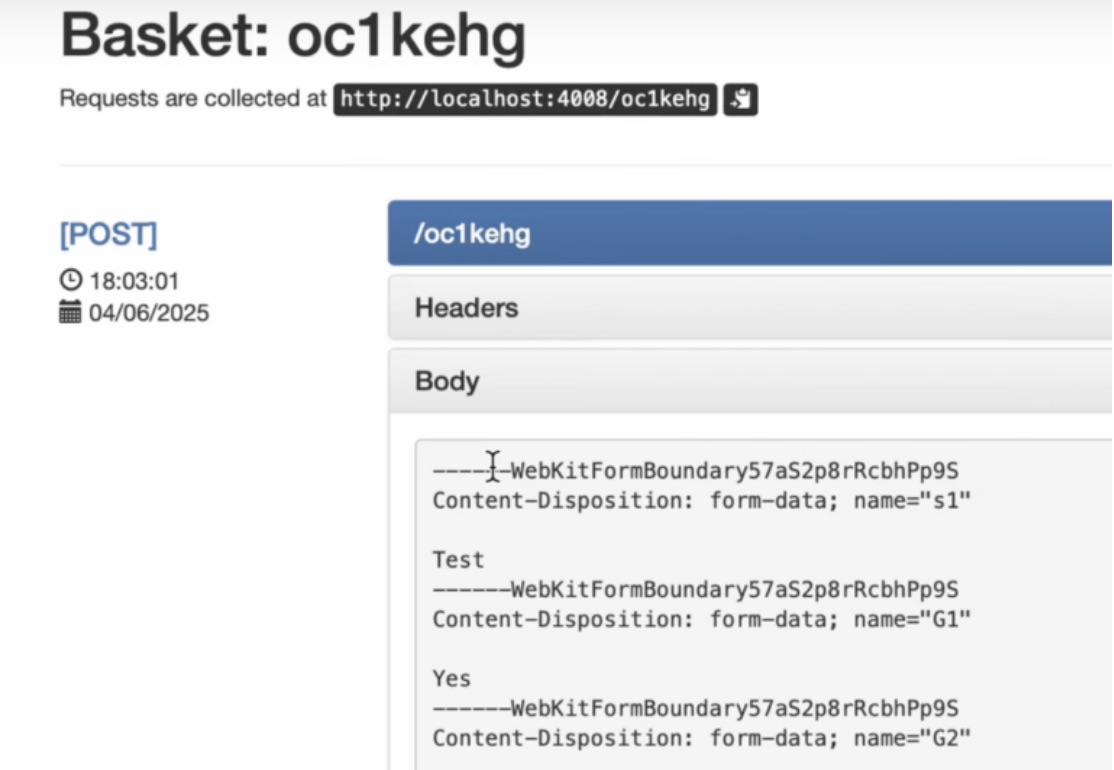
如何在网页里填写 PDF 表格?
有时候,你可能希望用户能在你的网站上填写 PDF 表单。然而,这件事并不简单,因为 PDF 并不是一种原生的网页格式。虽然浏览器可以显示 PDF 文件,但原生并不支持编辑或填写它们。更糟的是,如果你想收集表单数据ÿ…...
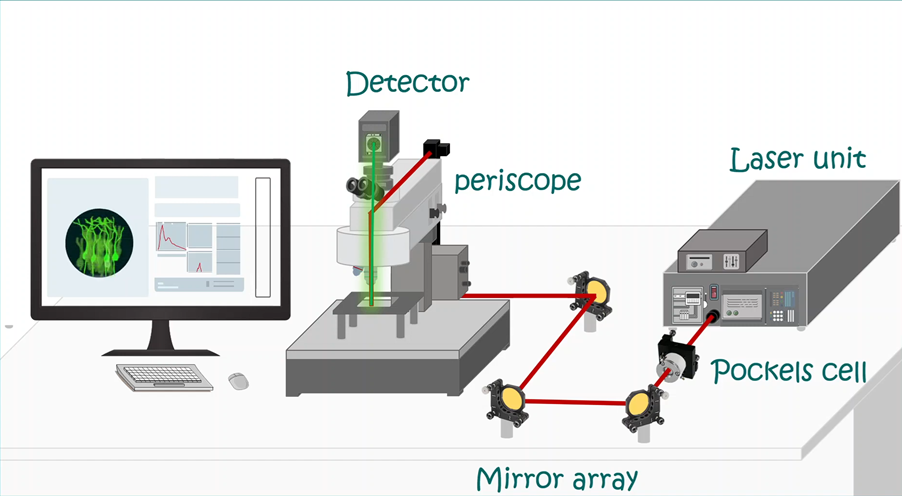
LabVIEW双光子成像系统技术
双光子成像技术的核心特性 双光子成像通过双低能量光子协同激发机制,展现出显著的技术优势: 深层组织穿透能力:适用于活体组织深度成像 高分辨率观测性能:满足微观结构的精细研究需求 低光毒性特点:减少对样本的损伤…...
)
【LeetCode】3309. 连接二进制表示可形成的最大数值(递归|回溯|位运算)
LeetCode 3309. 连接二进制表示可形成的最大数值(中等) 题目描述解题思路Java代码 题目描述 题目链接:LeetCode 3309. 连接二进制表示可形成的最大数值(中等) 给你一个长度为 3 的整数数组 nums。 现以某种顺序 连接…...

十九、【用户管理与权限 - 篇一】后端基础:用户列表与角色模型的初步构建
【用户管理与权限 - 篇一】后端基础:用户列表与角色模型的初步构建 前言准备工作第一部分:回顾 Django 内置的 `User` 模型第二部分:设计并创建 `Role` 和 `UserProfile` 模型第三部分:创建 Serializers第四部分:创建 ViewSets第五部分:注册 API 路由第六部分:后端初步测…...

k8s从入门到放弃之HPA控制器
k8s从入门到放弃之HPA控制器 Kubernetes中的Horizontal Pod Autoscaler (HPA)控制器是一种用于自动扩展部署、副本集或复制控制器中Pod数量的机制。它可以根据观察到的CPU利用率(或其他自定义指标)来调整这些对象的规模,从而帮助应用程序在负…...
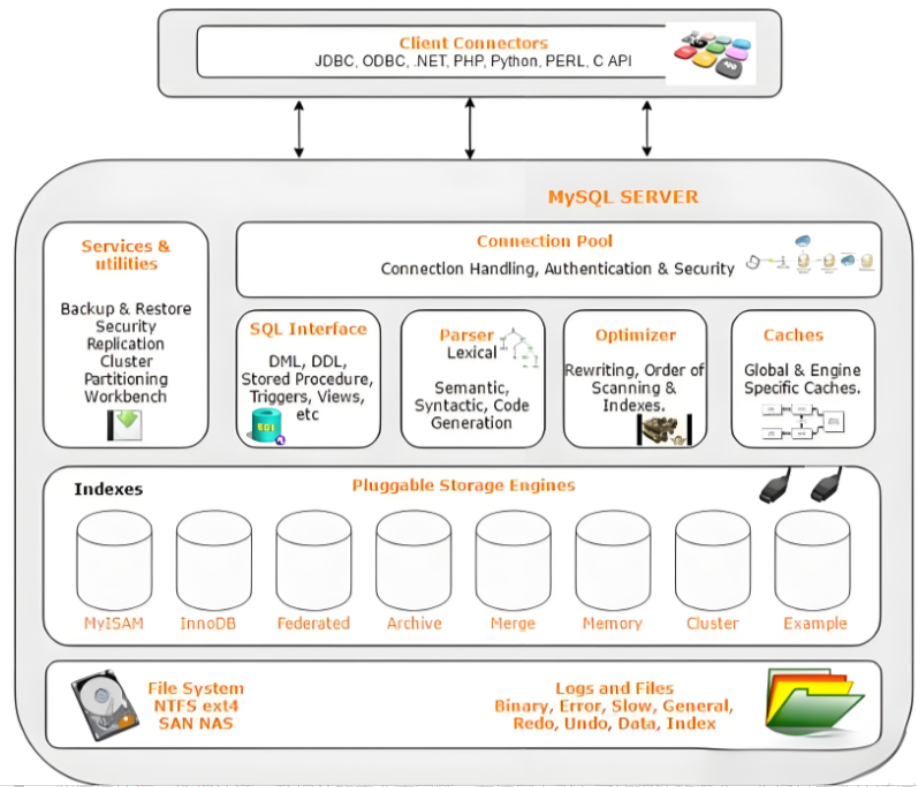
Mysql故障排插与环境优化
前置知识点 最上层是一些客户端和连接服务,包含本 sock 通信和大多数jiyukehuduan/服务端工具实现的TCP/IP通信。主要完成一些简介处理、授权认证、及相关的安全方案等。在该层上引入了线程池的概念,为通过安全认证接入的客户端提供线程。同样在该层上可…...

简约商务通用宣传年终总结12套PPT模版分享
IOS风格企业宣传PPT模版,年终工作总结PPT模版,简约精致扁平化商务通用动画PPT模版,素雅商务PPT模版 简约商务通用宣传年终总结12套PPT模版分享:商务通用年终总结类PPT模版https://pan.quark.cn/s/ece1e252d7df...
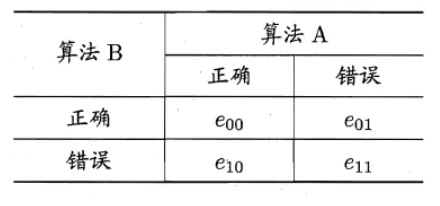
机器学习复习3--模型评估
误差与过拟合 我们将学习器对样本的实际预测结果与样本的真实值之间的差异称为:误差(error)。 误差定义: ①在训练集上的误差称为训练误差(training error)或经验误差(empirical error&#x…...