
【pytest、playwright】allure报告生成视频和图片
目录
1、修改插件pytest_playwright
2、conftest.py配置
3、修改pytest.ini文件
4、运行case
5、注意事项
1、修改插件pytest_playwright
 pytest_playwright.py内容如下:
# Copyright (c) Microsoft Corporation.
#
# Licensed under the Apache License, Version 2.0 (the "License");
# you may not use this file except in compliance with the License.
# You may obtain a copy of the License at
#
# http://www.apache.org/licenses/LICENSE-2.0
#
# Unless required by applicable law or agreed to in writing, software
# distributed under the License is distributed on an "AS IS" BASIS,
# WITHOUT WARRANTIES OR CONDITIONS OF ANY KIND, either express or implied.
# See the License for the specific language governing permissions and
# limitations under the License.import shutil
import os
import sys
import warnings
from typing import Any, Callable, Dict, Generator, List, Optionalimport pytest
from playwright.sync_api import (Browser,BrowserContext,BrowserType,Error,Page,Playwright,sync_playwright,
)
from slugify import slugify
import tempfile
import allureartifacts_folder = tempfile.TemporaryDirectory(prefix="playwright-pytest-")@pytest.fixture(scope="session", autouse=True)
def delete_output_dir(pytestconfig: Any) -> None:output_dir = pytestconfig.getoption("--output")if os.path.exists(output_dir):try:shutil.rmtree(output_dir)except FileNotFoundError:# When running in parallel, another thread may have already deleted the filespassdef pytest_generate_tests(metafunc: Any) -> None:if "browser_name" in metafunc.fixturenames:browsers = metafunc.config.option.browser or ["chromium"]metafunc.parametrize("browser_name", browsers, scope="session")def pytest_configure(config: Any) -> None:config.addinivalue_line("markers", "skip_browser(name): mark test to be skipped a specific browser")config.addinivalue_line("markers", "only_browser(name): mark test to run only on a specific browser")# Making test result information available in plugins
# https://docs.pytest.org/en/latest/example/simple.html#making-test-result-information-available-in-fixtures
@pytest.hookimpl(tryfirst=True, hookwrapper=True)
def pytest_runtest_makereport(item: Any) -> Generator[None, Any, None]:# execute all other hooks to obtain the report objectoutcome = yieldrep = outcome.get_result()# set a report attribute for each phase of a call, which can# be "setup", "call", "teardown"setattr(item, "rep_" + rep.when, rep)def _get_skiplist(item: Any, values: List[str], value_name: str) -> List[str]:skipped_values: List[str] = []# Allowlistonly_marker = item.get_closest_marker(f"only_{value_name}")if only_marker:skipped_values = valuesskipped_values.remove(only_marker.args[0])# Denylistskip_marker = item.get_closest_marker(f"skip_{value_name}")if skip_marker:skipped_values.append(skip_marker.args[0])return skipped_valuesdef pytest_runtest_setup(item: Any) -> None:if not hasattr(item, "callspec"):returnbrowser_name = item.callspec.params.get("browser_name")if not browser_name:returnskip_browsers_names = _get_skiplist(item, ["chromium", "firefox", "webkit"], "browser")if browser_name in skip_browsers_names:pytest.skip("skipped for this browser: {}".format(browser_name))VSCODE_PYTHON_EXTENSION_ID = "ms-python.python"@pytest.fixture(scope="session")
def browser_type_launch_args(pytestconfig: Any) -> Dict:launch_options = {}headed_option = pytestconfig.getoption("--headed")if headed_option:launch_options["headless"] = Falseelif VSCODE_PYTHON_EXTENSION_ID in sys.argv[0] and _is_debugger_attached():# When the VSCode debugger is attached, then launch the browser headed by defaultlaunch_options["headless"] = Falsebrowser_channel_option = pytestconfig.getoption("--browser-channel")if browser_channel_option:launch_options["channel"] = browser_channel_optionslowmo_option = pytestconfig.getoption("--slowmo")if slowmo_option:launch_options["slow_mo"] = slowmo_optionreturn launch_optionsdef _is_debugger_attached() -> bool:pydevd = sys.modules.get("pydevd")if not pydevd or not hasattr(pydevd, "get_global_debugger"):return Falsedebugger = pydevd.get_global_debugger()if not debugger or not hasattr(debugger, "is_attached"):return Falsereturn debugger.is_attached()def _build_artifact_test_folder(pytestconfig: Any, request: pytest.FixtureRequest, folder_or_file_name: str
) -> str:output_dir = pytestconfig.getoption("--output")return os.path.join(output_dir, slugify(request.node.nodeid), folder_or_file_name)@pytest.fixture(scope="session")
def browser_context_args(pytestconfig: Any,playwright: Playwright,device: Optional[str],
) -> Dict:context_args = {}if device:context_args.update(playwright.devices[device])base_url = pytestconfig.getoption("--base-url")if base_url:context_args["base_url"] = base_urlvideo_option = pytestconfig.getoption("--video")capture_video = video_option in ["on", "retain-on-failure"]if capture_video:context_args["record_video_dir"] = artifacts_folder.namereturn context_args@pytest.fixture(scope="session")
def playwright() -> Generator[Playwright, None, None]:pw = sync_playwright().start()yield pwpw.stop()@pytest.fixture(scope="session")
def browser_type(playwright: Playwright, browser_name: str) -> BrowserType:return getattr(playwright, browser_name)@pytest.fixture(scope="session")
def launch_browser(browser_type_launch_args: Dict,browser_type: BrowserType,
) -> Callable[..., Browser]:def launch(**kwargs: Dict) -> Browser:launch_options = {**browser_type_launch_args, **kwargs}browser = browser_type.launch(**launch_options)return browserreturn launch@pytest.fixture(scope="session")
def browser(launch_browser: Callable[[], Browser]) -> Generator[Browser, None, None]:browser = launch_browser()yield browserbrowser.close()artifacts_folder.cleanup()@pytest.fixture()
def context(browser: Browser,browser_context_args: Dict,pytestconfig: Any,request: pytest.FixtureRequest,
) -> Generator[BrowserContext, None, None]:pages: List[Page] = []context = browser.new_context(**browser_context_args)context.on("page", lambda page: pages.append(page))tracing_option = pytestconfig.getoption("--tracing")capture_trace = tracing_option in ["on", "retain-on-failure"]if capture_trace:context.tracing.start(name=slugify(request.node.nodeid),screenshots=True,snapshots=True,sources=True,)yield context# If requst.node is missing rep_call, then some error happened during execution# that prevented teardown, but should still be counted as a failurefailed = request.node.rep_call.failed if hasattr(request.node, "rep_call") else Trueif capture_trace:retain_trace = tracing_option == "on" or (failed and tracing_option == "retain-on-failure")if retain_trace:trace_path = _build_artifact_test_folder(pytestconfig, request, "trace.zip")context.tracing.stop(path=trace_path)else:context.tracing.stop()screenshot_option = pytestconfig.getoption("--screenshot")capture_screenshot = screenshot_option == "on" or (failed and screenshot_option == "only-on-failure")if capture_screenshot:print("--------------------------111")for index, page in enumerate(pages):human_readable_status = "failed" if failed else "finished"screenshot_path = _build_artifact_test_folder(pytestconfig, request, f"test-{human_readable_status}-{index + 1}.png")print(f'-----------------{screenshot_path}')try:page.screenshot(timeout=5000, path=screenshot_path)allure.attach.file(screenshot_path,name=f"{request.node.name}-{human_readable_status}-{index + 1}",attachment_type=allure.attachment_type.PNG)except Error:passcontext.close()video_option = pytestconfig.getoption("--video")preserve_video = video_option == "on" or (failed and video_option == "retain-on-failure")if preserve_video:for page in pages:video = page.videoif not video:continuetry:video_path = video.path()file_name = os.path.basename(video_path)file_path = _build_artifact_test_folder(pytestconfig, request, file_name)video.save_as(path=file_path)# 放入视频allure.attach.file(file_path, name=f"{request.node.name}-{human_readable_status}-{index + 1}",attachment_type=allure.attachment_type.WEBM)except Error:# Silent catch empty videos.pass@pytest.fixture
def page(context: BrowserContext) -> Generator[Page, None, None]:page = context.new_page()yield page@pytest.fixture(scope="session")
def is_webkit(browser_name: str) -> bool:return browser_name == "webkit"@pytest.fixture(scope="session")
def is_firefox(browser_name: str) -> bool:return browser_name == "firefox"@pytest.fixture(scope="session")
def is_chromium(browser_name: str) -> bool:return browser_name == "chromium"@pytest.fixture(scope="session")
def browser_name(pytestconfig: Any) -> Optional[str]:# When using unittest.TestCase it won't use pytest_generate_tests# For that we still try to give the user a slightly less feature-rich experiencebrowser_names = pytestconfig.getoption("--browser")if len(browser_names) == 0:return "chromium"if len(browser_names) == 1:return browser_names[0]warnings.warn("When using unittest.TestCase specifying multiple browsers is not supported")return browser_names[0]@pytest.fixture(scope="session")
def browser_channel(pytestconfig: Any) -> Optional[str]:return pytestconfig.getoption("--browser-channel")@pytest.fixture(scope="session")
def device(pytestconfig: Any) -> Optional[str]:return pytestconfig.getoption("--device")def pytest_addoption(parser: Any) -> None:group = parser.getgroup("playwright", "Playwright")group.addoption("--browser",action="append",default=[],help="Browser engine which should be used",choices=["chromium", "firefox", "webkit"],)group.addoption("--headed",action="store_true",default=False,help="Run tests in headed mode.",)group.addoption("--browser-channel",action="store",default=None,help="Browser channel to be used.",)group.addoption("--slowmo",default=0,type=int,help="Run tests with slow mo",)group.addoption("--device", default=None, action="store", help="Device to be emulated.")group.addoption("--output",default="test-results",help="Directory for artifacts produced by tests, defaults to test-results.",)group.addoption("--tracing",default="off",choices=["on", "off", "retain-on-failure"],help="Whether to record a trace for each test.",)group.addoption("--video",default="off",choices=["on", "off", "retain-on-failure"],help="Whether to record video for each test.",)group.addoption("--screenshot",default="off",choices=["on", "off", "only-on-failure"],help="Whether to automatically capture a screenshot after each test.",)
主要修改了原插件的哪些内容:
你们搜索这个文件内容,关于allure的内容,都是我们做了修改的~
2、conftest.py配置

删除原本安装的pytest_playwright插件:

在settiings中找到pytest_playwright,点击减号就可以删除了~
3、修改pytest.ini文件
--tracing=retain-on-failure--screenshot=only-on-failure--video=retain-on-failure
4、运行case
此时运行case,当case失败时,我们可以看到这个目录:

里面就是截图,录屏,以及路由追踪~
5、注意事项
如果conftest.py中配置了如下内容:
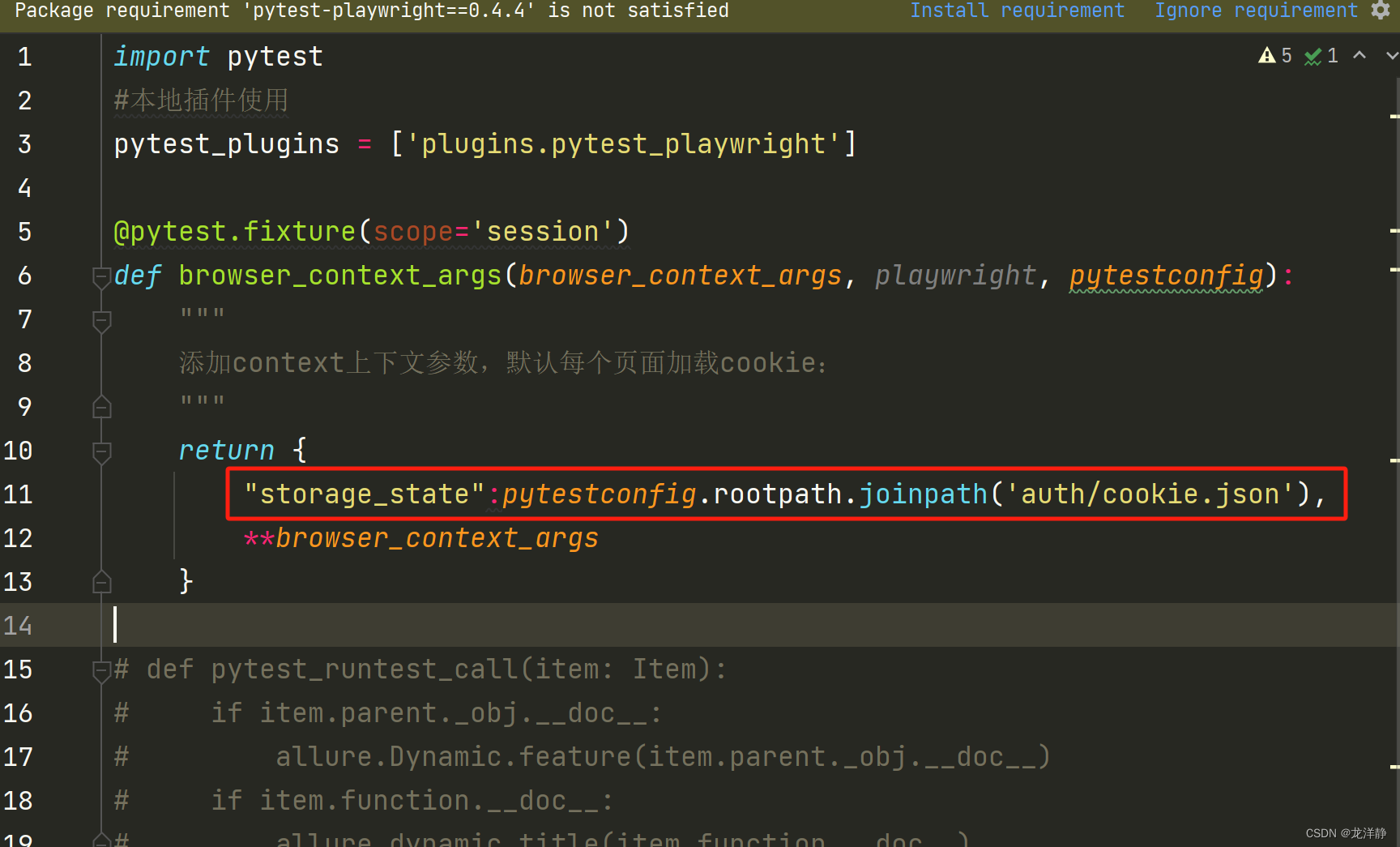
要保证json文件中有值,否则会报错~
相关文章:
【pytest、playwright】allure报告生成视频和图片
目录 1、修改插件pytest_playwright 2、conftest.py配置 3、修改pytest.ini文件 4、运行case 5、注意事项 1、修改插件pytest_playwright pytest_playwright.py内容如下: # Copyright (c) Microsoft Corporation. # # Licensed under the Apache License, Ver…...
浅谈iOS开发中的自动引用计数ARC
1.ARC是什么 我们知道,在C语言中,创建对象时必须手动分配和释放适量的内存。然而,在 Swift 中,当不再需要类实例时,ARC 会自动释放这些实例的内存。 Swift 使用 ARC 来跟踪和管理应用程序的内存,其主要是由…...

Spring IoCDI(2)
IoC详解 通过上面的案例, 我们已经知道了IoC和DI的基本操作, 接下来我们来系统地学习Spring IoC和DI的操作. 前面我们提到的IoC控制反转, 就是将对象的控制权交给Spring的IoC容器, 由IoC容器创建及管理对象. (也就是Bean的存储). Bean的存储 我们之前只讲到了Component注解…...

30. UE5 RPG GamplayAbility的配置项
在上一篇文章,我们介绍了如何将GA应用到角色身上的,接下来这篇文章,将主要介绍一下GA的相关配置项。 在这之前,再多一嘴,你要能激活技能,首先要先应用到ASC上面,才能够被激活。 标签 之前介绍…...

提升自己最快的方式是什么?
提升自己最快的方式通常涉及到个人成长的各个方面,包括心理、情感、技能和知识等。根据查阅到的资料,以下是一些具体的方法和步骤,帮助你快速提升自己: 1. 培养屏蔽力 荷兰畅销书作家罗伊马丁纳提到,屏蔽力是个人成长…...

题目:一个5位数,判断它是不是回文数。即12321是回文数,个位与万位相同,十位与千位相同。
题目:一个5位数,判断它是不是回文数。即12321是回文数,个位与万位相同,十位与千位相同。 There is no nutrition in the blog content. After reading it, you will not only suffer from malnutrition, but also impotence…...
《HelloGitHub》第 96 期
兴趣是最好的老师,HelloGitHub 让你对编程感兴趣! 简介 HelloGitHub 分享 GitHub 上有趣、入门级的开源项目。 https://github.com/521xueweihan/HelloGitHub 这里有实战项目、入门教程、黑科技、开源书籍、大厂开源项目等,涵盖多种编程语言 …...
C++tuple类型
tuple 类型 tuple是类似pair的模板。 每个pair的成员类型都不相同,但每个pair都恰好有两个成员。不同tuple类型的成员类型也不相同,但一个tuple可以有任意数量的成员。 每个确定的tuple类型的成员数目是固定的,但一个tuple类型的成员数目可…...

亚远景科技-浅谈ASPICE标准和ASPICE认证/评估
ASPICE(Automotive SPICE)是一种针对汽车行业的软件开发过程的评估模型,它旨在帮助汽车制造商和供应商提高软件开发过程的能力和质量,从而提升产品的质量、安全性和效率。 ASPICE标准涵盖了软件开发的各个阶段和活动,…...

PHP性能提升方案
一、背景与介绍 PHP语言开发效率高,特别应用于适合中小型项目,对于创业初期敏捷开发验证项目可行性或者Demo演示绝对占据优势。 但是随着现在Web应用的复杂性,针对项目要适应高并发、高流量的访问特性,PHP确实在性能方面相对Go、J…...
关系(二)利用python绘制热图
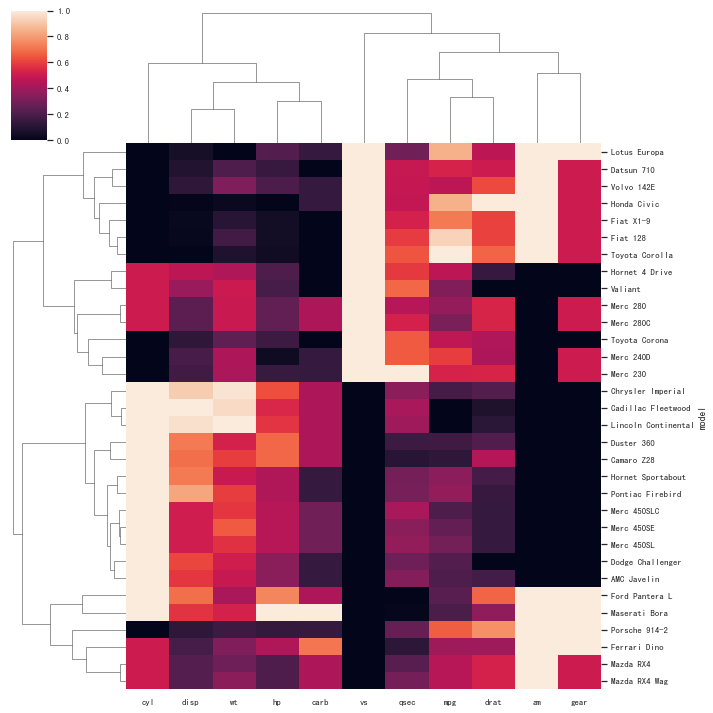
关系(二)利用python绘制热图 热图 (Heatmap)简介 热图适用于显示多个变量之间的差异,通过颜色判断彼此之间是否存在相关性。 快速绘制 基于seaborn import seaborn as sns import pandas as pd import numpy as np i…...

P8597 [蓝桥杯 2013 省 B] 翻硬币
# [蓝桥杯 2013 省 B] 翻硬币 ## 题目背景 小明正在玩一个“翻硬币”的游戏。 ## 题目描述 桌上放着排成一排的若干硬币。我们用 * 表示正面,用 o 表示反面(是小写字母,不是零),比如可能情形是 **oo***oooo&#x…...

主流公链 - Fantom
Fantom:高性能的区块链协议 Fantom是一种开创性的区块链协议,旨在革新去中心化应用和数字金融领域 技术特点 共识机制 Lachesis协议:Fantom使用了Lachesis协议作为其共识算法。Lachesis是一种 异步拜占庭容错(ABFT)共…...
vue-quill-editor 富文本编辑器(可上传视频图片),组件挂载的方式实现
1.安装 npm install vue-quill-editor --save npm install quill-image-drop-module --save npm install quill-image-resize-module --save2.在组件下面新增组件 QlEditor (1)index.vue <template><div><div idquillEditorQiniu><!-- 基于element…...

入门编程第一步,从记住这些单词开始
** 入门编程第一步,从记住这些单词开始 ** 2023-10-18 一、交互式环境与 print 输出 1、print : 打印/输出 2、coding : 编码 3、syntax : 语法 4、error : 错误 5、invalid : 无效 6、idenfifier : 名称/标识符 7、character : 字符 二、字符串的操作&#x…...
[C++]使用OpenCV去除面积较小的连通域
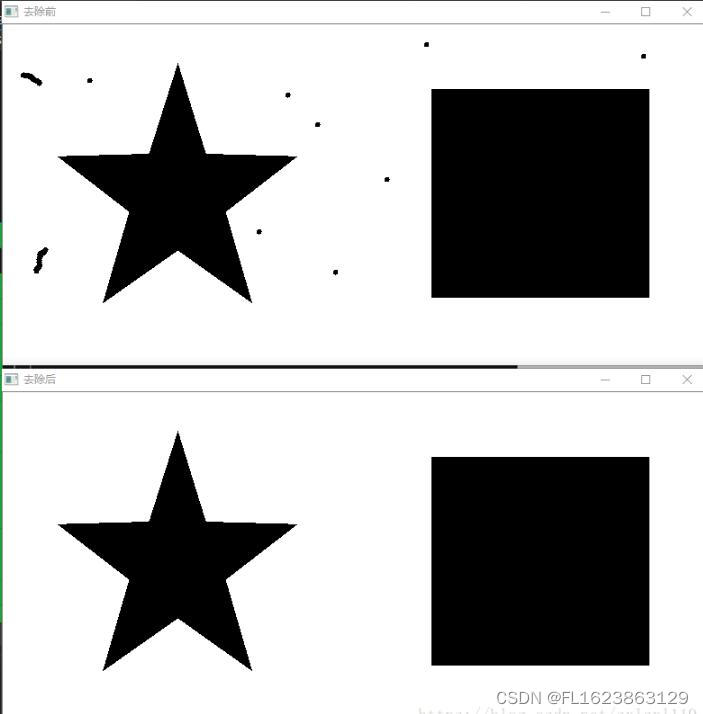
这是后期补充的部分,和前期的代码不太一样 效果图 源代码 //测试 void CCutImageVS2013Dlg::OnBnClickedTestButton1() {vector<vector<Point> > contours; //轮廓数组vector<Point2d> centers; //轮廓质心坐标 vector<vector<Point&…...

vscode连接不上,终端ssh正常,一直输入密码正确但是无法登录
若是之前链结果突然等不上,使用第一个链接 若是第一次链接连不上,先使用第二个链接,在使用第一个链接 原因:原因是服务器端的wget命令不能使用,vscode需要服务器端下载个文件,无法下载就导致了如上的错误…...
Hive on Spark 配置
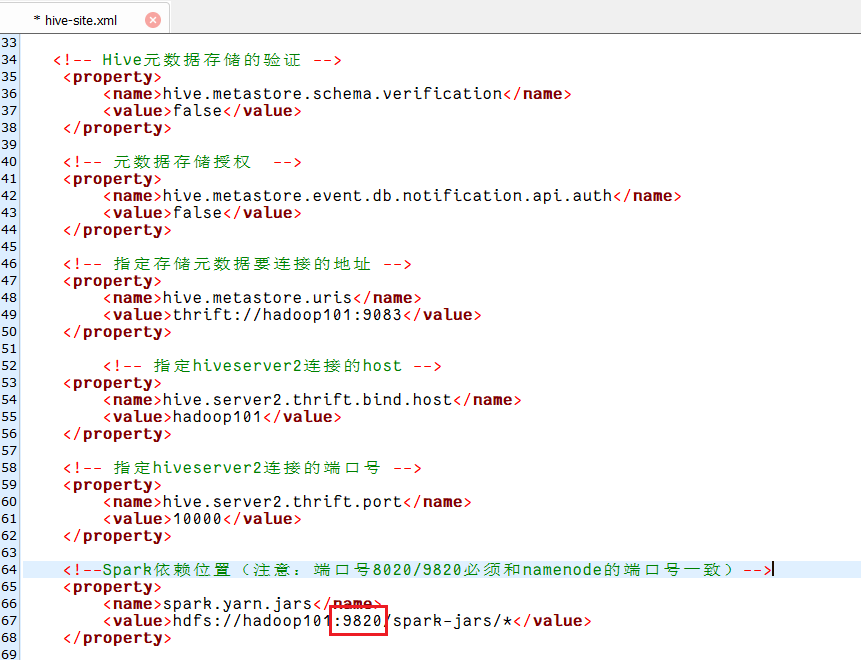
目录 1 Hive 引擎简介2 Hive on Spark 配置2.1 在 Hive 所在节点部署 Spark2.2 在hive中创建spark配置文件2.3 向 HDFS上传Spark纯净版 jar 包2.4 修改hive-site.xml文件2.5 Hive on Spark测试2.6 报错 1 Hive 引擎简介 Hive引擎包括:MR(默认)…...

ROS 基本
ROS创建自己的功能包 ROS中工作空间(workspace)是一个存放工程开发相关文件的文件夹,其中有四个文件夹。 src:代码空间(Source Space)build:编译空间(Build Space)devel:开发空间(Development Space)install:安装空间(Install Space) OK接下来创作工作空间&#…...
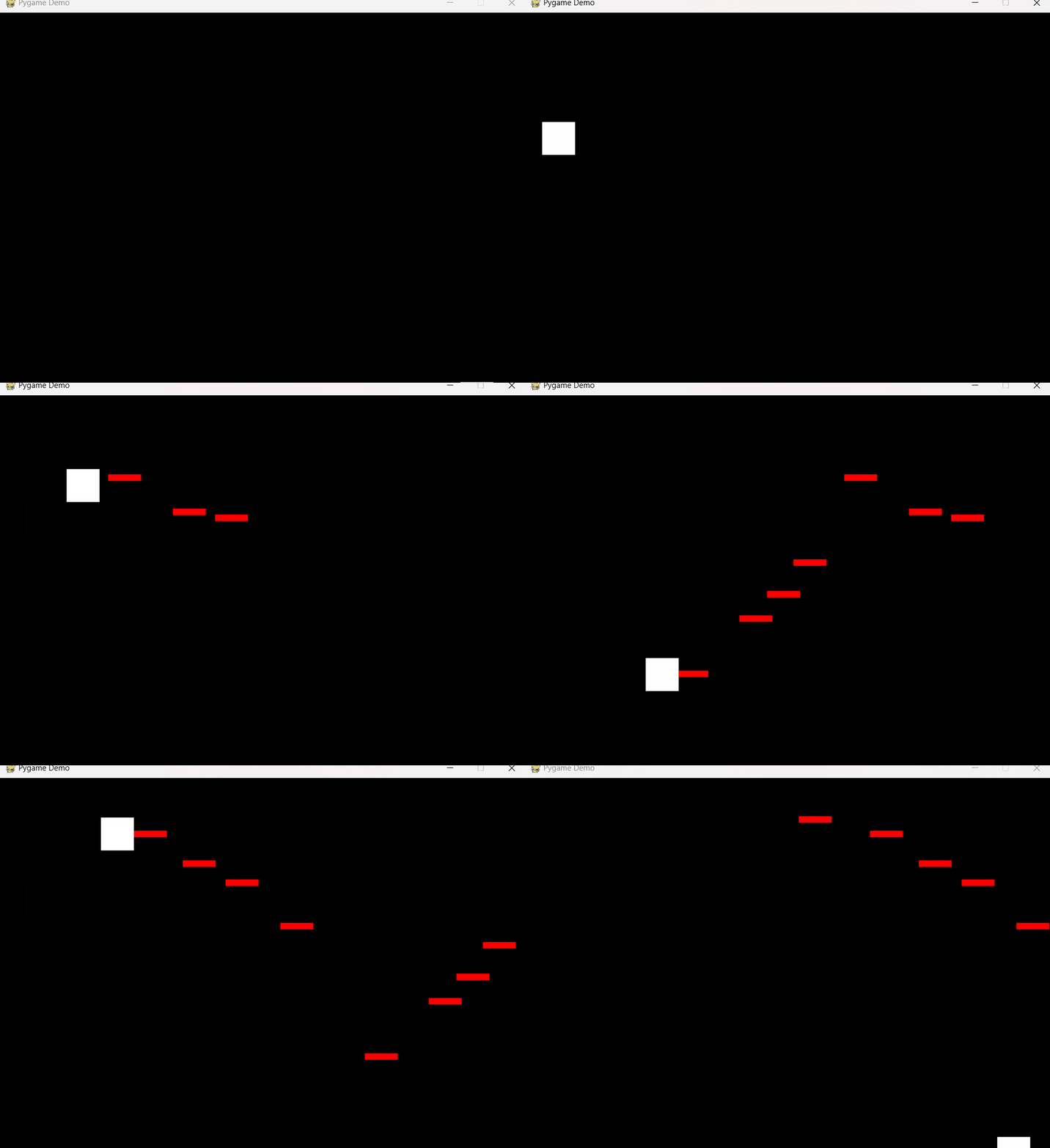
Pygame基础9-射击
简介 玩家用鼠标控制飞机(白色方块)移动,按下鼠标后,玩家所在位置出现子弹,子弹匀速向右飞行。 代码 没有什么新的东西,使用两个精灵类表示玩家和子弹。 有一个细节需要注意,当子弹飞出屏幕…...
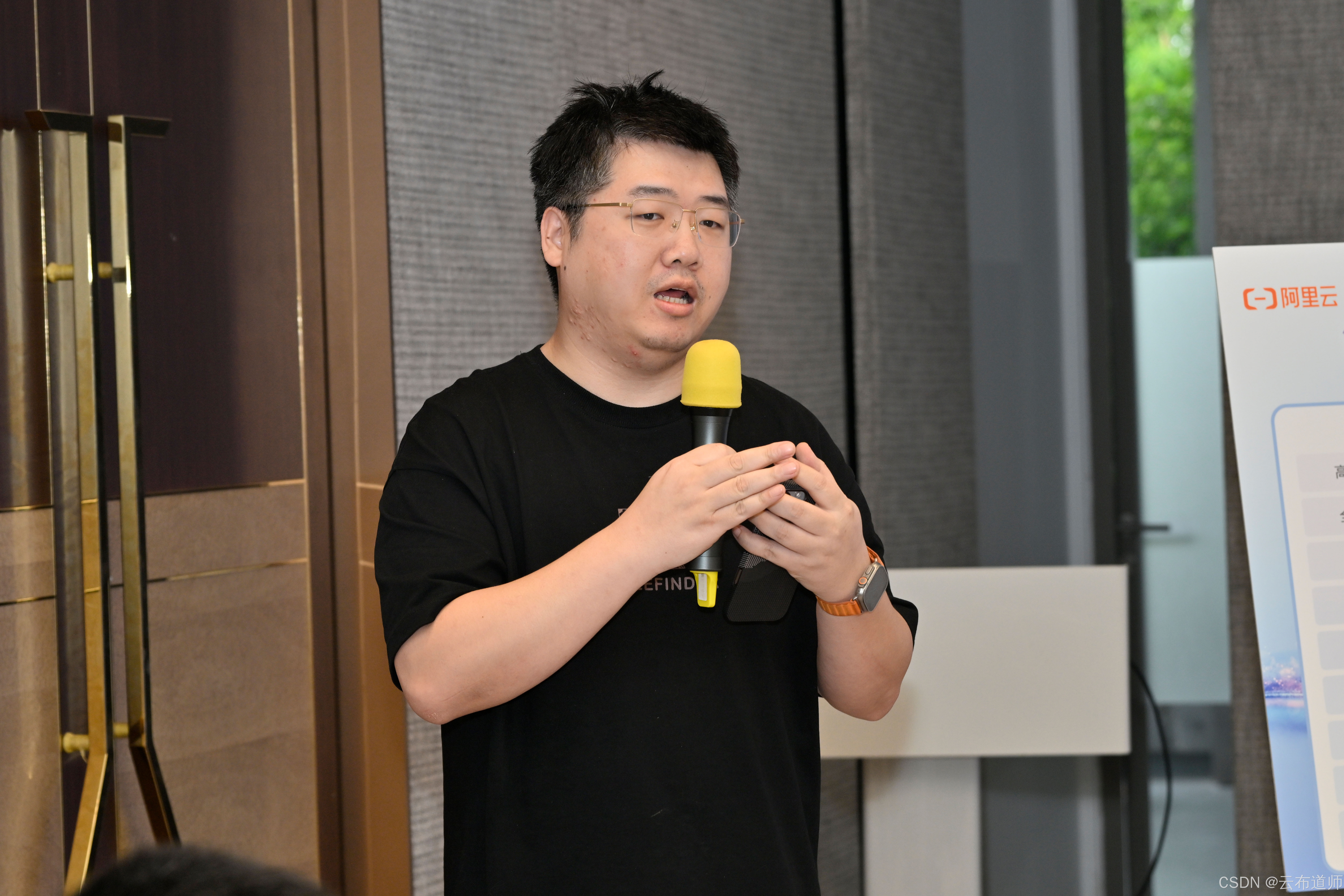
云启出海,智联未来|阿里云网络「企业出海」系列客户沙龙上海站圆满落地
借阿里云中企出海大会的东风,以**「云启出海,智联未来|打造安全可靠的出海云网络引擎」为主题的阿里云企业出海客户沙龙云网络&安全专场于5.28日下午在上海顺利举办,现场吸引了来自携程、小红书、米哈游、哔哩哔哩、波克城市、…...
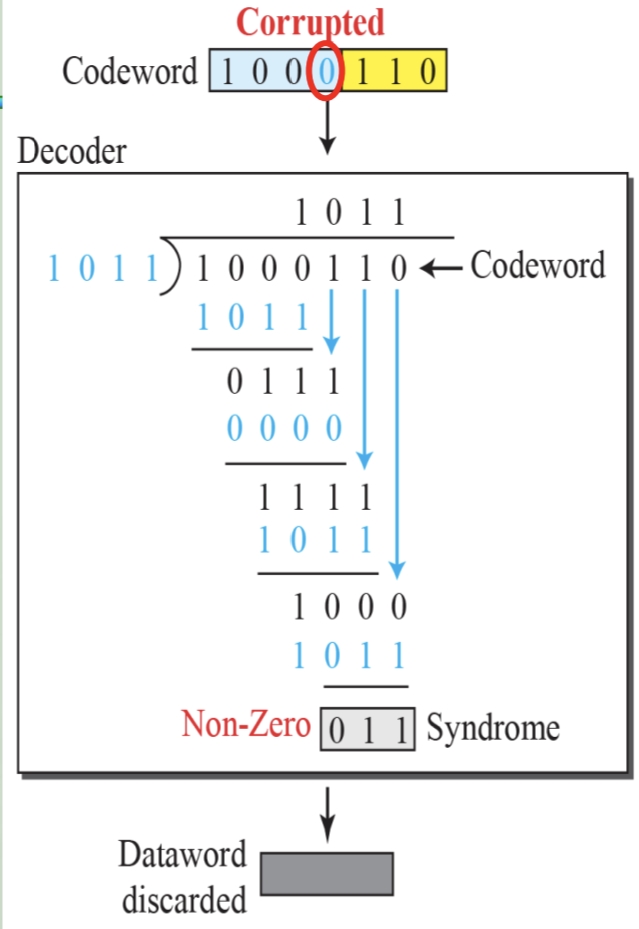
循环冗余码校验CRC码 算法步骤+详细实例计算
通信过程:(白话解释) 我们将原始待发送的消息称为 M M M,依据发送接收消息双方约定的生成多项式 G ( x ) G(x) G(x)(意思就是 G ( x ) G(x) G(x) 是已知的)࿰…...

1688商品列表API与其他数据源的对接思路
将1688商品列表API与其他数据源对接时,需结合业务场景设计数据流转链路,重点关注数据格式兼容性、接口调用频率控制及数据一致性维护。以下是具体对接思路及关键技术点: 一、核心对接场景与目标 商品数据同步 场景:将1688商品信息…...

【android bluetooth 框架分析 04】【bt-framework 层详解 1】【BluetoothProperties介绍】
1. BluetoothProperties介绍 libsysprop/srcs/android/sysprop/BluetoothProperties.sysprop BluetoothProperties.sysprop 是 Android AOSP 中的一种 系统属性定义文件(System Property Definition File),用于声明和管理 Bluetooth 模块相…...
基础光照(Basic Lighting))
C++.OpenGL (10/64)基础光照(Basic Lighting)
基础光照(Basic Lighting) 冯氏光照模型(Phong Lighting Model) #mermaid-svg-GLdskXwWINxNGHso {font-family:"trebuchet ms",verdana,arial,sans-serif;font-size:16px;fill:#333;}#mermaid-svg-GLdskXwWINxNGHso .error-icon{fill:#552222;}#mermaid-svg-GLd…...
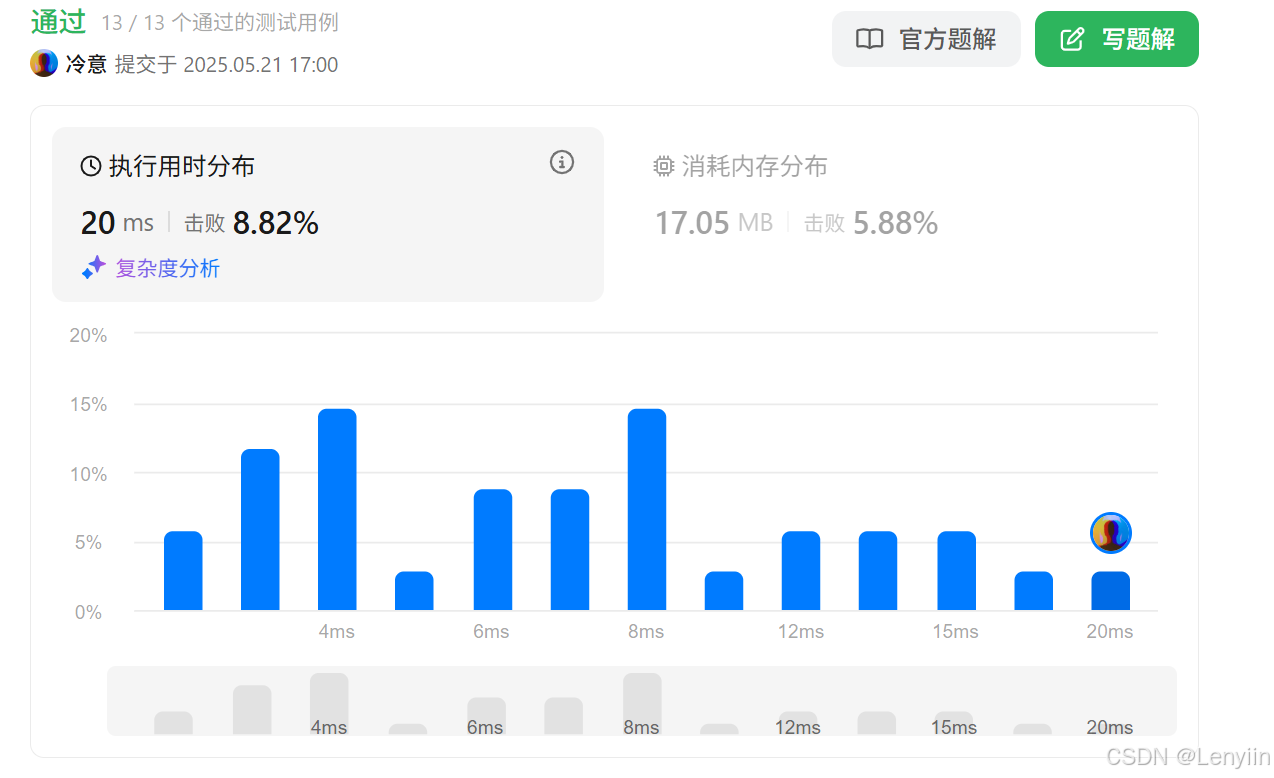
第 86 场周赛:矩阵中的幻方、钥匙和房间、将数组拆分成斐波那契序列、猜猜这个单词
Q1、[中等] 矩阵中的幻方 1、题目描述 3 x 3 的幻方是一个填充有 从 1 到 9 的不同数字的 3 x 3 矩阵,其中每行,每列以及两条对角线上的各数之和都相等。 给定一个由整数组成的row x col 的 grid,其中有多少个 3 3 的 “幻方” 子矩阵&am…...

【Nginx】使用 Nginx+Lua 实现基于 IP 的访问频率限制
使用 NginxLua 实现基于 IP 的访问频率限制 在高并发场景下,限制某个 IP 的访问频率是非常重要的,可以有效防止恶意攻击或错误配置导致的服务宕机。以下是一个详细的实现方案,使用 Nginx 和 Lua 脚本结合 Redis 来实现基于 IP 的访问频率限制…...

Linux nano命令的基本使用
参考资料 GNU nanoを使いこなすnano基础 目录 一. 简介二. 文件打开2.1 普通方式打开文件2.2 只读方式打开文件 三. 文件查看3.1 打开文件时,显示行号3.2 翻页查看 四. 文件编辑4.1 Ctrl K 复制 和 Ctrl U 粘贴4.2 Alt/Esc U 撤回 五. 文件保存与退出5.1 Ctrl …...

Python+ZeroMQ实战:智能车辆状态监控与模拟模式自动切换
目录 关键点 技术实现1 技术实现2 摘要: 本文将介绍如何利用Python和ZeroMQ消息队列构建一个智能车辆状态监控系统。系统能够根据时间策略自动切换驾驶模式(自动驾驶、人工驾驶、远程驾驶、主动安全),并通过实时消息推送更新车…...

比较数据迁移后MySQL数据库和OceanBase数据仓库中的表
设计一个MySQL数据库和OceanBase数据仓库的表数据比较的详细程序流程,两张表是相同的结构,都有整型主键id字段,需要每次从数据库分批取得2000条数据,用于比较,比较操作的同时可以再取2000条数据,等上一次比较完成之后,开始比较,直到比较完所有的数据。比较操作需要比较…...