
cropperjs 裁剪/框选图片
1.效果
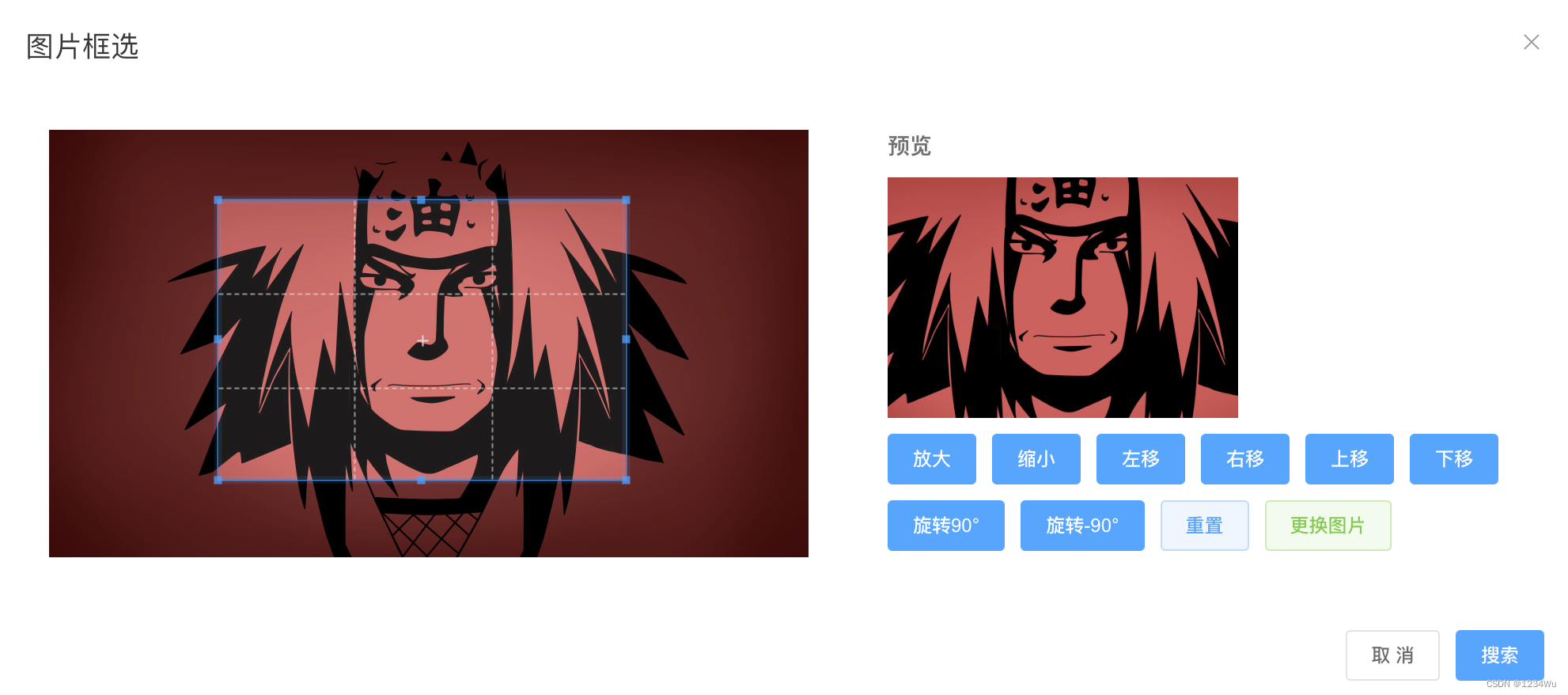
2.使用组件
<!-- 父级 --><Cropper ref="cropperRef" :imgUrl="url" @searchImg="searchImg"></Cropper>
3.封装组件
<template><el-dialog :title="title" :visible.sync="dialogVisible" width="1000px"><input ref="input" type="file" name="image" @change="setImage" /><div class="flex justify-around"><div class="w-480px h-270px flex justify-center items-center"><divv-show="!imgSrc"@click="showFileChooser"class="w-full h-full flex cursor-pointer justify-center items-center border-1px border-dashed border-gray-300 rounded-lg"><i class="font-size-20px el-icon-plus avatar-uploader-icon"></i></div><!-- :aspect-ratio="16 / 16" --><vue-cropperv-show="imgSrc"class="w-full h-full"ref="cropper":src="imgSrc"alt="Source Image"@ready="ready"@cropstart="cropstart"@cropmove="cropmove"@cropend="cropend"@crop="crop"@zoom="zoom"preview=".preview":autoCropArea="autoCropArea"></vue-cropper></div><div class="w-420px"><div class="font-bold color-#666 ml-20px mb-10px">预览</div><div v-show="!imgSrc" class="preview_empty ml-20px"></div><div v-show="imgSrc" class="preview ml-20px"></div><!-- <div>裁剪图片</div><div class="cropped-image"><el-image class="h-180px" v-if="cropImg" :src="cropImg" alt="Cropped Image" /><div v-else class="crop-placeholder" /></div> --><div class="actions mt-10px ml-10px"><el-button class="mb-10px ml-10px" type="primary" @click="zoom(0.2)" size="small">放大</el-button><el-button class="mb-10px" type="primary" @click="zoom(-0.2)" size="small">缩小</el-button><el-button class="mb-10px" type="primary" @click="move(-10, 0)" size="small">左移</el-button><el-button class="mb-10px" type="primary" @click="move(10, 0)" size="small">右移</el-button><el-button class="mb-10px" type="primary" @click="move(0, -10)" size="small">上移</el-button><el-button class="mb-10px" type="primary" @click="move(0, 10)" size="small">下移</el-button><el-button class="mb-10px" type="primary" @click="rotate(90)" size="small">旋转90°</el-button><el-button class="mb-10px" type="primary" @click="rotate(-90)" size="small">旋转-90°</el-button><!-- <el-button class="mb-10px" type="primary" @click="flipX" size="small">水平翻转</el-button><el-button class="mb-10px" type="primary" @click="flipY" size="small">垂直翻转</el-button> --><!-- <el-button class="mb-10px" type="success" @click="cropImage" size="small">搜索</el-button> --><el-button class="mb-10px" type="primary" @click="reset" size="small" plain>重置</el-button><el-buttonv-if="!isHideFileChooser"class="mb-10px"type="success"@click="showFileChooser"size="small"plain>更换图片</el-button><!-- <el-button class="mb-10px" type="primary" @click="getCropBoxData" size="small">获取裁剪框数据</el-button><el-button class="mb-10px" type="primary" @click="setCropBoxData" size="small">设置裁剪框数据</el-button><el-button class="mb-10px" type="primary" @click="getData" size="small">获取裁剪数据</el-button><el-button class="mb-10px" type="primary" @click="setData" size="small">设置裁剪数据</el-button> --></div></div></div><span slot="footer" class="dialog-footer"><el-button size="small" @click="dialogVisible = false">取 消</el-button><el-button size="small" type="primary" @click="cropImage">搜索</el-button></span></el-dialog>
</template><script>
import VueCropper from 'vue-cropperjs'
import 'cropperjs/dist/cropper.css'export default {name: 'Cropper',components: { VueCropper },props: {title: {type: String,default: '图片框选'},imgUrl: {type: String,default: ''},autoCropArea: {type: Number,default: 0.6},isHideFileChooser: {type: Boolean,default: true}},data() {return {imgSrc: '',dialogVisible: false,cropImg: ''}},watch: {imgUrl(val) {if (val) {this.imgSrc = valconsole.log('🚀 ~ imgUrl ~ this.imgSrc:', this.imgSrc)}}},methods: {open() {if (!this.imgUrl) {this.imgSrc = ''}this.dialogVisible = true},handleClose() {this.$emit('close')},ready() {// console.log('🚀 ~ ready ~ this.$refs.cropper:', this.$refs.cropper)},cropImage() {// get image data for post processing, e.g. upload or setting image srcthis.cropImg = this.$refs.cropper.getCroppedCanvas().toDataURL()const base64Data = this.cropImg.split(',')[1]this.$emit('searchImg', base64Data)this.dialogVisible = false},cropstart() {// console.log('🚀 ~ cropstart ~')},cropmove() {// console.log('🚀 ~ cropmove ~')},cropend() {// console.log('🚀 ~ cropend ~')},crop(data) {// console.log('🚀 ~ crop ~ data:', data)},flipX() {const dom = this.$refs.flipXlet scale = dom.getAttribute('data-scale')scale = scale ? -scale : -1this.$refs.cropper.scaleX(scale)dom.setAttribute('data-scale', scale)},flipY() {const dom = this.$refs.flipYlet scale = dom.getAttribute('data-scale')scale = scale ? -scale : -1this.$refs.cropper.scaleY(scale)dom.setAttribute('data-scale', scale)},getCropBoxData() {this.data = JSON.stringify(this.$refs.cropper.getCropBoxData(), null, 4)},getData() {this.data = JSON.stringify(this.$refs.cropper.getData(), null, 4)console.log('🚀 ~ getData ~ this.data:', this.data)},move(offsetX, offsetY) {this.$refs.cropper.move(offsetX, offsetY)},reset() {this.$refs.cropper.reset()},rotate(deg) {this.$refs.cropper.rotate(deg)},setCropBoxData() {if (!this.data) returnthis.$refs.cropper.setCropBoxData(JSON.parse(this.data))},setData() {if (!this.data) returnthis.$refs.cropper.setData(JSON.parse(this.data))},setImage(e) {const file = e.target.files[0]if (file.type.indexOf('image/') === -1) {alert('Please select an image file')return}if (typeof FileReader === 'function') {const reader = new FileReader()reader.onload = (event) => {this.imgSrc = event.target.result// rebuild cropperjs with the updated sourcethis.$refs.cropper.replace(event.target.result)}reader.readAsDataURL(file)} else {alert('Sorry, FileReader API not supported')}},showFileChooser() {this.$refs.input.click()},zoom(percent) {this.$refs.cropper.relativeZoom(percent)}},mounted() {this.imgSrc = this.imgUrl}
}
</script><style lang="scss" scoped>
input[type='file'] {display: none;
}.preview-area {width: 100%;
}.preview-area p {font-size: 1.25rem;margin: 0;margin-bottom: 1rem;
}.preview-area p:last-of-type {margin-top: 1rem;
}.preview {width: 270px;height: calc(270px * (9 / 16));overflow: hidden;background-color: #f5f5f5;
}.preview_empty {width: 270px;height: calc(270px * (9 / 16));overflow: hidden;background-color: #f5f5f5;
}
.crop-placeholder {width: 100%;height: 200px;background: #ccc;
}.cropped-image img {max-width: 100%;
}
</style>
相关文章:
cropperjs 裁剪/框选图片
1.效果 2.使用组件 <!-- 父级 --><Cropper ref"cropperRef" :imgUrl"url" searchImg"searchImg"></Cropper>3.封装组件 <template><el-dialog :title"title" :visible.sync"dialogVisible" wi…...
)
ArkTS开发系列之事件(2.8.2手势事件)
上篇回顾:ArkTS开发系列之事件(2.8.1触屏、键鼠、焦点事件) 本篇内容:ArkTS开发系列之事件(2.8.2手势事件) 一、绑定手势方法 1. 常规手势绑定方法 Text(手势).fontSize(44).gesture(TapGesture().onAct…...
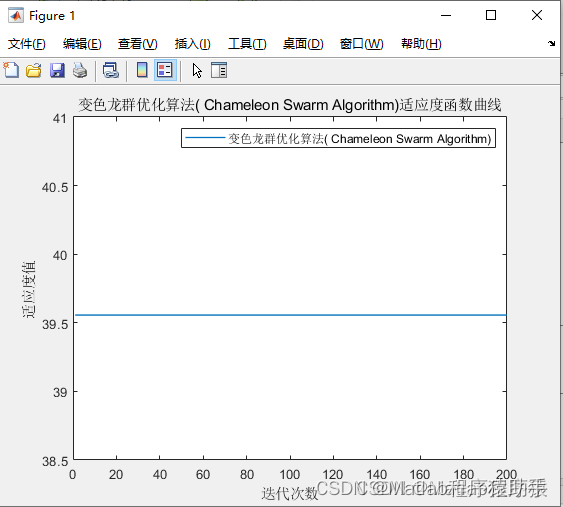
【MATLAB源码-第135期】基于matlab的变色龙群优化算法CSA)机器人栅格路径规划,输出做短路径图和适应度曲线。
操作环境: MATLAB 2022a 1、算法描述 变色龙群优化算法(Chameleon Swarm Algorithm,CSA)是一种新颖的群体智能优化算法,受到自然界中变色龙捕食和社交行为的启发。变色龙以其独特的适应能力而著称,能够根…...

使用Python实现深度学习模型:语言模型与文本生成
语言模型是自然语言处理中的核心任务之一,它们用于预测文本中的下一个单词或生成与输入文本相关的新文本。本文将详细介绍如何使用Python实现一个语言模型,并通过这个模型进行文本生成。 我们将使用TensorFlow和Hugging Face的Transformers库来实现这一任务。 1. 语言模型简…...
)
大数据面试题之Hive(3)
目录 Hive的函数:UDF、UDAF、UDTF的区别? UDF是怎么在Hive里执行的 row_number,rank,dense_rank的区别 Hive count(distinct)有几个reduce,海量数据会有什么问题 HQL:行转列、列转行 一条HQL从代码到执行的过程 了解Hive S…...

华为OD机考题HJ17 坐标移动
前言 应广大同学要求,开始以OD机考题作为练习题,看看算法和数据结构掌握情况。有需要练习的可以关注下。 描述 开发一个坐标计算工具, A表示向左移动,D表示向右移动,W表示向上移动,S表示向下移动。从&am…...

redis修改密码
在Redis中,修改密码通常涉及编辑Redis配置文件或者在运行时通过Redis命令动态修改。 温馨提示:(运行时直接参考第2条) 1.编辑配置文件: 找到Redis配置文件redis.conf,通常位于/etc/redis/或/usr/local/e…...

《昇思 25 天学习打卡营第 7 天 | 模型训练 》
《昇思 25 天学习打卡营第 7 天 | 模型训练 》 活动地址:https://xihe.mindspore.cn/events/mindspore-training-camp 签名:Sam9029 模型训练 本章节-结合前几张的内容所讲-算是一节综合实践 mindscope 框架使用张量 数据类型数据集下载与加载网络构建函…...

HTML/CSS 基础
1、<input type"checkbox" checked> checked 默认选中为复选框 2、表格中的标题<caption> 3、文字标签直接加 title 4、<dl>为自定义列表的整体,包裹<dt><dd> <dt>自定义列表的主题 <dd>主题的每一项内容 5、…...

Linux系统安装Lua语言及Lua外部库
安装Lua Lua语言是一种轻量级、高效且可扩展的脚本语言,具有简洁易学的语法和占用资源少的特点。它支持动态类型,提供了丰富的表达式和运算符,同时具备自动垃圾回收机制和跨平台性。Lua语言易于嵌入到其他应用程序中,并可与其他语…...
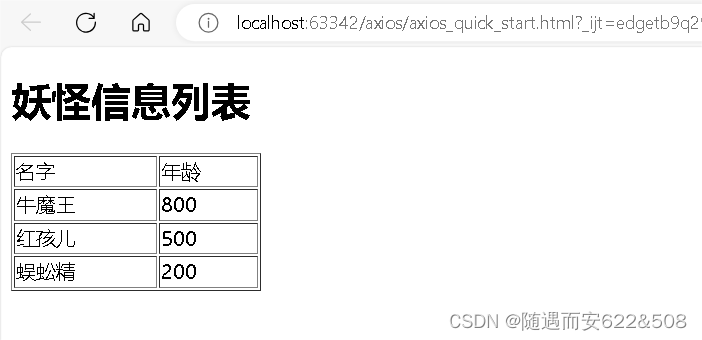
前端技术栈学习:Vue2、Vue cli脚手架、ElementUI组件库、Axios
1 基本介绍 (1)Vue 是一个前端框架, 易于构建用户界面 (2)Vue 的核心库只关注视图层,不仅易于上手,还便于与第三方库或项目整合 (3)支持和其它类库结合使用 (4&#…...
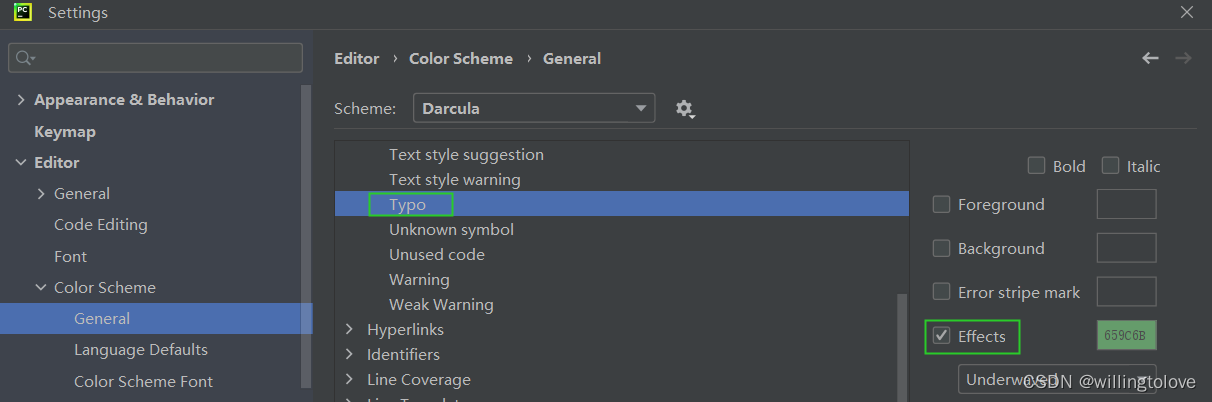
pycharm中取消Typo:In word ‘xxx‘提示(绿色波浪线提示)的方法
#事故现场 使用pycharm写python代码出现绿色波浪线的提示,并提示Typo:In word ‘xxx’,这是pycharm检测到单词拼写错误、不规范; 那如何取消这种提示呢? #解决方法 方法一:Settings → Editor → Inspections → P…...

js中的浅拷贝和深拷贝
浅拷贝Shallow Copy 浅拷贝只复制对象的顶层属性及其引用,而不复制这些引用所指向的对象。如果原始对象中的某个属性是一个对象或数组,那么浅拷贝后的对象将包含对这个内部对象或数组的引用,而不是这个对象或数组的一个新副本。 let obj1 …...

【Linux】常用基本命令
wget网址用于直接从网上下载某个文件到服务器,当然也可以直接从网上先把东西下到本地然后用filezilla这个软件来传输到服务器上。 当遇到不会的命令时候,可以使用man “不会的命令”来查看这个命令的详细信息。比如我想要看看ls这个命令的详细用法&…...
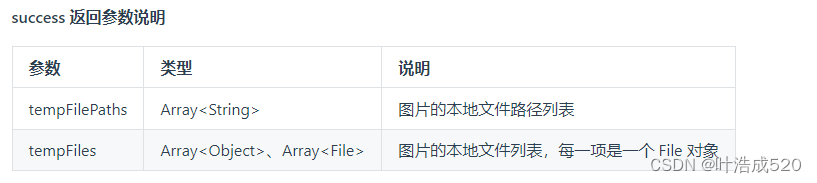
uniapp——上传图片获取到file对象而非临时地址——基础积累
最近在看uniapp的代码,遇到一个需求,就是要实现上传图片的功能 uniapp 官网地址:https://uniapp.dcloud.net.cn/ 上传图片有对应的API: uni.chooseImage方法:https://uniapp.dcloud.net.cn/api/media/image.html#choo…...
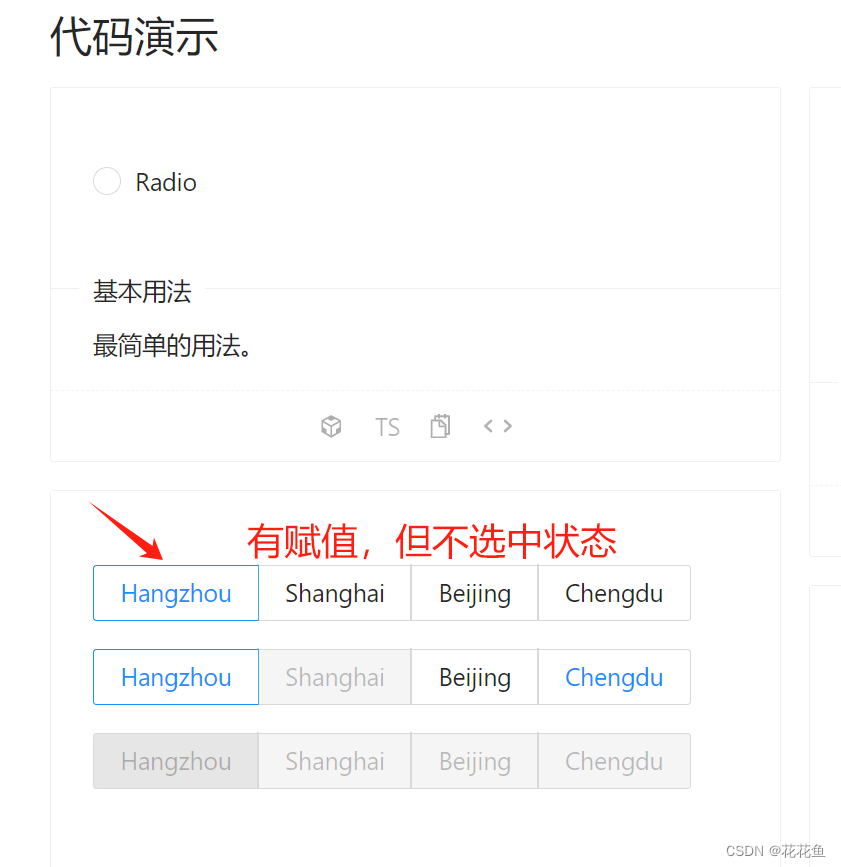
vue3 antdv RadioButton默认值选择问题处理
1、先上官方文档: Ant Design Vue — An enterprise-class UI components based on Ant Design and Vue.js 官方代码: <template><div><div><a-radio-group v-model:value"value1"><a-radio-button value"a…...
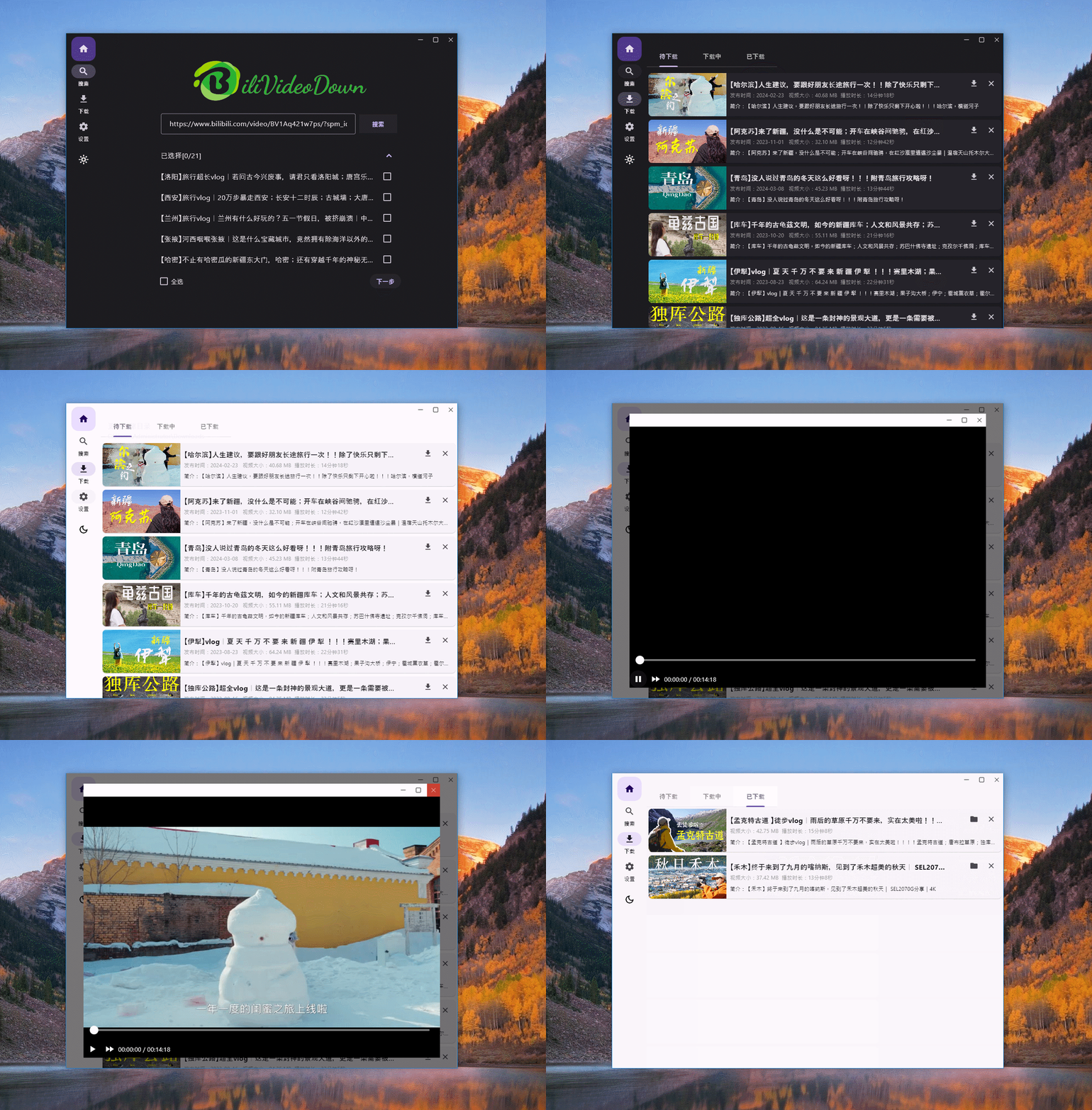
最佳实践,一款基于 Flutter 的桌面应用
前言 这篇文章介绍作为一名后端开发人员,快速的入门前端或者客户端一些相关的技术的心得。先来说说为什么作为一名后端开发人员也需要学习一些前端或者客户端相关的技术。通常来说,深耕一个领域没有错,因为社会常常就是这样分工的࿰…...

python第一个多进程爬虫
使用 multiprocessing 模块实现多进程爬取股票网址买卖数据的基本思路是: 定义爬虫函数,用于从一个或多个股票网址上抓取数据。创建多个进程,每个进程执行爬虫函数,可能针对不同的股票或不同的网页。使用 multiprocessing.Queue …...

在Ubuntu 18.04上安装和配置Ansible的方法
前些天发现了一个巨牛的人工智能学习网站,通俗易懂,风趣幽默,忍不住分享一下给大家。点击跳转到网站。 简介 配置管理系统旨在简化对大量服务器的控制,适用于管理员和运维团队。它们允许您从一个中央位置以自动化的方式控制许多…...
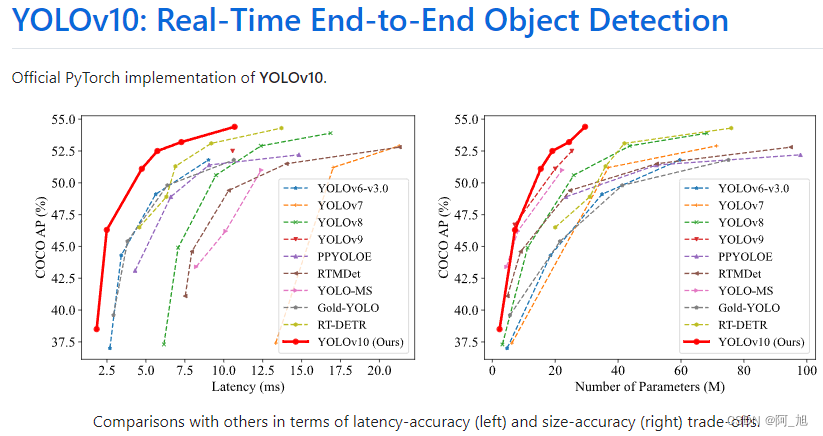
【详细教程】如何使用YOLOv10进行图片与视频的目标检测
《博主简介》 小伙伴们好,我是阿旭。专注于人工智能、AIGC、python、计算机视觉相关分享研究。 ✌更多学习资源,可关注公-仲-hao:【阿旭算法与机器学习】,共同学习交流~ 👍感谢小伙伴们点赞、关注! 《------往期经典推…...

Python爬虫实战:研究MechanicalSoup库相关技术
一、MechanicalSoup 库概述 1.1 库简介 MechanicalSoup 是一个 Python 库,专为自动化交互网站而设计。它结合了 requests 的 HTTP 请求能力和 BeautifulSoup 的 HTML 解析能力,提供了直观的 API,让我们可以像人类用户一样浏览网页、填写表单和提交请求。 1.2 主要功能特点…...
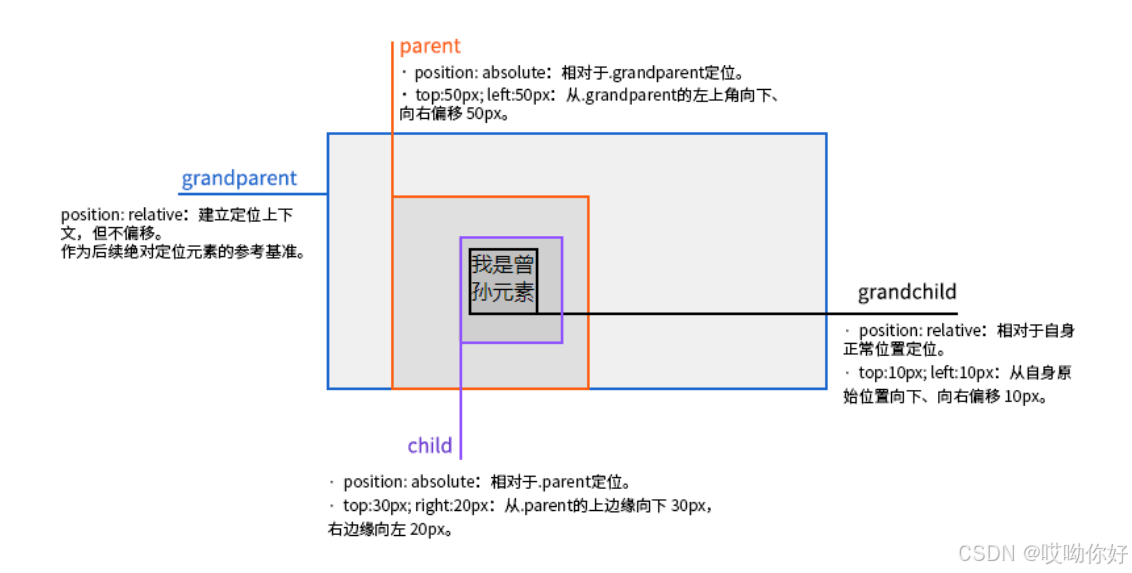
【CSS position 属性】static、relative、fixed、absolute 、sticky详细介绍,多层嵌套定位示例
文章目录 ★ position 的五种类型及基本用法 ★ 一、position 属性概述 二、position 的五种类型详解(初学者版) 1. static(默认值) 2. relative(相对定位) 3. absolute(绝对定位) 4. fixed(固定定位) 5. sticky(粘性定位) 三、定位元素的层级关系(z-i…...
:滤镜命令)
ffmpeg(四):滤镜命令
FFmpeg 的滤镜命令是用于音视频处理中的强大工具,可以完成剪裁、缩放、加水印、调色、合成、旋转、模糊、叠加字幕等复杂的操作。其核心语法格式一般如下: ffmpeg -i input.mp4 -vf "滤镜参数" output.mp4或者带音频滤镜: ffmpeg…...

【笔记】WSL 中 Rust 安装与测试完整记录
#工作记录 WSL 中 Rust 安装与测试完整记录 1. 运行环境 系统:Ubuntu 24.04 LTS (WSL2)架构:x86_64 (GNU/Linux)Rust 版本:rustc 1.87.0 (2025-05-09)Cargo 版本:cargo 1.87.0 (2025-05-06) 2. 安装 Rust 2.1 使用 Rust 官方安…...
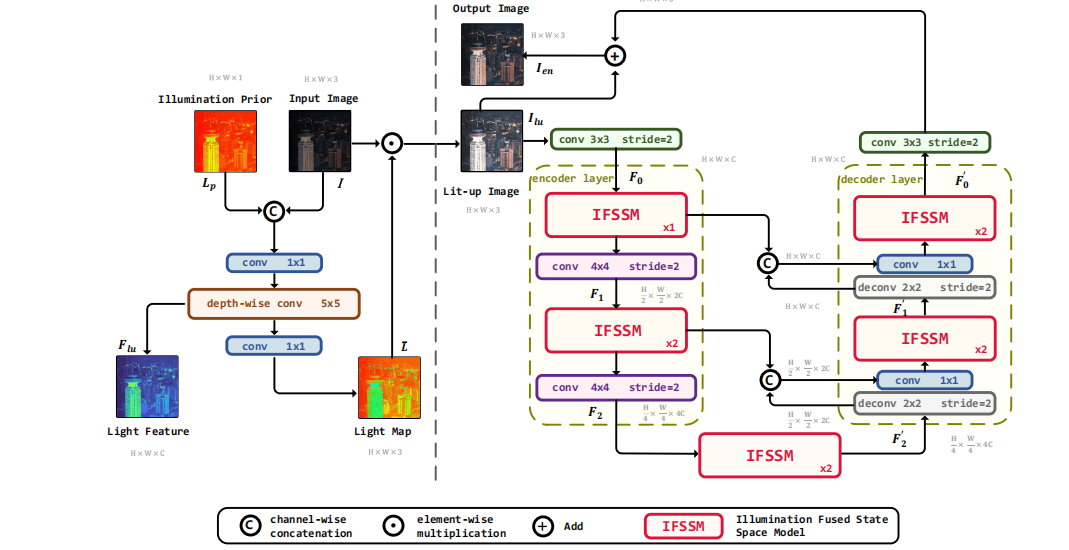
深度学习水论文:mamba+图像增强
🧀当前视觉领域对高效长序列建模需求激增,对Mamba图像增强这方向的研究自然也逐渐火热。原因在于其高效长程建模,以及动态计算优势,在图像质量提升和细节恢复方面有难以替代的作用。 🧀因此短时间内,就有不…...

Golang——6、指针和结构体
指针和结构体 1、指针1.1、指针地址和指针类型1.2、指针取值1.3、new和make 2、结构体2.1、type关键字的使用2.2、结构体的定义和初始化2.3、结构体方法和接收者2.4、给任意类型添加方法2.5、结构体的匿名字段2.6、嵌套结构体2.7、嵌套匿名结构体2.8、结构体的继承 3、结构体与…...

关于uniapp展示PDF的解决方案
在 UniApp 的 H5 环境中使用 pdf-vue3 组件可以实现完整的 PDF 预览功能。以下是详细实现步骤和注意事项: 一、安装依赖 安装 pdf-vue3 和 PDF.js 核心库: npm install pdf-vue3 pdfjs-dist二、基本使用示例 <template><view class"con…...
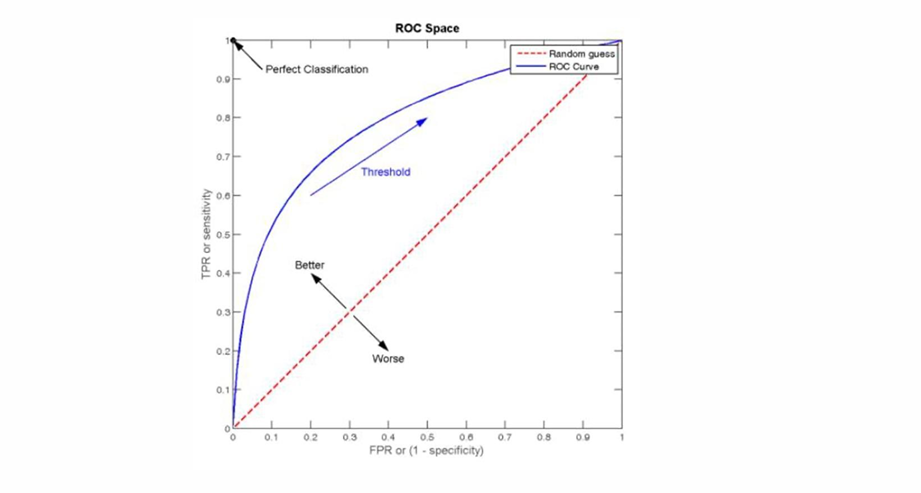
自然语言处理——文本分类
文本分类 传统机器学习方法文本表示向量空间模型 特征选择文档频率互信息信息增益(IG) 分类器设计贝叶斯理论:线性判别函数 文本分类性能评估P-R曲线ROC曲线 将文本文档或句子分类为预定义的类或类别, 有单标签多类别文本分类和多…...
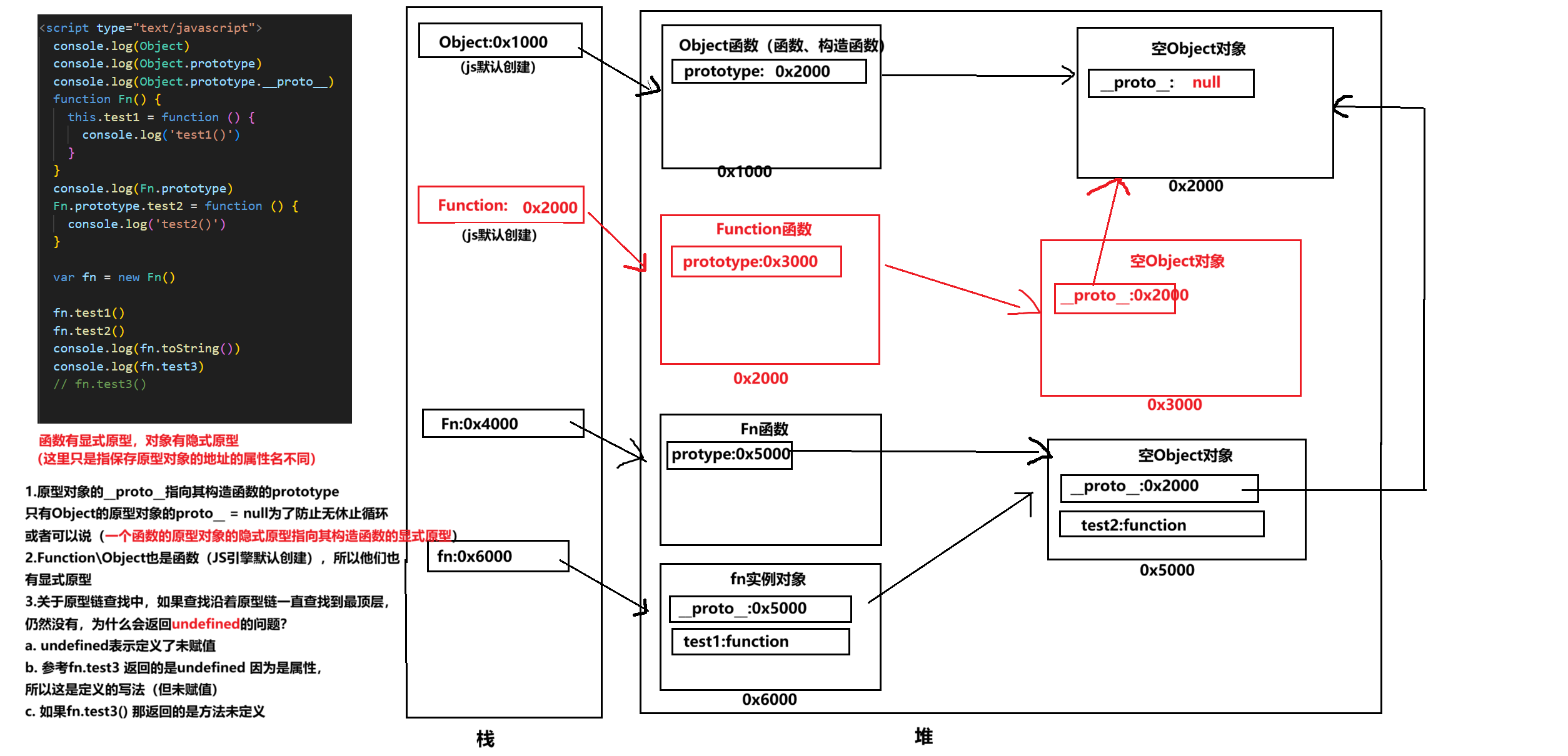
图解JavaScript原型:原型链及其分析 | JavaScript图解
忽略该图的细节(如内存地址值没有用二进制) 以下是对该图进一步的理解和总结 1. JS 对象概念的辨析 对象是什么:保存在堆中一块区域,同时在栈中有一块区域保存其在堆中的地址(也就是我们通常说的该变量指向谁&…...

Linux安全加固:从攻防视角构建系统免疫
Linux安全加固:从攻防视角构建系统免疫 构建坚不可摧的数字堡垒 引言:攻防对抗的新纪元 在日益复杂的网络威胁环境中,Linux系统安全已从被动防御转向主动免疫。2023年全球网络安全报告显示,高级持续性威胁(APT)攻击同比增长65%,平均入侵停留时间缩短至48小时。本章将从…...