
【springmvc】执行流程
SpringMVC执行流程
原理图
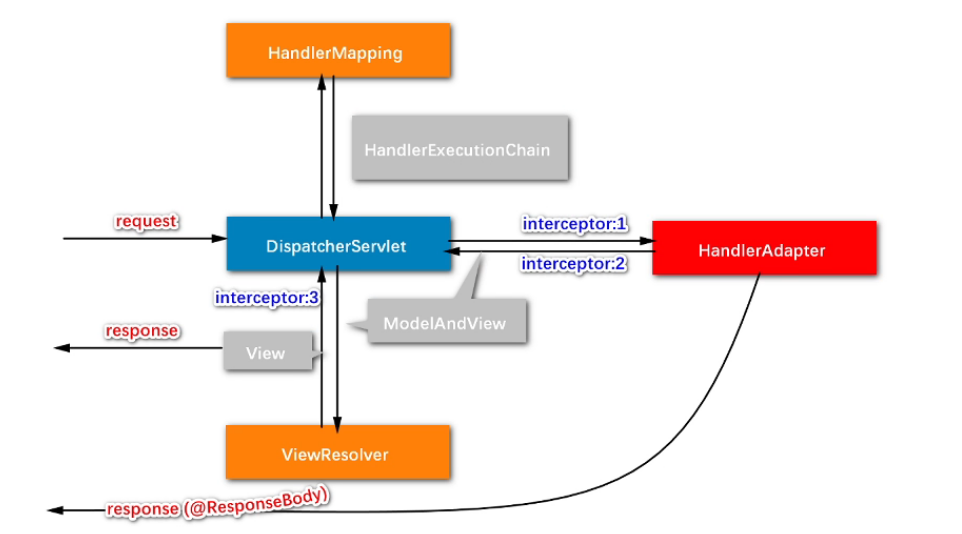
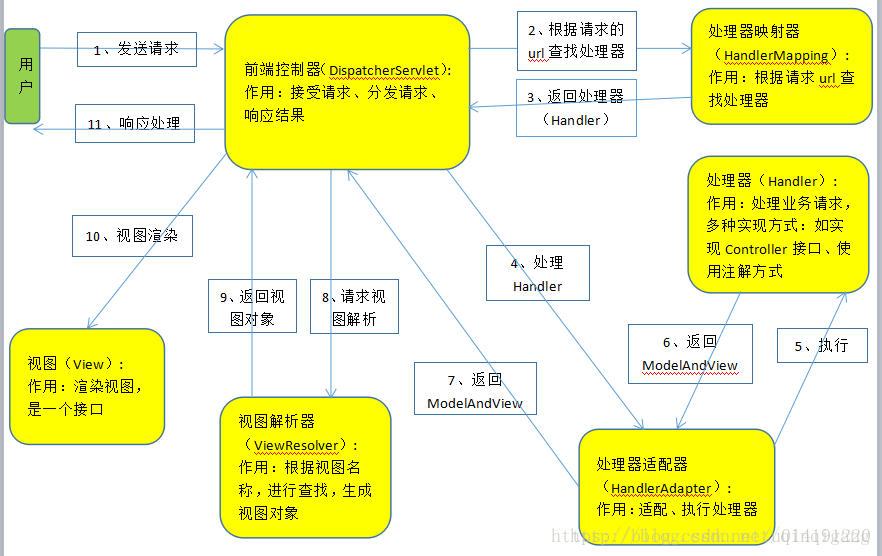
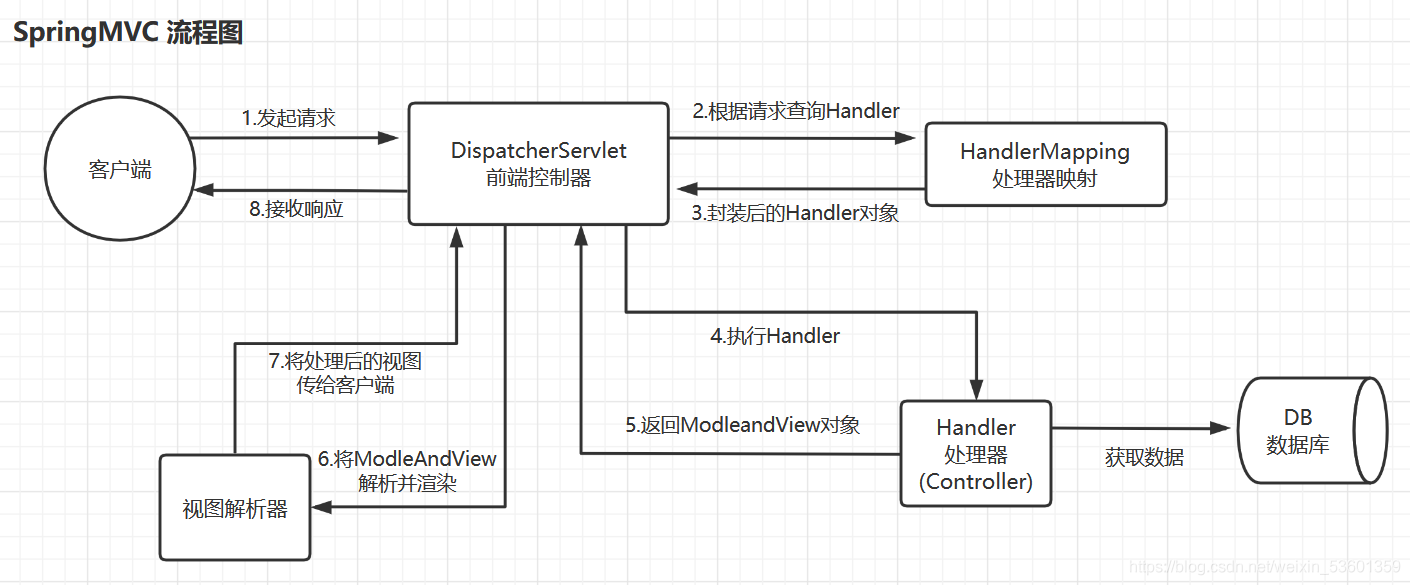
1、SpringMVC常用组件
- DispatcherServlet:前端控制器,不需要工程师开发,由框架提供
作用:统一处理请求和响应,整个流程控制的中心,由它调用其它组件处理用户的请求
- HandlerMapping:处理器映射器,不需要工程师开发,由框架提供
作用:根据请求的url、method等信息查找Handler,即控制器方法
- Handler:处理器,需要工程师开发
作用:在DispatcherServlet的控制下Handler对具体的用户请求进行处理
- HandlerAdapter:处理器适配器,不需要工程师开发,由框架提供
作用:通过HandlerAdapter对处理器(控制器方法)进行执行
- ViewResolver:视图解析器,不需要工程师开发,由框架提供
作用:进行视图解析,得到相应的视图,例如:ThymeleafView、InternalResourceView、RedirectView
- View:视图
作用:将模型数据通过页面展示给用户
2、DispatcherServlet初始化过程
DispatcherServlet 本质上是一个 Servlet,所以天然的遵循 Servlet 的生命周期。所以宏观上是 Servlet 生命周期来进行调度。
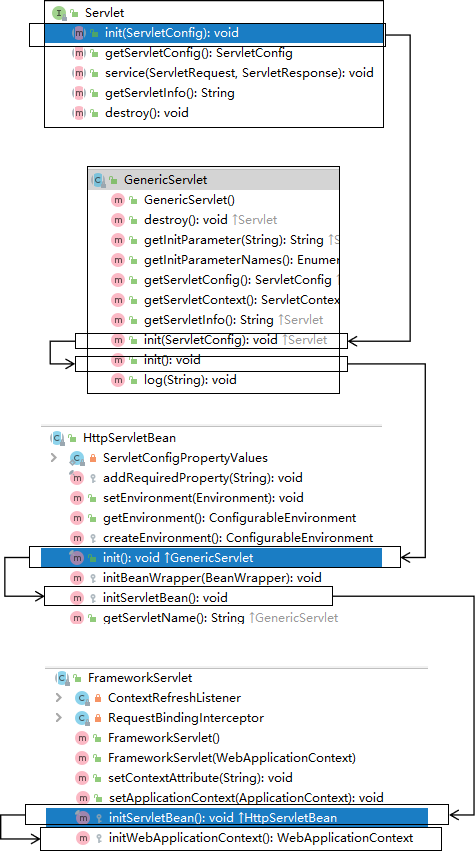
a>初始化WebApplicationContext
所在类:org.springframework.web.servlet.FrameworkServlet
protected WebApplicationContext initWebApplicationContext() {WebApplicationContext rootContext =WebApplicationContextUtils.getWebApplicationContext(getServletContext());WebApplicationContext wac = null;if (this.webApplicationContext != null) {// A context instance was injected at construction time -> use itwac = this.webApplicationContext;if (wac instanceof ConfigurableWebApplicationContext) {ConfigurableWebApplicationContext cwac = (ConfigurableWebApplicationContext) wac;if (!cwac.isActive()) {// The context has not yet been refreshed -> provide services such as// setting the parent context, setting the application context id, etcif (cwac.getParent() == null) {// The context instance was injected without an explicit parent -> set// the root application context (if any; may be null) as the parentcwac.setParent(rootContext);}configureAndRefreshWebApplicationContext(cwac);}}}if (wac == null) {// No context instance was injected at construction time -> see if one// has been registered in the servlet context. If one exists, it is assumed// that the parent context (if any) has already been set and that the// user has performed any initialization such as setting the context idwac = findWebApplicationContext();}if (wac == null) {// No context instance is defined for this servlet -> create a local one// 创建WebApplicationContextwac = createWebApplicationContext(rootContext);}if (!this.refreshEventReceived) {// Either the context is not a ConfigurableApplicationContext with refresh// support or the context injected at construction time had already been// refreshed -> trigger initial onRefresh manually here.synchronized (this.onRefreshMonitor) {// 刷新WebApplicationContextonRefresh(wac);}}if (this.publishContext) {// Publish the context as a servlet context attribute.// 将IOC容器在应用域共享String attrName = getServletContextAttributeName();getServletContext().setAttribute(attrName, wac);}return wac;
}
b>创建WebApplicationContext
所在类:org.springframework.web.servlet.FrameworkServlet
protected WebApplicationContext createWebApplicationContext(@Nullable ApplicationContext parent) {Class<?> contextClass = getContextClass();if (!ConfigurableWebApplicationContext.class.isAssignableFrom(contextClass)) {throw new ApplicationContextException("Fatal initialization error in servlet with name '" + getServletName() +"': custom WebApplicationContext class [" + contextClass.getName() +"] is not of type ConfigurableWebApplicationContext");}// 通过反射创建 IOC 容器对象ConfigurableWebApplicationContext wac =(ConfigurableWebApplicationContext) BeanUtils.instantiateClass(contextClass);wac.setEnvironment(getEnvironment());// 设置父容器wac.setParent(parent);String configLocation = getContextConfigLocation();if (configLocation != null) {wac.setConfigLocation(configLocation);}configureAndRefreshWebApplicationContext(wac);return wac;
}
c>DispatcherServlet初始化策略
FrameworkServlet创建WebApplicationContext后,刷新容器,调用onRefresh(wac),此方法在DispatcherServlet中进行了重写,调用了initStrategies(context)方法,初始化策略,即初始化DispatcherServlet的各个组件
所在类:org.springframework.web.servlet.DispatcherServlet
protected void initStrategies(ApplicationContext context) {initMultipartResolver(context);initLocaleResolver(context);initThemeResolver(context);initHandlerMappings(context);initHandlerAdapters(context);initHandlerExceptionResolvers(context);initRequestToViewNameTranslator(context);initViewResolvers(context);initFlashMapManager(context);
}
3、DispatcherServlet调用组件处理请求
a>processRequest()
FrameworkServlet重写HttpServlet中的service()和doXxx(),这些方法中调用了processRequest(request, response)
所在类:org.springframework.web.servlet.FrameworkServlet
protected final void processRequest(HttpServletRequest request, HttpServletResponse response)throws ServletException, IOException {long startTime = System.currentTimeMillis();Throwable failureCause = null;LocaleContext previousLocaleContext = LocaleContextHolder.getLocaleContext();LocaleContext localeContext = buildLocaleContext(request);RequestAttributes previousAttributes = RequestContextHolder.getRequestAttributes();ServletRequestAttributes requestAttributes = buildRequestAttributes(request, response, previousAttributes);WebAsyncManager asyncManager = WebAsyncUtils.getAsyncManager(request);asyncManager.registerCallableInterceptor(FrameworkServlet.class.getName(), new RequestBindingInterceptor());initContextHolders(request, localeContext, requestAttributes);try {// 执行服务,doService()是一个抽象方法,在DispatcherServlet中进行了重写doService(request, response);}catch (ServletException | IOException ex) {failureCause = ex;throw ex;}catch (Throwable ex) {failureCause = ex;throw new NestedServletException("Request processing failed", ex);}finally {resetContextHolders(request, previousLocaleContext, previousAttributes);if (requestAttributes != null) {requestAttributes.requestCompleted();}logResult(request, response, failureCause, asyncManager);publishRequestHandledEvent(request, response, startTime, failureCause);}
}
b>doService()
所在类:org.springframework.web.servlet.DispatcherServlet
@Override
protected void doService(HttpServletRequest request, HttpServletResponse response) throws Exception {logRequest(request);// Keep a snapshot of the request attributes in case of an include,// to be able to restore the original attributes after the include.Map<String, Object> attributesSnapshot = null;if (WebUtils.isIncludeRequest(request)) {attributesSnapshot = new HashMap<>();Enumeration<?> attrNames = request.getAttributeNames();while (attrNames.hasMoreElements()) {String attrName = (String) attrNames.nextElement();if (this.cleanupAfterInclude || attrName.startsWith(DEFAULT_STRATEGIES_PREFIX)) {attributesSnapshot.put(attrName, request.getAttribute(attrName));}}}// Make framework objects available to handlers and view objects.request.setAttribute(WEB_APPLICATION_CONTEXT_ATTRIBUTE, getWebApplicationContext());request.setAttribute(LOCALE_RESOLVER_ATTRIBUTE, this.localeResolver);request.setAttribute(THEME_RESOLVER_ATTRIBUTE, this.themeResolver);request.setAttribute(THEME_SOURCE_ATTRIBUTE, getThemeSource());if (this.flashMapManager != null) {FlashMap inputFlashMap = this.flashMapManager.retrieveAndUpdate(request, response);if (inputFlashMap != null) {request.setAttribute(INPUT_FLASH_MAP_ATTRIBUTE, Collections.unmodifiableMap(inputFlashMap));}request.setAttribute(OUTPUT_FLASH_MAP_ATTRIBUTE, new FlashMap());request.setAttribute(FLASH_MAP_MANAGER_ATTRIBUTE, this.flashMapManager);}RequestPath requestPath = null;if (this.parseRequestPath && !ServletRequestPathUtils.hasParsedRequestPath(request)) {requestPath = ServletRequestPathUtils.parseAndCache(request);}try {// 处理请求和响应doDispatch(request, response);}finally {if (!WebAsyncUtils.getAsyncManager(request).isConcurrentHandlingStarted()) {// Restore the original attribute snapshot, in case of an include.if (attributesSnapshot != null) {restoreAttributesAfterInclude(request, attributesSnapshot);}}if (requestPath != null) {ServletRequestPathUtils.clearParsedRequestPath(request);}}
}
c>doDispatch()
所在类:org.springframework.web.servlet.DispatcherServlet
protected void doDispatch(HttpServletRequest request, HttpServletResponse response) throws Exception {HttpServletRequest processedRequest = request;HandlerExecutionChain mappedHandler = null;boolean multipartRequestParsed = false;WebAsyncManager asyncManager = WebAsyncUtils.getAsyncManager(request);try {ModelAndView mv = null;Exception dispatchException = null;try {processedRequest = checkMultipart(request);multipartRequestParsed = (processedRequest != request);// Determine handler for the current request./*mappedHandler:调用链包含handler、interceptorList、interceptorIndexhandler:浏览器发送的请求所匹配的控制器方法interceptorList:处理控制器方法的所有拦截器集合interceptorIndex:拦截器索引,控制拦截器afterCompletion()的执行*/mappedHandler = getHandler(processedRequest);if (mappedHandler == null) {noHandlerFound(processedRequest, response);return;}// Determine handler adapter for the current request.// 通过控制器方法创建相应的处理器适配器,调用所对应的控制器方法HandlerAdapter ha = getHandlerAdapter(mappedHandler.getHandler());// Process last-modified header, if supported by the handler.String method = request.getMethod();boolean isGet = "GET".equals(method);if (isGet || "HEAD".equals(method)) {long lastModified = ha.getLastModified(request, mappedHandler.getHandler());if (new ServletWebRequest(request, response).checkNotModified(lastModified) && isGet) {return;}}// 调用拦截器的preHandle()if (!mappedHandler.applyPreHandle(processedRequest, response)) {return;}// Actually invoke the handler.// 由处理器适配器调用具体的控制器方法,最终获得ModelAndView对象mv = ha.handle(processedRequest, response, mappedHandler.getHandler());if (asyncManager.isConcurrentHandlingStarted()) {return;}applyDefaultViewName(processedRequest, mv);// 调用拦截器的postHandle()mappedHandler.applyPostHandle(processedRequest, response, mv);}catch (Exception ex) {dispatchException = ex;}catch (Throwable err) {// As of 4.3, we're processing Errors thrown from handler methods as well,// making them available for @ExceptionHandler methods and other scenarios.dispatchException = new NestedServletException("Handler dispatch failed", err);}// 后续处理:处理模型数据和渲染视图processDispatchResult(processedRequest, response, mappedHandler, mv, dispatchException);}catch (Exception ex) {triggerAfterCompletion(processedRequest, response, mappedHandler, ex);}catch (Throwable err) {triggerAfterCompletion(processedRequest, response, mappedHandler,new NestedServletException("Handler processing failed", err));}finally {if (asyncManager.isConcurrentHandlingStarted()) {// Instead of postHandle and afterCompletionif (mappedHandler != null) {mappedHandler.applyAfterConcurrentHandlingStarted(processedRequest, response);}}else {// Clean up any resources used by a multipart request.if (multipartRequestParsed) {cleanupMultipart(processedRequest);}}}
}
d>processDispatchResult()
private void processDispatchResult(HttpServletRequest request, HttpServletResponse response,@Nullable HandlerExecutionChain mappedHandler, @Nullable ModelAndView mv,@Nullable Exception exception) throws Exception {boolean errorView = false;if (exception != null) {if (exception instanceof ModelAndViewDefiningException) {logger.debug("ModelAndViewDefiningException encountered", exception);mv = ((ModelAndViewDefiningException) exception).getModelAndView();}else {Object handler = (mappedHandler != null ? mappedHandler.getHandler() : null);mv = processHandlerException(request, response, handler, exception);errorView = (mv != null);}}// Did the handler return a view to render?if (mv != null && !mv.wasCleared()) {// 处理模型数据和渲染视图render(mv, request, response);if (errorView) {WebUtils.clearErrorRequestAttributes(request);}}else {if (logger.isTraceEnabled()) {logger.trace("No view rendering, null ModelAndView returned.");}}if (WebAsyncUtils.getAsyncManager(request).isConcurrentHandlingStarted()) {// Concurrent handling started during a forwardreturn;}if (mappedHandler != null) {// Exception (if any) is already handled..// 调用拦截器的afterCompletion()mappedHandler.triggerAfterCompletion(request, response, null);}
}
4、SpringMVC的执行流程
-
用户向服务器发送请求,请求被SpringMVC 前端控制器 DispatcherServlet捕获。
-
DispatcherServlet对请求URL进行解析,得到请求资源标识符(URI),判断请求URI对应的映射:
a) 不存在
i. 再判断是否配置了mvc:default-servlet-handler
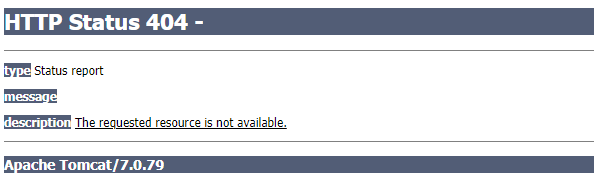
ii. 如果没配置,则控制台报映射查找不到,客户端展示404错误

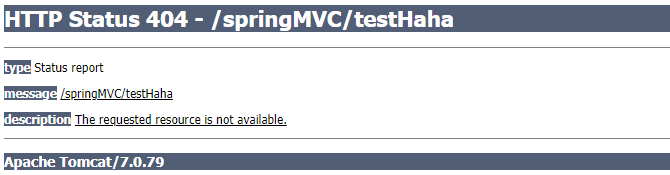
iii. 如果有配置,则访问目标资源(一般为静态资源,如:JS,CSS,HTML),找不到客户端也会展示404错误

b) 存在则执行下面的流程
-
根据该URI,调用HandlerMapping获得该Handler配置的所有相关的对象(包括Handler对象以及Handler对象对应的拦截器),最后以HandlerExecutionChain执行链对象的形式返回。
-
DispatcherServlet 根据获得的Handler,选择一个合适的HandlerAdapter。
-
如果成功获得HandlerAdapter,此时将开始执行拦截器的preHandler(…)方法【正向】
-
提取Request中的模型数据,填充Handler入参,开始执行Handler(Controller)方法,处理请求。在填充Handler的入参过程中,根据你的配置,Spring将帮你做一些额外的工作:
a) HttpMessageConveter: 将请求消息(如Json、xml等数据)转换成一个对象,将对象转换为指定的响应信息
b) 数据转换:对请求消息进行数据转换。如String转换成Integer、Double等
c) 数据格式化:对请求消息进行数据格式化。 如将字符串转换成格式化数字或格式化日期等
d) 数据验证: 验证数据的有效性(长度、格式等),验证结果存储到BindingResult或Error中
-
Handler执行完成后,向DispatcherServlet 返回一个ModelAndView对象。
-
此时将开始执行拦截器的postHandle(…)方法【逆向】。
-
根据返回的ModelAndView(此时会判断是否存在异常:如果存在异常,则执行HandlerExceptionResolver进行异常处理)选择一个适合的ViewResolver进行视图解析,根据Model和View,来渲染视图。
-
渲染视图完毕执行拦截器的afterCompletion(…)方法【逆向】。
-
将渲染结果返回给客户端。
相关文章:
【springmvc】执行流程
SpringMVC执行流程 原理图 1、SpringMVC常用组件 DispatcherServlet:前端控制器,不需要工程师开发,由框架提供 作用:统一处理请求和响应,整个流程控制的中心,由它调用其它组件处理用户的请求 HandlerMa…...

什么是AIGC?
目录前言一、什么是AIGC?1、什么是PGC?2、什么是UGC?3、什么是PUCG?4、什么是AIGC?二、总结前言 很明显,ChatGPT的爆火,带动了AIGC(AI-Generated Content)概念的火热。 …...

【深度强化学习】(2) Double DQN 模型解析,附Pytorch完整代码
大家好,今天和大家分享一个深度强化学习算法 DQN 的改进版 Double DQN,并基于 OpenAI 的 gym 环境库完成一个小游戏,完整代码可以从我的 GitHub 中获得: https://github.com/LiSir-HIT/Reinforcement-Learning/tree/main/Model 1…...

【正则表达式】正则表达式语法规则
正则表达式语法规则1.普通字符 字符描述[ABC]匹配 […] 中的所有字符[^ABC]匹配除了 […] 中字符的所有字符[A-Z][A-Z] 表示一个区间,匹配所有大写字母,[a-z] 表示所有小写字母.匹配除换行符以外的任意字符[\s\S]匹配所有。\s 是匹配所有空白符…...
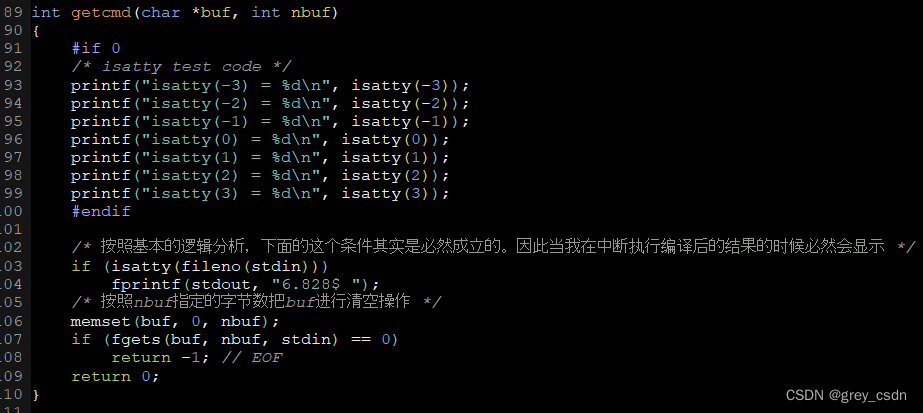
1636_isatty函数的功能
全部学习汇总: GreyZhang/g_unix: some basic learning about unix operating system. (github.com) 前面刚刚看完了一个函数和三个文件指针,一行代码懂了半行。但是继续分析我之前看到的代码还是遇到了困难,因为之前自己对于UNIX的一些基础知…...
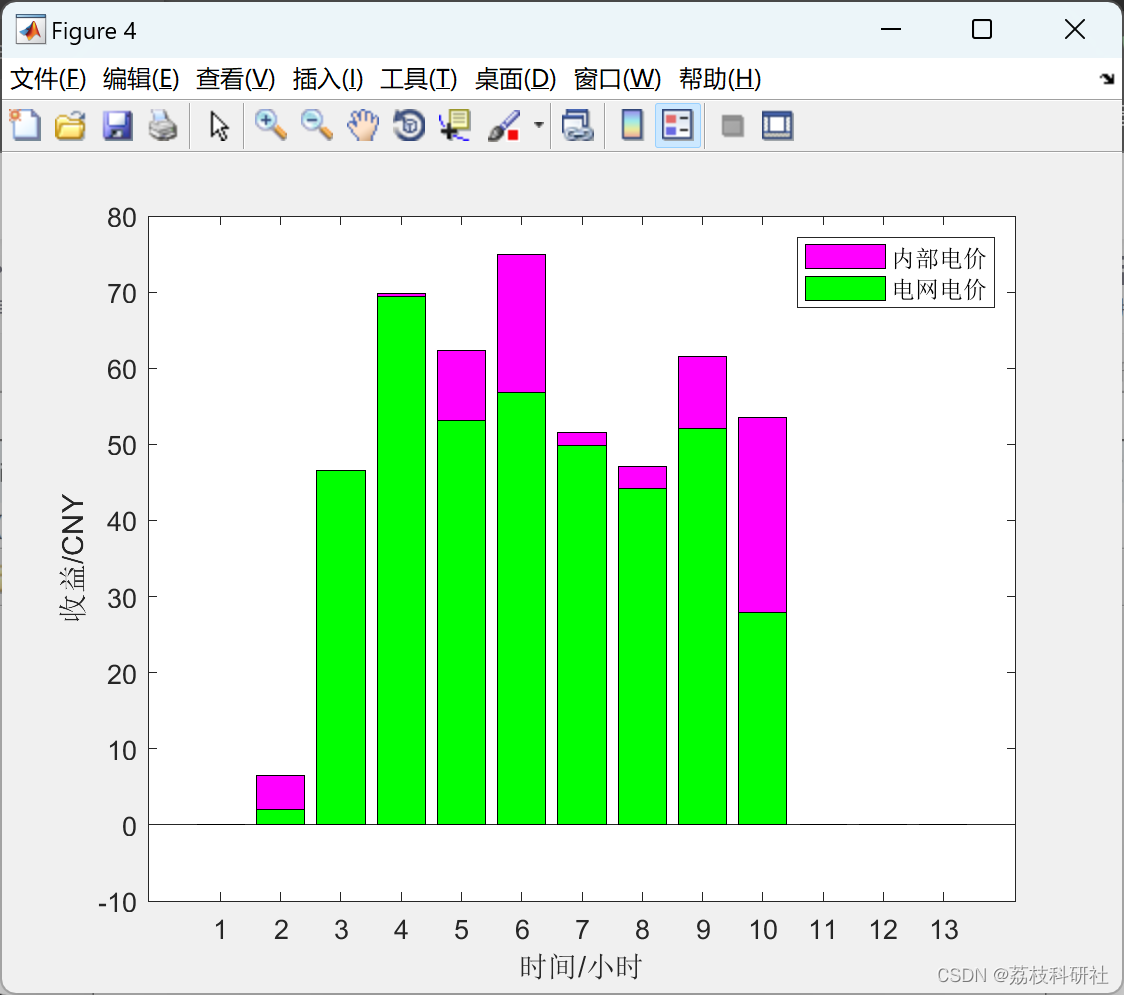
基于Stackelberg博弈的光伏用户群优化定价模型(Matlab代码实现)
💥💥💞💞欢迎来到本博客❤️❤️💥💥 🏆博主优势:🌞🌞🌞博客内容尽量做到思维缜密,逻辑清晰,为了方便读者。 ⛳️座右铭&a…...

EXCEL职业版本(3)
Excel职业版本(3) 公式与函数 运算符 算数运算符 关系运算符 地址的引用 相对引用:你变它就变,如影随形 A2:A5 绝对引用:以不变应万变 $A$2 混合引用:识时务者为俊杰,根据时…...

查找Pycharm跑代码下载模型存放位置以及有关模型下载小技巧(model_name_or_path参数)
目录一、前言二、发现问题三、删除这些模型方法一:直接删除注意方法二:代码删除一、前言 当服务器连不上,只能在本地跑代码时需要使用***预训练语言模型进行处理 免不了需要把模型下载到本地 时间一长就会发现C盘容量不够 二、发现问题 正…...

JS学习笔记day04
今日内容 零、 复习昨日 一、事件 二、DOM操作 三、案例 零、 复习昨日 js 脚本语言,弱类型 引入方案: 3种 js的内容: 语法dombom 语法 变量 var 数据类型 引用类型 - 对象,JSON {key:value,key:value} 数组 var arr new Array();var arr [1,2];下标取值赋值pop() s…...

异步控制流程 遍历篇
文章目录基础方法onlyOnce 只执行一次,第二次报错once 只执行一次,第二次无效iteratorSymbol 判断是否具有迭代器并返回迭代器arrayEach 普通数组遍历baseEach 对象类型遍历symbolEach 具有迭代器类型遍历异步遍历each异步控制流程的目的: 对…...
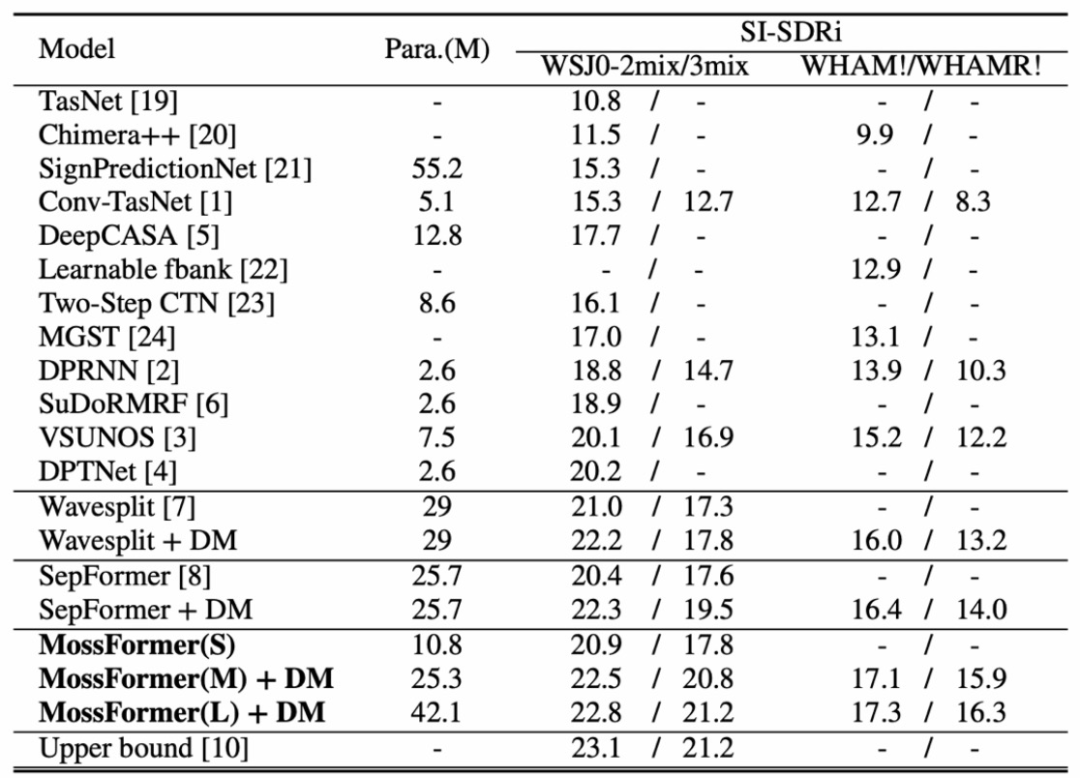
ICASSP 2023论文模型开源|语音分离Mossformer
人类能在复杂的多人说话环境中轻易地分离干扰声音,选择性聆听感兴趣的主讲人说话。但这对机器却不容易,如何构建一个能够媲美人类听觉系统的自动化系统颇具挑战性。 本文将详细解读ICASSP2023本届会议收录的单通道语音分离模型Mossformer论文࿰…...

vs2019 更改工程项目名称
本地 解决方案所在的位置为:D:\Projcet 解决方案名称:hello.sln 位置:D:\Projcet\hello.sln 工程项目名称:test 位置:D:\Projcet\test (文件夹中包含头文件,源文件) 工程包含的文件: fun.h …...
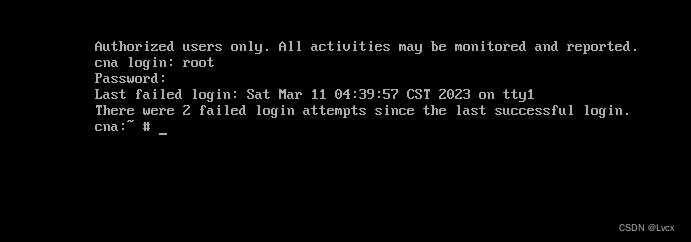
FusionCompute安装和配置步骤
1. 先去华为官网下载FusionCompute的镜像 下载地址:https://support.huawei.com/enterprise/zh/distributed-storage/fusioncompute-pid-8576912/software/251713663?idAbsPathfixnode01%7C22658044%7C7919788%7C9856606%7C21462752%7C8576912 下载后放在D盘中&am…...

makefile 参数和基本使用
make 常用选项make[-f file] [options] [target]make 默认在当前目录中查找GUNmakefile、makefile 及 Makefile 文件作为make的输入文件-f 指定文件作为输入文件-v 显示版本号-n 只输出命令不执行, 一般作为测试-s 执行命令不显示命令,-w 显示执行前和执…...

golang 占位符还傻傻分不清?
xdm ,写 C/C 语言的时候有格式控制符,例如 %s , %d , %c , %p 等等 在写 golang 的时候,也是有对应的格式控制符,也叫做占位符,写这个占位符,需要有对应的数据与之对应,不能瞎搞 基本常见常用…...

manacher算法详解
例题 求一个字符串的最长回文子串的长度 O(N2)O(N^2)O(N2)的解法很容易想,就是从每个字符位置向左右同时拓展,然后检查当前是不是回文,更新长度,可以简单写一下代码 int solve(string &ss){int ans 0;int n ss.length();s…...

要做一个关于DDD的内部技术分享,记录下用到的资源,学习笔记(未完)
最后更新于2023年3月10日 14:28:08 问题建模》软件分层》具体结构,是层层递进的关系。有了问题建模,才能进行具体的软件分层的讨论,再有了分层,才能讨论在domain里面应该怎么实现具体结构。 1、问题建模:Domain、Mod…...

KDZD互感器二次负载测试仪
一、概述 电能计量综合误差过大是电能计量中普遍存在的一个关键问题。电压互感器二次回路压降引起的计量误差往往是影响电能计量综合误差的因素。所谓电压互感器二次压降引起的误差,就是指电压互感器二次端子和负载端子之间电压的幅值差相对于二次实际电压的百分数…...

在空投之后,Blur能否颠覆OpenSea的主导地位?
Mar. 2023, Daniel数据源: NFT Aggregators Overview & Aggregator Statistics Overview & Blur Airdrop一年前,通过聚合器进行的NFT交易量开始像滚雪球一样增长,有时甚至超过了直接通过市场平台的交易量。虽然聚合器的使用量从10月到…...
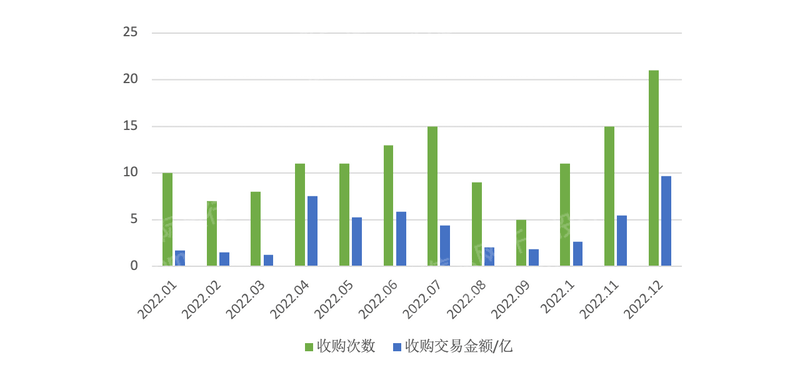
2023年新三板产品及服务研究报告
第一章 概述 全国中小企业股份转让系统(英语:National Equities Exchange and Quotations,缩写NEEQ),简称股转系统,是第三家全国性证券交易场所,因挂牌企业均为高科技企业而不同于原转让系统内…...

ComfyUI-Manager终极指南:3个核心功能彻底解决AI工作流管理难题
ComfyUI-Manager终极指南:3个核心功能彻底解决AI工作流管理难题 【免费下载链接】ComfyUI-Manager ComfyUI-Manager is an extension designed to enhance the usability of ComfyUI. It offers management functions to install, remove, disable, and enable vari…...
)
保姆级教程:在CentOS 7上用达梦8搭建DCA练习环境(附ulimit、VNC、ODBC全配置)
达梦8 DCA认证实战:CentOS 7环境搭建与调优全指南 在国产数据库技术快速发展的今天,达梦数据库作为核心产品之一,其DCA认证已成为众多从业者提升竞争力的重要选择。与理论为主的认证不同,DCA更注重实际操作能力,而一个…...

软阴影:那个让虚拟世界“温柔起来“的光影小秘密
一、从一只小猫的影子说起 前几天我在朋友家做客,他家养了一只胖乎乎的橘猫,正趴在阳台的窗边晒太阳。我无意间瞥了一眼那只猫脚边的影子,突然被一个细节震撼了—— 那只猫的影子——并不是一片均匀的黑。 仔细看——猫肚子紧贴地板的地方——…...

CANN-昇腾NPU-RAG推理-检索增强生成怎么部署
RAG(Retrieval-Augmented Generation)是 LLM 知识库的组合:先检索相关文档,再让 LLM 基于文档回答。昇腾NPU 上部署 RAG 需要两个组件:Embedding 模型(做向量检索)和 LLM(做生成&am…...

Unity主题系统设计:状态驱动的主题抽象与自动注入方案
1. 这不是换个颜色那么简单:为什么Unity项目里“换肤”总在发布前夜崩盘?你有没有经历过这样的场景:美术同学凌晨两点发来一套新主题资源包,UI设计师说“这次配色更符合品牌调性”,产品说“上线前必须支持深色模式”&a…...
)
别再用SonarQube凑数了!DeepSeek原生圈复杂度引擎的6大颠覆性能力(含GitHub私有部署密钥)
更多请点击: https://kaifayun.com 第一章:DeepSeek圈复杂度分析的底层原理与范式革命 DeepSeek圈复杂度分析并非传统McCabe度量的简单复刻,而是基于控制流图(CFG)动态重构与语义感知路径裁剪的双重机制构建的新范式。…...

MAX78000移植Zephyr RTOS实战:从BSP创建到AI边缘设备开发
1. 项目概述与动机作为一名长期在嵌入式边缘AI和机器人领域摸爬滚打的开发者,我最近把目光投向了一块相当有潜力的板子:Maxim Integrated(现为ADI一部分)的MAX78000FTHR开发套件。这块板子的核心——MAX78000微控制器,…...

FM3773 低功耗离线式恒流/恒压 PSR 控制器
概述 FM3773 是一种高性能的交流/直流用于电池充电器和适配器的电源控制器,内置 850V 功率三极管。该设备采用脉冲频率调制(PFM)的方法来建立非连续导通模式(DCM)反激式电源。 FM3773 提供精确的恒定电压,恒…...

从游戏引擎到仿真平台:手把手教你用AirSim+UE4搭建你的第一个无人机/自动驾驶仿真环境
从游戏引擎到仿真平台:构建AirSimUE4无人机与自动驾驶仿真环境实战指南当游戏引擎遇上机器人算法测试,会碰撞出怎样的火花?微软开源的AirSim项目将虚幻引擎(Unreal Engine)从游戏开发领域引入到自动驾驶和无人机研究的…...

如何快速集成 react-native-bottom-sheet-behavior:5 分钟搞定 Android 底部弹窗
如何快速集成 react-native-bottom-sheet-behavior:5 分钟搞定 Android 底部弹窗 【免费下载链接】react-native-bottom-sheet-behavior react-native wrapper for android BottomSheetBehavior 项目地址: https://gitcode.com/gh_mirrors/re/react-native-bottom…...