
HTML 标签简写和全称及其对应的中文说明和实例

<!DOCTYPE html>
<html lang="zh-CN"><head><meta charset="UTF-8"><meta name="viewport" content="width=device-width, initial-scale=1.0"><title>HTML 标签简写及全称</title><style>* {margin: 0;padding: 0;text-shadow: 1px 1px 1px rgba(0, 0, 0, 0.951);}body {background: #2c3e50;}h1 {color: #f85f5faf;background-color: #1b657b4b;text-align: center;}p {color: #f85f5faf;}table.reference {width: 100%;border-collapse: collapse;}details {display: inline-block;color: chocolate;}table.reference th {background-color: #555;color: #ebf704;border: 1px solid #d4d4d4;font-size: 14px;padding: 3px;vertical-align: top;text-align: left;}table.reference tr:nth-child(odd) {background-color: #144756;}table.reference td {line-height: 2em;min-width: 24px;border: 1px solid #d4d4d4;color: hsla(160, 100%, 37%, 0.63);padding: 5px;vertical-align: top;}table.reference td:hover {color: #ebf704;box-shadow: inset -2px -2px 3px rgba(255, 255, 255, 0.6), inset 2px 2px 3px rgba(0, 0, 0, 0.6);}table.reference td:nth-child(1),table.reference td:nth-child(4),table.reference td:nth-child(7) {width: 1%;color: rgb(255, 250, 250);background-color: #144756;}</style>
</head><body><div class="article-body"><div class="article-intro" id="content"><h1>HTML 标签简写及全称:表格内容将通过JavaScript动态生成</h1><p>下表列出了 HTML 标签简写和全称及其对应的中文说明和实例:</p><table class="reference" id="html-tags-table"><thead><tr><th>序号</th><th>标签<details><summary></summary>实例</details>中文说明</th><th>英文全称</th><th>序号</th><th>标签<details><summary></summary>实例</details>中文说明</th><th>英文全称</th><th>序号</th><th>标签<details><summary></summary>实例</details>中文说明</th><th>英文全称</th></tr></thead><tbody id="html-tags-tbody"><!-- 表格内容将通过JavaScript动态生成 --></tbody></table></div></div><script>const tagsData = [{ tag: 'a', fullName: 'Anchor', description: '锚点', example: '<a href="https://www.baidu.com">百度</a>' },{ tag: 'abbr', fullName: 'Abbreviation', description: '缩写词', example: '<abbr title="abbreviation">abbr</abbr>' },{ tag: 'acronym', fullName: 'Acronym', description: '取首字母的缩写词,HTML5 不支持 <acronym> 标签。请使用 <abbr> 标签代替它。', example: 'Can I get this < acronym title="as soon as possible">ASAP < /acronym>?' },{ tag: 'address', fullName: 'Address', description: '地址', example: '<address>地址</address>' },{ tag: 'alt', fullName: 'alter', description: '替用(一般是图片显示不出的提示)', example: '<img src="image.jpg" alt="图片加载失败">' },{ tag: 'b', fullName: 'Bold', description: '粗体(文本)', example: '<b>粗体</b>' },{ tag: 'bdo', fullName: 'Bi-Directional Override', description: '文本显示方向', example: '<bdo dir="rtl">文本显示方向</bdo>' },{ tag: 'big', fullName: 'Big', description: '变大(文本)', example: '<big>变大</big>' },{ tag: 'blockquote', fullName: 'Block Quotation', description: '区块引用语', example: '<blockquote>区块引用语</blockquote>' },{ tag: 'br', fullName: 'Break', description: '换行', example: '<p>段落<br>换行</p>' },{ tag: 'cell', fullName: 'cell', description: '巢', example: '<table><tr><td>单元格1</td><td>单元格2</td></tr></table>' },{ tag: 'cellpadding', fullName: 'cellpadding', description: '巢补白', example: '<table><tr><td>单元格1</td><td>单元格2</td></tr></table>' },{ tag: 'cellspacing', fullName: 'cellspacing', description: '巢空间', example: '<table><tr><td>单元格1</td><td>单元格2</td></tr></table>' },{ tag: 'center', fullName: 'Centered', description: '居中(文本)', example: '<center>居中</center>' },{ tag: 'cite', fullName: 'Citation', description: '引用', example: '<cite>引用</cite>' },{ tag: 'code', fullName: 'Code', description: '源代码(文本)' , example: '<code>源代码</code>' },{ tag: 'dd', fullName: 'Definition Description', description: '定义描述' , example: '<dl><dt>定义术语</dt><dd>定义描述</dd></dl>' },{ tag: 'del', fullName: 'Deleted', description: '删除(的文本)' , example: '<del>删除的文本</del>' },{ tag: 'dfn', fullName: 'Defines a Definition Term', description: '定义定义条目', example: '<dfn>定义定义条目</dfn>' },{ tag: 'div', fullName: 'Division', description: '分隔' , example: '<div>分隔</div>' },{ tag: 'dl', fullName: 'Definition List', description: '定义列表', example: '<dl><dt>定义术语</dt><dd>定义描述</dd></dl>' },{ tag: 'dt', fullName: 'Definition Term', description: '定义术语', example: '<dl><dt>定义术语</dt><dd>定义描述</dd></dl>' },{ tag: 'em', fullName: 'Emphasized', description: '加重(文本)' , example: '<em>加重的文本</em>' },{ tag: 'font', fullName: 'Font', description: '字体', example: '<font size="5">字体</font>' },{ tag: 'h1~h6', fullName: 'Header 1 to Header 6', description: '标题1到标题6' , example: '<h1>标题1</h1><h2>标题2</h2><h3>标题3</h3><h4>标题4</h4><h5>标题5</h5><h6>标题6</h6>' },{ tag: 'hr', fullName: 'Horizontal Rule', description: '水平尺', example: '<hr>' },{ tag: 'href', fullName: 'hypertext reference', description: '超文本引用', example: '<a href="https://www.baidu.com">百度</a>' },{ tag: 'i', fullName: 'Italic', description: '斜体(文本)' , example: '<i>斜体</i>' },{ tag: 'iframe', fullName: 'Inline frame', description: '定义内联框架' , example: '<iframe src="https://www.baidu.com" width="500" height="500"></iframe>' },{ tag: 'ins', fullName: 'Inserted', description: '插入(的文本)', example: '<ins>插入的文本</ins>' },{ tag: 'kbd', fullName: 'Keyboard', description: '键盘(文本)', example: '<kbd>键盘</kbd>' },{ tag: 'li', fullName: 'List Item', description: '列表项目' , example: '<ul><li>列表项目1</li><li>列表项目2</li></ul>' },{ tag: 'nl', fullName: 'navigation lists', description: '导航列表' , example: '<nav><ul><li>导航项目1</li><li>导航项目2</li></ul></nav>' },{ tag: 'ol', fullName: 'Ordered List', description: '排序列表' , example: '<ol><li>列表项目1</li><li>列表项目2</li></ol>' },{ tag: 'optgroup', fullName: 'Option group', description: '定义选项组' , example: '<select><optgroup label="组1"><option value="1">选项1</option><option value="2">选项2</option></optgroup><optgroup label="组2"><option value="3">选项3</option><option value="4">选项4</option></optgroup></select>' },{ tag: 'p', fullName: 'Paragraph', description: '段落' , example: '<p>段落</p>' },{ tag: 'pre', fullName: 'Preformatted', description: '预定义格式(文本 )', example: '<pre>预定义格式</pre>' },{ tag: 'q', fullName: 'Quotation', description: '引用语' , example: '<q>引用语</q>' },{ tag: 'rel', fullName: 'Reload', description: '加载' , example: '<a href="https://www.baidu.com" rel="nofollow">百度</a>' },{ tag: 's/ strike', fullName: 'Strikethrough', description: '删除线' , example: '<s>删除线</s>' },{ tag: 'samp', fullName: 'Sample', description: '示例(文本)' , example: '<samp>示例</samp>' },{ tag: 'small', fullName: 'Small', description: '变小(文本)' , example: '<small>变小的文本</small>' },{ tag: 'span', fullName: 'Span', description: '范围' , example: '<span>范围</span>' },{ tag: 'src', fullName: 'Source', description: '源文件链接', example: '<img src="image.jpg" alt="图片加载失败">' },{ tag: 'strong', fullName: 'Strong', description: '加重(文本)' , example: '<strong>加重的文本</strong>' },{ tag: 'sub', fullName: 'Subscripted', description: '下标(文本)', example: '<sub>下标</sub>' },{ tag: 'sup', fullName: 'Superscripted', description: '上标(文本)' , example: '<sup>上标</sup>' },{ tag: 'td', fullName: 'table data cell', description: '表格中的一个单元格' , example: '<table><tr><td>单元格1</td><td>单元格2</td></tr></table>' },{ tag: 'th', fullName: 'table header cell', description: '表格中的表头', example: '<table><tr><th>表头1</th><th>表头2</th></tr></table>' },{ tag: 'tr', fullName: 'table row', description: '表格中的一行' , example: '<table><tr><td>单元格1</td><td>单元格2</td></tr></table>' },{ tag: 'tt', fullName: 'Teletype', description: '打印机(文本)', example: '<tt>打印机</tt>' },{ tag: 'u', fullName: 'Underlined', description: '下划线(文本)', example: '<u>下划线</u>' },{ tag: 'ul', fullName: 'Unordered List', description: '不排序列表' , example: '<ul><li>列表项目1</li><li>列表项目2</li></ul>' },{ tag: 'var', fullName: 'Variable', description: '变量(文本)' , example: '<var>变量</var>' }];let html = '';for (let i = 0; i < 20; i++) {const item = tagsData[i];const nextItem = tagsData[i + 20];const nextItem2 = tagsData[i + 40];html += ` <tr><td class="item">${i + 1}</td><td class="tag">${item.tag}<details><summary></summary>${item.example}</details>${item.description}</td><td class="fullName">${item.fullName}</td><td class="item">${nextItem ? i + 21 : ''}</td><td class="tag">${nextItem ? nextItem.tag : ''}<details><summary></summary>${nextItem ? nextItem.example : ''}</details>${nextItem ? nextItem.description : ''}</td><td class="fullName">${nextItem ? nextItem.fullName : ''}</td><td class="item">${nextItem2 ? i + 41 : ''}</td><td class="tag">${nextItem2 ? nextItem2.tag : ''}<details><summary></summary>${nextItem2 ? nextItem2.example : ''}</details>${nextItem2 ? nextItem2.description : ''}</td><td class="fullName">${nextItem2 ? nextItem2.fullName : ''}</td></tr> `;}const tableBody = document.querySelector('#html-tags-tbody');tableBody.innerHTML = `<table>${html}</table>`;</script>
</body></html>

相关文章:
HTML 标签简写和全称及其对应的中文说明和实例
<!DOCTYPE html> <html lang"zh-CN"><head><meta charset"UTF-8"><meta name"viewport" content"widthdevice-width, initial-scale1.0"><title>HTML 标签简写及全称</title><style>…...
docker-compose实战 (9)部署多项目环境(LAMP+react+vue+redis+mysql+nginx))
(2024)docker-compose实战 (9)部署多项目环境(LAMP+react+vue+redis+mysql+nginx)
前言 本系列最初的想法就是搭建一个多项目的环境, 包含nginx, nodejs, php, html, redis, MongoDB, mysql.本文使用的PHP镜像为php:7.3.6-apache, 这里可以使用上一篇文章中生成好的镜像.LAMP或包含react或vue的前端项目, 本文就各写了一个, 可以按照实际需求, 自行添加多个容…...

全网最适合入门的面向对象编程教程:13 类和对象的 Python 实现-可视化阅读代码神器 Sourcetrail 的安装使用
全网最适合入门的面向对象编程教程:13 类和对象的 Python 实现-可视化阅读代码神器 Sourcetrail 的安装使用 摘要: 本文主要介绍了可视化阅读代码神器Sourcetrail的安装与使用,包括软件简介和特性、下载地址、安装方式、新建工程和如何查看…...

Django 视图 - FBV 与 CBV
Django 视图 - FBV 与 CBV 在 Django 框架中,视图是处理 Web 请求和返回 Web 响应的核心组件。Django 提供了两种主要的视图编写方式:函数基础视图(Function-Based Views,简称 FBV)和类基础视图(Class-Bas…...

AI机器人在未来的应用场景预测:是否会取代人类?华为、百度、特斯拉他们在AI领域都在做什么?
引言 随着人工智能(AI)技术的飞速发展,AI机器人在各个领域的应用变得越来越普遍。从工业自动化到日常生活,AI机器人已经开始展现出强大的潜力和实际应用价值。本文将深入探讨AI机器人在未来的应用场景,并分析它们是否…...

第58期 | GPTSecurity周报
GPTSecurity是一个涵盖了前沿学术研究和实践经验分享的社区,集成了生成预训练Transformer(GPT)、人工智能生成内容(AIGC)以及大语言模型(LLM)等安全领域应用的知识。在这里,您可以找…...

maven 依赖冲突
依赖冲突 1、对于 Maven 而言,同一个 groupId 同一个 artifactId 下,只能使用一个 version。 <!-- https://mvnrepository.com/artifact/org.apache.commons/commons-math3 --><dependency><groupId>org.apache.commons</groupId&…...

demon drone 200无人机标定流程
demon drone 200无人机标定流程 一、飞控固件更新1.1 固件更新1.2 参数更新 二、imu标定2.1 安装imu标定工具(在你自己的电脑上)2.2 录制rosbag(在对应飞机上)2.3 运行标定程序(在你自己的电脑上) 三、双目及imu联合标定3.1 安装标…...

案例开发-日程管理-第一期
九 案例开发-日程管理-第一期 共7期 9.1 登录页及校验 <!DOCTYPE html> <html lang"en"> <head><meta charset"UTF-8"><title>Title</title><style>.ht{text-align: center;color: cadetblue;font-family: 幼…...

【Java 注解,自定义注解,元注解,注解本质,注解解析】
文章目录 什么是注解?Java内置注解自定义注解元注解注解的本质注解解析 什么是注解? 注解是Java编程语言中的一种元数据,提供了有关程序的额外信息。注解以符号开始,紧跟着注解的名称和一对括号,括号内包含注解的参数…...

染色法判定二分图
什么是二分图? 二分图,也称作二部图,是图论中的一种特殊模型。在一个无向图G(V,E) 中,如果顶点集合 V 可以被分割成两个互不相交的子集 A 和 B,并且图中的每条边 (i,j) 关联的两个顶点 i 和 j 分别属于这两个不同的顶…...

自动气象站的主要功能优势
在科技日新月异的今天,我们生活的方方面面都受到了科技的影响。其中,自动气象站作为气象观测领域的重要一环,不仅提升了气象数据的准确性和时效性,还为我们的日常生活、农业生产、灾害预防等提供了重要的数据支持。 自动气象站概述…...

Java中实现二维数组(矩阵)的转置
在矩阵运算中,矩阵的转置是一个基本操作,即将矩阵的行变成列,列变成行。在Java中,我们可以通过编写一个方法来实现二维数组的转置。下面,我将详细介绍如何在Java中完成这一任务,并提供完整的代码示例。 编…...
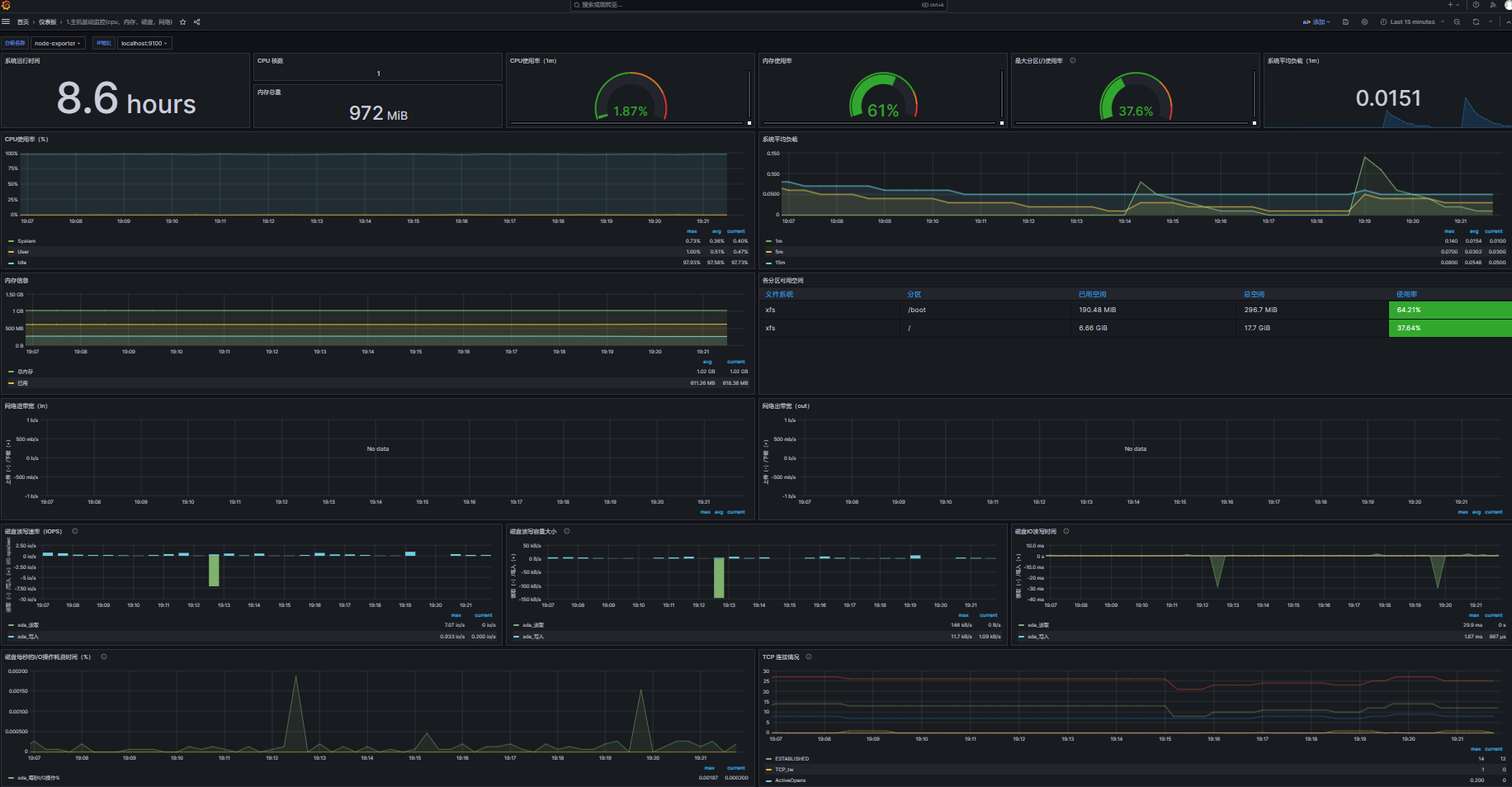
Prometheus+Grafana主机运行数据
目录 介绍 安装Node Exporter 配置Prometheus 验证配置 导入仪表盘 介绍 Prometheus是一款开源的监控和警报工具,而Node Exporter是Prometheus的一个官方插件,用于采集主机上的各种系统和硬件指标。 安装Node Exporter 下载最新版本的Node Export…...

GraphQL在Postman中:释放API查询的强大潜能
🚀 GraphQL在Postman中:释放API查询的强大潜能 Postman作为API开发和测试的领先工具,对GraphQL的支持为开发者提供了一种新的方式来查询和管理数据。GraphQL是一种查询语言,用于API,允许客户端明确指定他们需要哪些数…...

大语言模型里的微调vs RAG vs 模板提示词
文章目录 介绍微调(Fine-tuning)定义优点:缺点:应用场景:技术细节 检索增强生成(RAG,Retrieval-Augmented Generation)定义优点:缺点:应用场景:技…...

网络编程:常用网络测试工具
telnet netstat ping arp wireshark(网络抓包工具) tcpdumpssh2 secure crt ——软件工具sudo ufw disable sudo apt-get install openssh-server openssh-client //两个命令敲完 得重启sudo apt-get install wireshark 1、telnet 远程登录工具&…...
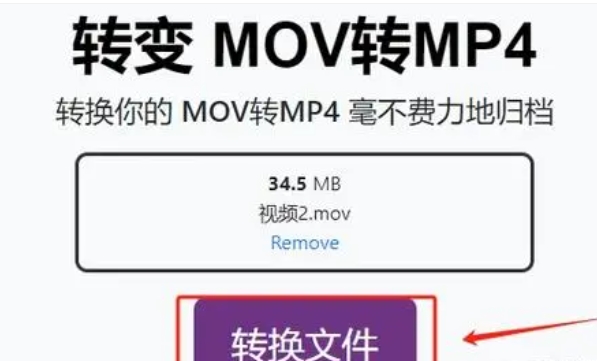
mov视频怎么改成mp4?把mov改成MP4的四个方法
mov视频怎么改成mp4?选择合适的视频格式对于确保内容质量和流通性至关重要。尽管苹果公司的mov格式因其出色的视频表现备受赞誉,但在某些情况下,它并非最佳选择,因为使用mov格式可能面临一些挑战。MP4格式在各种设备(如…...

力扣1472.设计浏览器历史记录
力扣1472.设计浏览器历史记录 用双指针记录历史记录 以及栈顶高度移动时会直接把之前的记录消掉 class BrowserHistory {int pos-1;int top0;string history[5010];public:BrowserHistory(string homepage) {visit(homepage);}void visit(string url) {pos ;top pos;histor…...

准大一新生开学千万要带证件照用途大揭秘
1、提前关注好都有哪些考场,以及这些考场大致在网页的哪个位置。比如我选对外经贸大学,我就直接找到第二个点进去。 2、电脑上同时开了谷歌浏览器和IE浏览器,以及手机也登陆了。亲测下来,同一时间刷新,谷歌浏览器能显示…...

日语AI面试高效通关秘籍:专业解读与青柚面试智能助攻
在如今就业市场竞争日益激烈的背景下,越来越多的求职者将目光投向了日本及中日双语岗位。但是,一场日语面试往往让许多人感到步履维艰。你是否也曾因为面试官抛出的“刁钻问题”而心生畏惧?面对生疏的日语交流环境,即便提前恶补了…...
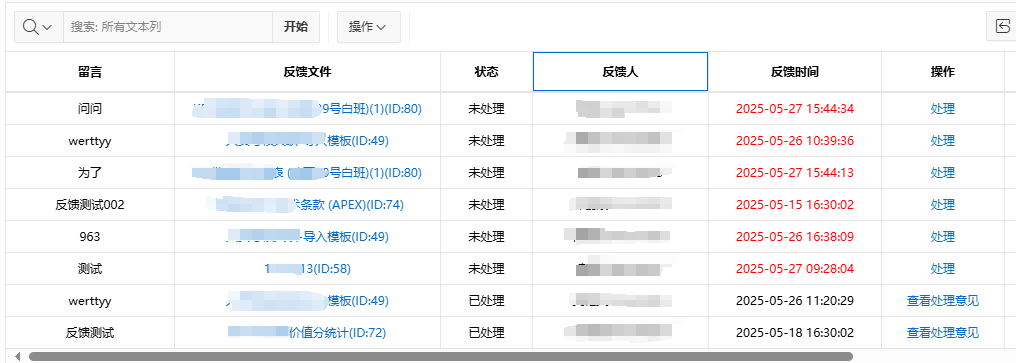
【Oracle APEX开发小技巧12】
有如下需求: 有一个问题反馈页面,要实现在apex页面展示能直观看到反馈时间超过7天未处理的数据,方便管理员及时处理反馈。 我的方法:直接将逻辑写在SQL中,这样可以直接在页面展示 完整代码: SELECTSF.FE…...

.Net框架,除了EF还有很多很多......
文章目录 1. 引言2. Dapper2.1 概述与设计原理2.2 核心功能与代码示例基本查询多映射查询存储过程调用 2.3 性能优化原理2.4 适用场景 3. NHibernate3.1 概述与架构设计3.2 映射配置示例Fluent映射XML映射 3.3 查询示例HQL查询Criteria APILINQ提供程序 3.4 高级特性3.5 适用场…...
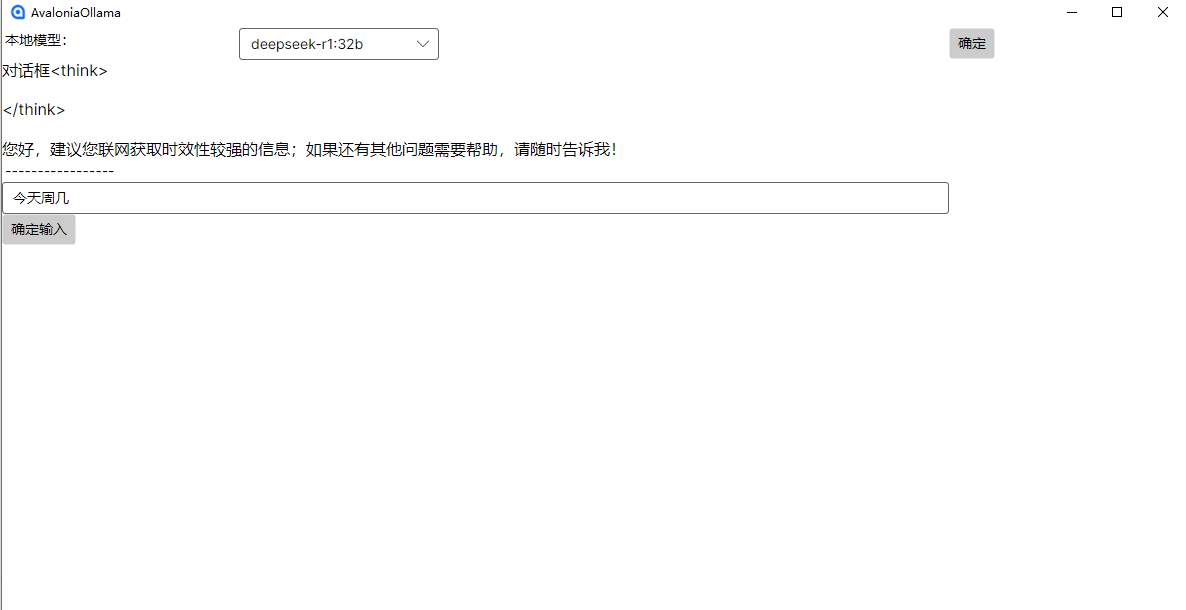
c#开发AI模型对话
AI模型 前面已经介绍了一般AI模型本地部署,直接调用现成的模型数据。这里主要讲述讲接口集成到我们自己的程序中使用方式。 微软提供了ML.NET来开发和使用AI模型,但是目前国内可能使用不多,至少实践例子很少看见。开发训练模型就不介绍了&am…...

浅谈不同二分算法的查找情况
二分算法原理比较简单,但是实际的算法模板却有很多,这一切都源于二分查找问题中的复杂情况和二分算法的边界处理,以下是博主对一些二分算法查找的情况分析。 需要说明的是,以下二分算法都是基于有序序列为升序有序的情况…...
算法打卡第18天
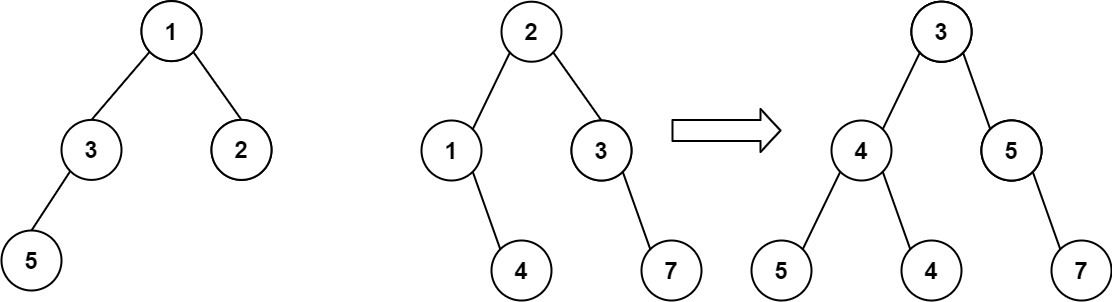
从中序与后序遍历序列构造二叉树 (力扣106题) 给定两个整数数组 inorder 和 postorder ,其中 inorder 是二叉树的中序遍历, postorder 是同一棵树的后序遍历,请你构造并返回这颗 二叉树 。 示例 1: 输入:inorder [9,3,15,20,7…...
之(六) ——通用对象池总结(核心))
怎么开发一个网络协议模块(C语言框架)之(六) ——通用对象池总结(核心)
+---------------------------+ | operEntryTbl[] | ← 操作对象池 (对象数组) +---------------------------+ | 0 | 1 | 2 | ... | N-1 | +---------------------------+↓ 初始化时全部加入 +------------------------+ +-------------------------+ | …...

WEB3全栈开发——面试专业技能点P4数据库
一、mysql2 原生驱动及其连接机制 概念介绍 mysql2 是 Node.js 环境中广泛使用的 MySQL 客户端库,基于 mysql 库改进而来,具有更好的性能、Promise 支持、流式查询、二进制数据处理能力等。 主要特点: 支持 Promise / async-await…...
GraphRAG优化新思路-开源的ROGRAG框架
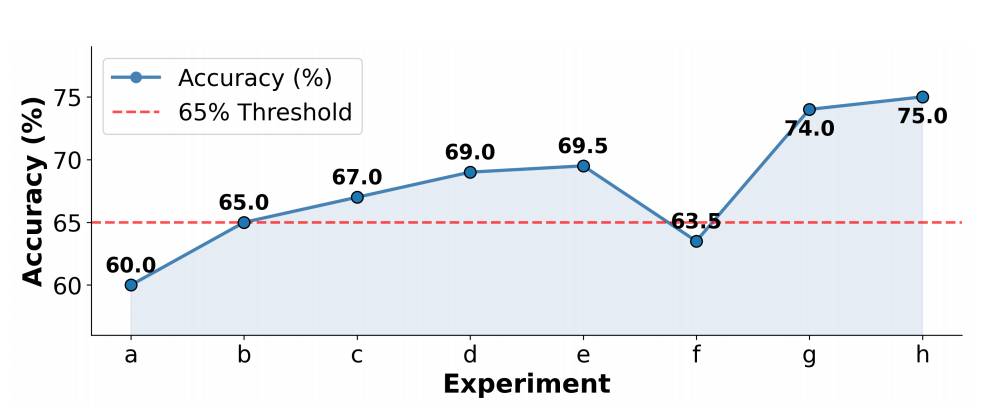
目前的如微软开源的GraphRAG的工作流程都较为复杂,难以孤立地评估各个组件的贡献,传统的检索方法在处理复杂推理任务时可能不够有效,特别是在需要理解实体间关系或多跳知识的情况下。先说结论,看完后感觉这个框架性能上不会比Grap…...

32位寻址与64位寻址
32位寻址与64位寻址 32位寻址是什么? 32位寻址是指计算机的CPU、内存或总线系统使用32位二进制数来标识和访问内存中的存储单元(地址),其核心含义与能力如下: 1. 核心定义 地址位宽:CPU或内存控制器用32位…...