
kafka 动态扩容现有 topic 的分区数和副本数
文章目录
- @[toc]
- 创建一个演示 topic
- 生产一些数据
- 使用消费者组消费数据
- 增加分区
- 无新数据产生,有旧数据未消费
- 有新数据产生,有旧数据未消费
- 增加副本
- 创建 json 文件
- 使用指定的 json 文件增加 topic 的副本数
- 使用指定的 json 文件查看 topic 的副本数增加的进度
- 查看 topic 情况
文章目录
- @[toc]
- 创建一个演示 topic
- 生产一些数据
- 使用消费者组消费数据
- 增加分区
- 无新数据产生,有旧数据未消费
- 有新数据产生,有旧数据未消费
- 增加副本
- 创建 json 文件
- 使用指定的 json 文件增加 topic 的副本数
- 使用指定的 json 文件查看 topic 的副本数增加的进度
- 查看 topic 情况
- 文档内出现的
${KAFKA_BROKERS}表示 kafka 的连接地址,${ZOOKEEPER_CONNECT}表示 zk 的连接地址,需要替换成自己的实际 ip 地址
创建一个演示 topic
kafka-topics.sh --create --zookeeper ${ZOOKEEPER_CONNECT} --replication-factor 1 --partitions 3 --topic test-topic-update
查看 topic 详情
kafka-topics.sh --bootstrap-server ${KAFKA_BROKERS} --describe --topic test-topic-update
总共是六个 kafka 节点,三分区一副本,分散在三个不同的 kafka 节点
Topic:test-topic-update PartitionCount:3 ReplicationFactor:1 Configs:segment.bytes=1073741824Topic: test-topic-update Partition: 0 Leader: 5 Replicas: 5 Isr: 5Topic: test-topic-update Partition: 1 Leader: 1 Replicas: 1 Isr: 1Topic: test-topic-update Partition: 2 Leader: 0 Replicas: 0 Isr: 0
- 关于输出内容的概念
分区(Partition):- 主题(Topic)在 Kafka 中的数据被分成一个或多个分区。每个分区是一个有序且持久化的消息日志。
- 分区允许 Kafka 集群进行水平扩展,使多个消费者能够并行地处理主题的消息。
- 消费者组中的每个消费者负责处理一个或多个分区的消息。
领导者(Leader):- 每个分区都有一个领导者,领导者负责处理该分区的所有读写请求。
- 生产者向领导者发送消息,消费者从领导者读取消息。
- 领导者也负责维护分区的复制和同步。
副本(Replicas):- 为了提高数据的冗余和可用性,每个分区可以有多个副本,包括一个领导者副本和零个或多个追随者副本。
- 领导者副本处理写请求,追随者副本用于数据冗余和读请求。
同步副本集(In-Sync Replicas,ISR):- 同步副本集是指在分区的所有副本中,与领导者副本保持同步的副本。
- 领导者和同步副本集中的副本是可用于读取的,其他追随者副本可能会有一些延迟。
生产一些数据
- 手动生产 300 条数据
kafka-verifiable-producer.sh --broker-list ${KAFKA_BROKERS} --topic test-topic-update --max-messages 300
使用消费者组消费数据
- 消费者组不存在的情况下,没有返回被消费的数据,过两三秒之后,可以中断这个命令,然后使用下面的
--describe来验证
kafka-console-consumer.sh --bootstrap-server ${KAFKA_BROKERS} --topic test-topic-update --group test-topic-update-group
查看消费组内的 topic 消费情况
kafka-consumer-groups.sh --bootstrap-server ${KAFKA_BROKERS} --describe --group test-topic-update-group
目前三百条都被消费了,使用上面的生产数据的命令,再生产300条,模拟 topic 有数据的场景
GROUP                   TOPIC             PARTITION  CURRENT-OFFSET  LOG-END-OFFSET  LAG             CONSUMER-ID     HOST            CLIENT-ID
test-topic-update-group test-topic-update 2          100             100             0               -               -               -
test-topic-update-group test-topic-update 0          100             100             0               -               -               -
test-topic-update-group test-topic-update 1          100             100             0               -               -               -
生产完数据后,再次查看,返回结果如下
GROUP                   TOPIC             PARTITION  CURRENT-OFFSET  LOG-END-OFFSET  LAG             CONSUMER-ID     HOST            CLIENT-ID
test-topic-update-group test-topic-update 2          100             200             100             -               -               -
test-topic-update-group test-topic-update 0          100             200             100             -               -               -
test-topic-update-group test-topic-update 1          100             200             100             -               -               -
增加分区
- 在增加分区的场景下比较方便,直接使用
--alter就能实现,这里将原来的 3 分区改成 12 分区
kafka-topics.sh --bootstrap-server ${KAFKA_BROKERS} --alter --topic test-topic-update --partitions 12
无新数据产生,有旧数据未消费
查看 topic 情况
kafka-topics.sh --bootstrap-server ${KAFKA_BROKERS} --describe --topic test-topic-update
可以看到,分区已经更新成 12 个了,也可以看出,kafka 在动态增加分区的时候,是均分的,都会按照类似下面的 5-1-0-3-2-4 这样的顺序去均分(当然,前提是分区数和节点数是倍数关系)
Topic:test-topic-update PartitionCount:12 ReplicationFactor:1 Configs:segment.bytes=1073741824Topic: test-topic-update Partition: 0 Leader: 5 Replicas: 5 Isr: 5Topic: test-topic-update Partition: 1 Leader: 1 Replicas: 1 Isr: 1Topic: test-topic-update Partition: 2 Leader: 0 Replicas: 0 Isr: 0Topic: test-topic-update Partition: 3 Leader: 3 Replicas: 3 Isr: 3Topic: test-topic-update Partition: 4 Leader: 2 Replicas: 2 Isr: 2Topic: test-topic-update Partition: 5 Leader: 4 Replicas: 4 Isr: 4Topic: test-topic-update Partition: 6 Leader: 5 Replicas: 5 Isr: 5Topic: test-topic-update Partition: 7 Leader: 1 Replicas: 1 Isr: 1Topic: test-topic-update Partition: 8 Leader: 0 Replicas: 0 Isr: 0Topic: test-topic-update Partition: 9 Leader: 3 Replicas: 3 Isr: 3Topic: test-topic-update Partition: 10 Leader: 2 Replicas: 2 Isr: 2Topic: test-topic-update Partition: 11 Leader: 4 Replicas: 4 Isr: 4
查看消费组内的分区情况
kafka-consumer-groups.sh --bootstrap-server ${KAFKA_BROKERS} --describe --group test-topic-update-group
因为没有新数据进入,也没有消费旧数据,此时还是显示的原先的信息
GROUP                   TOPIC             PARTITION  CURRENT-OFFSET  LOG-END-OFFSET  LAG             CONSUMER-ID     HOST            CLIENT-ID
test-topic-update-group test-topic-update 2          100             200             100             -               -               -
test-topic-update-group test-topic-update 0          100             200             100             -               -               -
test-topic-update-group test-topic-update 1          100             200             100             -               -               -
将未消费的 300 条数据进行消费
kafka-console-consumer.sh --bootstrap-server ${KAFKA_BROKERS} --topic test-topic-update --group test-topic-update-group --max-messages 300
消费完成后,再次查看消费组的情况
kafka-consumer-groups.sh --bootstrap-server ${KAFKA_BROKERS} --describe --group test-topic-update-group
此时就变成正常的 12 分区了
GROUP                   TOPIC             PARTITION  CURRENT-OFFSET  LOG-END-OFFSET  LAG             CONSUMER-ID     HOST            CLIENT-ID
test-topic-update-group test-topic-update 0          100             100             0               -               -               -
test-topic-update-group test-topic-update 7          0               0               0               -               -               -
test-topic-update-group test-topic-update 5          0               0               0               -               -               -
test-topic-update-group test-topic-update 1          100             100             0               -               -               -
test-topic-update-group test-topic-update 6          0               0               0               -               -               -
test-topic-update-group test-topic-update 2          100             100             0               -               -               -
test-topic-update-group test-topic-update 3          0               0               0               -               -               -
test-topic-update-group test-topic-update 10         0               0               0               -               -               -
test-topic-update-group test-topic-update 9          0               0               0               -               -               -
test-topic-update-group test-topic-update 8          0               0               0               -               -               -
test-topic-update-group test-topic-update 11         0               0               0               -               -               -
test-topic-update-group test-topic-update 4          0               0               0               -               -               -
这里为了方便验证,我把 topic 删了后重建了,下面这个删除 topic 的命令,大家别随意执行,会删除数据的
kafka-topics.sh --bootstrap-server ${KAFKA_BROKERS} --delete --topic test-topic-update
有新数据产生,有旧数据未消费
- 同样,先扩容分区
kafka-topics.sh --bootstrap-server ${KAFKA_BROKERS} --alter --topic test-topic-update --partitions 12
未生产新数据的时候,查看消费者组的信息同样是没有更新分区信息
kafka-consumer-groups.sh --bootstrap-server ${KAFKA_BROKERS} --describe --group test-topic-update-group
此时,手动使用命令模拟新数据进来
kafka-verifiable-producer.sh --broker-list ${KAFKA_BROKERS} --topic test-topic-update --max-messages 100
通过命令查看消费者组的情况
kafka-consumer-groups.sh --bootstrap-server ${KAFKA_BROKERS} --describe --group test-topic-update-group
此时显示的是老分区,而且只显示了 8+8+9=25 条数据
GROUP                   TOPIC             PARTITION  CURRENT-OFFSET  LOG-END-OFFSET  LAG             CONSUMER-ID     HOST            CLIENT-ID
test-topic-update-group test-topic-update 2          100             108             8               -               -               -
test-topic-update-group test-topic-update 0          100             108             8               -               -               -
test-topic-update-group test-topic-update 1          100             109             9               -               -               -
手动消费一下数据试试
kafka-console-consumer.sh --bootstrap-server ${KAFKA_BROKERS} --topic test-topic-update --group test-topic-update-group --max-messages 100
发现返回的信息里面,只显示25条数据
kafka-consumer-groups.sh --bootstrap-server ${KAFKA_BROKERS} --describe --group test-topic-update-group
但是观察消费者组的情况,显示的是都消费了,看起来,应该是和 topic 加入新消费者组的情况一样,不展示,但实际消费数据了(这块是个人的理解,具体的原理需要有兴趣的大佬深究一下,希望能赐教带我飞)
GROUP                   TOPIC             PARTITION  CURRENT-OFFSET  LOG-END-OFFSET  LAG             CONSUMER-ID     HOST            CLIENT-ID
test-topic-update-group test-topic-update 0          108             108             0               -               -               -
test-topic-update-group test-topic-update 7          9               9               0               -               -               -
test-topic-update-group test-topic-update 5          8               8               0               -               -               -
test-topic-update-group test-topic-update 1          109             109             0               -               -               -
test-topic-update-group test-topic-update 6          9               9               0               -               -               -
test-topic-update-group test-topic-update 2          108             108             0               -               -               -
test-topic-update-group test-topic-update 3          8               8               0               -               -               -
test-topic-update-group test-topic-update 10         8               8               0               -               -               -
test-topic-update-group test-topic-update 9          8               8               0               -               -               -
test-topic-update-group test-topic-update 8          8               8               0               -               -               -
test-topic-update-group test-topic-update 11         8               8               0               -               -               -
test-topic-update-group test-topic-update 4          9               9               0               -               -               -
增加副本
创建 json 文件
kafka-reassign-partitions.sh是 Kafka 提供的命令行工具,用于重新分配主题分区的副本。这个工具允许你重新定义主题分区副本的分布,以实现负载均衡、故障恢复或集群扩展等目的
之前的 topic 是 1 副本,12 分区,按照之前的 5-1-0-3-2-4 的顺序来分配第一个副本,然后按照 4-3-2-0-1-5 的顺序来分配第二个副本,我这里的 json 文件就命名为:add_rep_test_topic_update.json,大家可以以自己实际来命名
{"version":1, "partitions":[
{"topic":"test-topic-update","partition":0,"replicas":[5,4]},
{"topic":"test-topic-update","partition":1,"replicas":[1,3]},
{"topic":"test-topic-update","partition":2,"replicas":[0,2]},
{"topic":"test-topic-update","partition":3,"replicas":[3,0]},
{"topic":"test-topic-update","partition":4,"replicas":[2,1]},
{"topic":"test-topic-update","partition":5,"replicas":[4,5]},
{"topic":"test-topic-update","partition":6,"replicas":[5,4]},
{"topic":"test-topic-update","partition":7,"replicas":[1,3]},
{"topic":"test-topic-update","partition":8,"replicas":[0,2]},
{"topic":"test-topic-update","partition":9,"replicas":[3,0]},
{"topic":"test-topic-update","partition":10,"replicas":[2,1]},
{"topic":"test-topic-update","partition":11,"replicas":[4,5]}]
}
使用指定的 json 文件增加 topic 的副本数
kafka-reassign-partitions.sh --zookeeper ${ZOOKEEPER_CONNECT} --execute --reassignment-json-file add_rep_test_topic_update.json
使用指定的 json 文件查看 topic 的副本数增加的进度
kafka-reassign-partitions.sh --zookeeper ${ZOOKEEPER_CONNECT} --verify --reassignment-json-file add_rep_test_topic_update.json
通过命令返回的内容,可以看出都成功了
Reassignment of partition test-topic-update-0 completed successfully
Reassignment of partition test-topic-update-7 completed successfully
Reassignment of partition test-topic-update-5 completed successfully
Reassignment of partition test-topic-update-1 completed successfully
Reassignment of partition test-topic-update-6 completed successfully
Reassignment of partition test-topic-update-2 completed successfully
Reassignment of partition test-topic-update-3 completed successfully
Reassignment of partition test-topic-update-10 completed successfully
Reassignment of partition test-topic-update-9 completed successfully
Reassignment of partition test-topic-update-8 completed successfully
Reassignment of partition test-topic-update-11 completed successfully
Reassignment of partition test-topic-update-4 completed successfully
查看 topic 情况
kafka-topics.sh --bootstrap-server ${KAFKA_BROKERS} --describe --topic test-topic-update
现在的 topic 变成了 12 分区,2 副本的状态了
Topic:test-topic-update PartitionCount:12 ReplicationFactor:2 Configs:segment.bytes=1073741824Topic: test-topic-update Partition: 0 Leader: 5 Replicas: 5,4 Isr: 5,4Topic: test-topic-update Partition: 1 Leader: 1 Replicas: 1,3 Isr: 3,1Topic: test-topic-update Partition: 2 Leader: 0 Replicas: 0,2 Isr: 0,2Topic: test-topic-update Partition: 3 Leader: 3 Replicas: 3,0 Isr: 3,0Topic: test-topic-update Partition: 4 Leader: 1 Replicas: 2,1 Isr: 1,2Topic: test-topic-update Partition: 5 Leader: 4 Replicas: 4,5 Isr: 5,4Topic: test-topic-update Partition: 6 Leader: 5 Replicas: 5,4 Isr: 4,5Topic: test-topic-update Partition: 7 Leader: 1 Replicas: 1,3 Isr: 1,3Topic: test-topic-update Partition: 8 Leader: 0 Replicas: 0,2 Isr: 0,2Topic: test-topic-update Partition: 9 Leader: 3 Replicas: 3,0 Isr: 0,3Topic: test-topic-update Partition: 10 Leader: 1 Replicas: 2,1 Isr: 1,2Topic: test-topic-update Partition: 11 Leader: 4 Replicas: 4,5 Isr: 4,5
相关文章:

kafka 动态扩容现有 topic 的分区数和副本数
文章目录 [toc]创建一个演示 topic生产一些数据使用消费者组消费数据增加分区无新数据产生,有旧数据未消费有新数据产生,有旧数据未消费 增加副本创建 json 文件使用指定的 json 文件增加 topic 的副本数使用指定的 json 文件查看 topic 的副本数增加的进…...

【数据结构】Golang 实现单链表
概念 通过指针将一组零散的内存块串联在一起 , 把内存块称为链表的“结点”。 记录下个结点地址的指针叫作后继指针 next ,第一个结点叫作头结点,把最后一个结点叫作尾结点 。 代码实现 定义单链表 在 golang 中可以通过结构体定义单链表…...
云服务器利用Docker搭建sqli-labs靶场环境
一、安装宝塔面板 使用xshell、electerm、SecureCRT等远程终端连接登陆上云服务器,在Linux宝塔面板使用脚本安装 安装后,如下图:按照提示,在云服务器防火墙/安全组放行Linux宝塔面板的端口 在浏览器打开上述网址,登…...

jQuery成功之路——jQuery介绍和jQuery选择器概述
一、jQuery介绍 1.1 jQuery概述 jQuery的概述 jQuery是一个快速、简洁的JavaScript框架。jQuery设计的宗旨是“write Less,Do More”,即倡导写更少的代码,做更多的事情。JQuery封装了JavaScript常用的功能代码,提供了一套易于使…...
极限五分钟,在宝塔中用 Docker 部署升讯威在线客服系统
最近客服系统成功经受住了客户现场组织的压力测试,获得了客户的认可。 客户组织多名客服上线后,所有员工同一时间打开访客页面疯狂不停的给在线客服发消息,系统稳定无异常无掉线,客服回复消息正常。消息实时到达无任何延迟。 本文…...

Java--静态字段与静态方法
1、静态字段 如果将一个字段定义为static,每个类只有一个这样的字段。而对于非静态的实例字段,每个对象都有自己的一个副本。 例如: class Employee {private static int nextId 1;private int id;... }其中,每一个Employee对…...
多线程的五种“打开”方式
1 概念 1.1 线程是什么?? 线程(Thread)是计算机科学中的一个基本概念,它是进程(Process)中的一个执行单元,负责执行程序的指令序列。线程是操作系统能够进行调度和执行的最小单位。…...
信息熵 条件熵 交叉熵 联合熵 相对熵(KL散度) 互信息(信息增益)
粗略版快速总结 条件熵 H ( Q ∣ P ) 联合熵 H ( P , Q ) − H ( P ) 条件熵H(Q∣P)联合熵H(P,Q)−H(P) 条件熵H(Q∣P)联合熵H(P,Q)−H(P) 信息增益 I ( P , Q ) H ( P ) − H ( P ∣ Q ) H ( P ) H ( Q ) − H ( P , Q ) 信息增益 I(P,Q)H(P)−H(P∣Q)H(P)H(Q)-H(P,Q) 信息…...
Fiddler Response私人订制
在客户端接口的测试中,我们经常会需要模拟各种返回状态或者特定的返回值,常见的是用Fiddler模拟各种请求返回值场景,如重定向AutoResponder、请求拦截修改再下发等等。小编在近期的测试中遇到的一些特殊的请求返回模拟的测试场景,…...
【德哥说库系列】-ASM管理Oracle 19C单实例部署
📢📢📢📣📣📣 哈喽!大家好,我是【IT邦德】,江湖人称jeames007,10余年DBA及大数据工作经验 一位上进心十足的【大数据领域博主】!😜&am…...
手写一个简单爬虫--手刃豆瓣top250排行榜
#拿到页面面源代码 request #通过re来提取想要的有效信息 re import requests import re url"https://movie.douban.com/top250"headers{"user-agent":"Mozilla/5.0 (Windows NT 10.0; Win64; x64) AppleWebKit/537.36 (KHTML, like Gecko) Chrome/11…...
【word密码】如何限制word文件中部分内容?
Word文件中有一部分内容不想他人编辑,我们可以设置限制编辑,可以对一部分内容设置限制编辑,具体方法如下: 我们将需要将可以编辑的地方选中,然后打开限制编辑功能 然后勾选限制编辑设置界面中的【限制编辑】和【每个人…...

spring 自定义类型转换-ConverterRegistry
1背景介绍 一个应用工程里面,一遍会涉及到很多的模型转换,如DTO模型转DO模型,DO模型转DTO, 或者Request转DTO模型,总的来说,维护起来还是相对比较复杂。每涉及一个转换都需要重新写对应类的get或者set方法,…...

springboot实现发送短信验证码
目录 一、选择并注册短信服务提供商: 二、添加依赖: 三、配置短信服务信息: 四、编写发送短信验证码的方法: 五、调用发送短信验证码的方法: 一、选择并注册短信服务提供商: 1、选择一个可靠的短信服…...

2024王道408数据结构P144 T18
2024王道408数据结构P144 T18 思考过程 首先还是先看题目的意思,让我们在中序线索二叉树里查找指定结点在后序的前驱结点,这题有一点难至少对我来说…我讲的不清楚理解一下我做的也有点糊涂。在创建结构体时多两个变量ltag和rtag,当ltag0时…...

在windows下安装配置skywalking
1.下载地址 Downloads | Apache SkyWalkinghttp://skywalking.apache.org/downloads/ 2.文件目录说明 将文件解压后,可看到agent和bin目录: Agent:作为探针,安装在服务器端,进行数据采集和上报。 Config:…...
关于大模型参数微调的不同方法
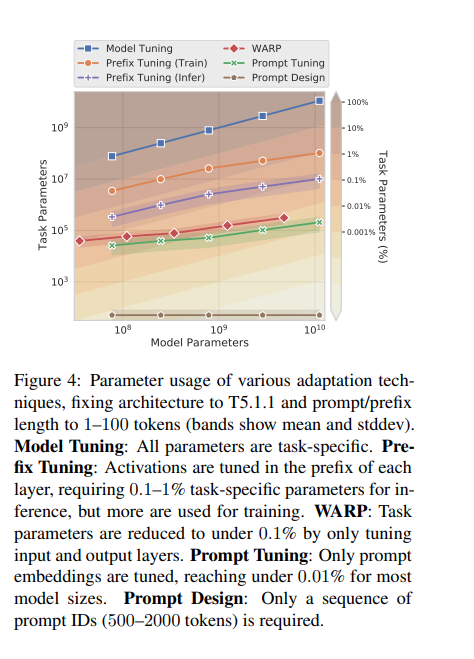
Adapter Tuning 适配器模块(Adapter Moudle)可以生成一个紧凑且可扩展的模型;每个任务只需要添加少量可训练参数,并且可以在不重新访问之前任务的情况下添加新任务。原始网络的参数保持不变,实现了高度的参数共享 Pa…...
)
方法的引用第一版(method reference)
1、体验方法引用 在使用Lambda表达式的时候,我们实际上传递进去的代码就是一种解决方案:拿参数做操作那么考虑一种情况:如果我们在Lanbda中所指定的操作方案,已经有地方存在相同方案,那是否还有必要再重复逻辑呢&#…...

Android DataBinding 基础入门(学习记录)
目录 一、DataBinding简介二、findViewById 和 DataBinding 原理及优缺点1. findViewById的优缺点2. DataBinding的优缺点 三、Android mvvm 之 databinding 原理1. 简介和三个主要的实体DataViewViewDataBinding 2.三个功能2.1. rebind 行为2.2 observe data 行为2.3 observe …...

spring 错误百科
一、使用Spring出错根源 1、隐式规则的存在 你可能忽略了 Sping Boot 中 SpringBootApplication 是有一个默认的扫描包范围的。这就是一个隐私规则。如果你原本不知道,那么犯错概率还是很高的。类似的案例这里不再赘述。 2、默认配置不合理 3、追求奇技淫巧 4、…...
。】2022-5-15)
【根据当天日期输出明天的日期(需对闰年做判定)。】2022-5-15
缘由根据当天日期输出明天的日期(需对闰年做判定)。日期类型结构体如下: struct data{ int year; int month; int day;};-编程语言-CSDN问答 struct mdata{ int year; int month; int day; }mdata; int 天数(int year, int month) {switch (month){case 1: case 3:…...
大话软工笔记—需求分析概述
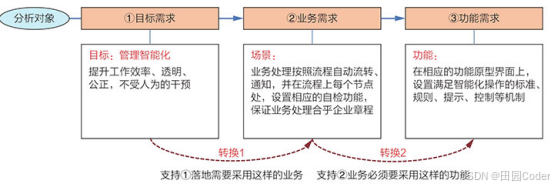
需求分析,就是要对需求调研收集到的资料信息逐个地进行拆分、研究,从大量的不确定“需求”中确定出哪些需求最终要转换为确定的“功能需求”。 需求分析的作用非常重要,后续设计的依据主要来自于需求分析的成果,包括: 项目的目的…...

Cesium1.95中高性能加载1500个点
一、基本方式: 图标使用.png比.svg性能要好 <template><div id"cesiumContainer"></div><div class"toolbar"><button id"resetButton">重新生成点</button><span id"countDisplay&qu…...
【单片机期末】单片机系统设计
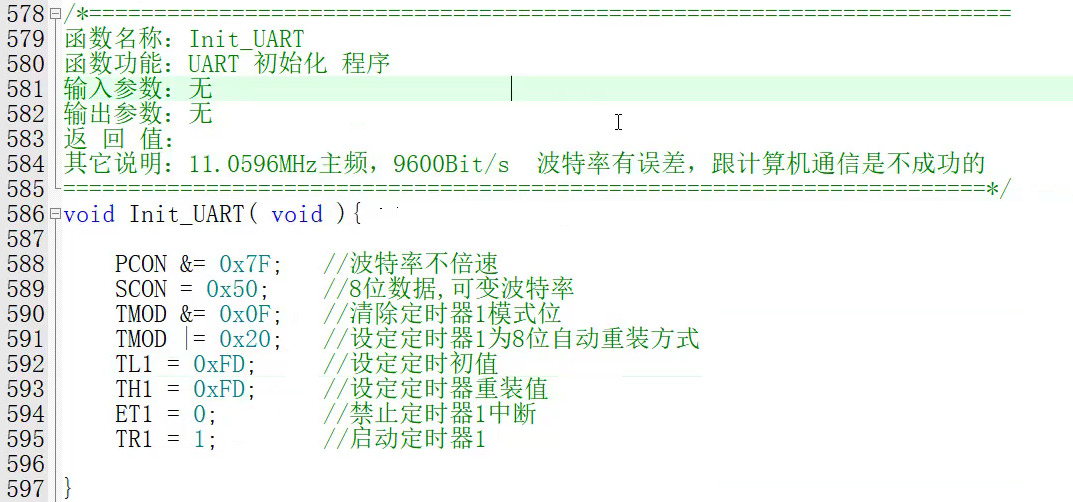
主要内容:系统状态机,系统时基,系统需求分析,系统构建,系统状态流图 一、题目要求 二、绘制系统状态流图 题目:根据上述描述绘制系统状态流图,注明状态转移条件及方向。 三、利用定时器产生时…...

云原生周刊:k0s 成为 CNCF 沙箱项目
开源项目推荐 HAMi HAMi(原名 k8s‑vGPU‑scheduler)是一款 CNCF Sandbox 级别的开源 K8s 中间件,通过虚拟化 GPU/NPU 等异构设备并支持内存、计算核心时间片隔离及共享调度,为容器提供统一接口,实现细粒度资源配额…...
Android写一个捕获全局异常的工具类
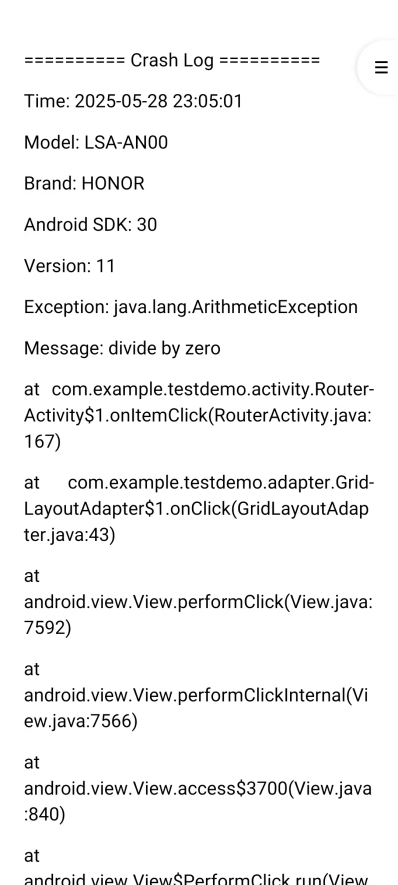
项目开发和实际运行过程中难免会遇到异常发生,系统提供了一个可以捕获全局异常的工具Uncaughtexceptionhandler,它是Thread的子类(就是package java.lang;里线程的Thread)。本文将利用它将设备信息、报错信息以及错误的发生时间都…...
AD学习(3)
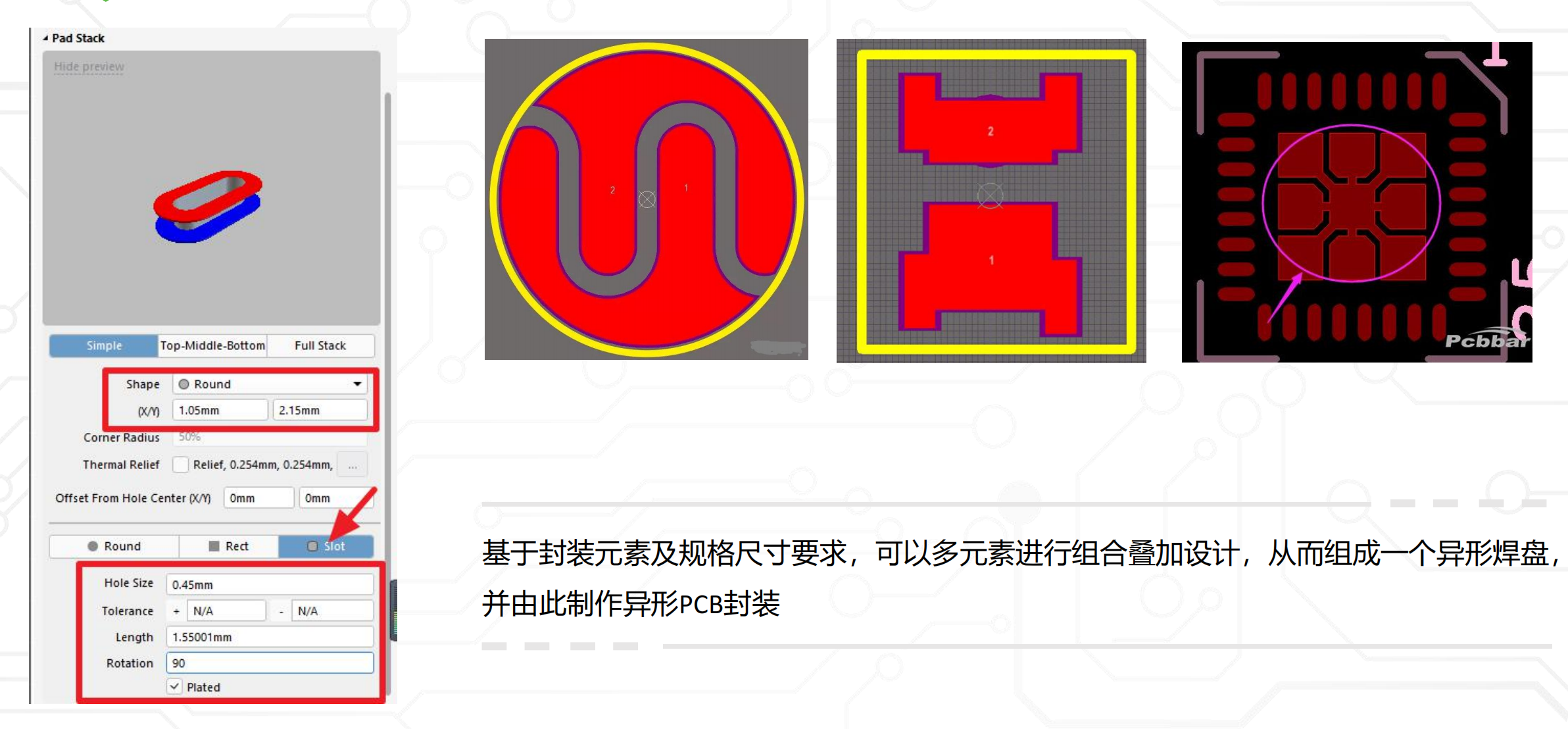
1 PCB封装元素组成及简单的PCB封装创建 封装的组成部分: (1)PCB焊盘:表层的铜 ,top层的铜 (2)管脚序号:用来关联原理图中的管脚的序号,原理图的序号需要和PCB封装一一…...

【大厂机试题解法笔记】矩阵匹配
题目 从一个 N * M(N ≤ M)的矩阵中选出 N 个数,任意两个数字不能在同一行或同一列,求选出来的 N 个数中第 K 大的数字的最小值是多少。 输入描述 输入矩阵要求:1 ≤ K ≤ N ≤ M ≤ 150 输入格式 N M K N*M矩阵 输…...

Neo4j 完全指南:从入门到精通
第1章:Neo4j简介与图数据库基础 1.1 图数据库概述 传统关系型数据库与图数据库的对比图数据库的核心优势图数据库的应用场景 1.2 Neo4j的发展历史 Neo4j的起源与演进Neo4j的版本迭代Neo4j在图数据库领域的地位 1.3 图数据库的基本概念 节点(Node)与关系(Relat…...
vue3 手动封装城市三级联动
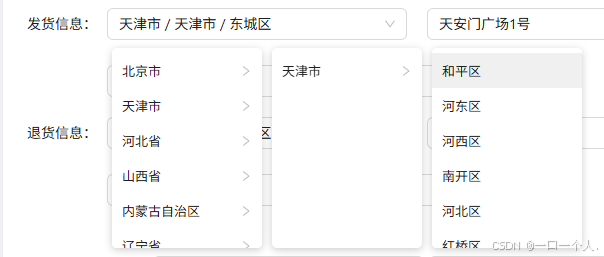
要做的功能 示意图是这样的,因为后端给的数据结构 不足以使用ant-design组件 的联动查询组件 所以只能自己分装 组件 当然 这个数据后端给的不一样的情况下 可能组件内对应的 逻辑方式就不一样 毕竟是 三个 数组 省份 城市 区域 我直接粘贴组件代码了 <temp…...