
Spring @Profile
1. Overview
In this tutorial, we’ll focus on introducing Profiles in Spring.
Profiles are a core feature of the framework — allowing us to map our beans to different profiles — for example, dev, test, and prod.
We can then activate different profiles in different environments to bootstrap only the beans we need.
2. Use @Profile on a Bean
Let’s start simple and look at how we can make a bean belong to a particular profile. We use the @Profile annotation — we are mapping the bean to that particular profile; the annotation simply takes the names of one (or multiple) profiles.
Consider a basic scenario: We have a bean that should only be active during development but not deployed in production.
We annotate that bean with a dev profile, and it will only be present in the container during development. In production, the dev simply won’t be active:
@Component
@Profile("dev")
public class DevDatasourceConfig
As a quick sidenote, profile names can also be prefixed with a NOT operator, e.g., !dev, to exclude them from a profile.
In the example, the component is activated only if dev profile is not active:
@Component
@Profile("!dev")
public class DevDatasourceConfig
3. Declare Profiles in XML
Profiles can also be configured in XML. The tag has a profile attribute, which takes comma-separated values of the applicable profiles:
<beans profile="dev"><bean id="devDatasourceConfig" class="org.baeldung.profiles.DevDatasourceConfig" />
</beans>
4. Set Profiles
The next step is to activate and set the profiles so that the respective beans are registered in the container.
This can be done in a variety of ways, which we’ll explore in the following sections.
4.1. Programmatically via WebApplicationInitializer Interface
In web applications, WebApplicationInitializer can be used to configure the ServletContext programmatically.
It’s also a very handy location to set our active profiles programmatically:
@Configuration
public class MyWebApplicationInitializer implements WebApplicationInitializer {@Overridepublic void onStartup(ServletContext servletContext) throws ServletException {servletContext.setInitParameter("spring.profiles.active", "dev");}
}
4.2. Programmatically via ConfigurableEnvironment
We can also set profiles directly on the environment:
@Autowired
private ConfigurableEnvironment env;
...
env.setActiveProfiles("someProfile");
4.3. Context Parameter in web.xml
Similarly, we can define the active profiles in the web.xml file of the web application, using a context parameter:
<context-param><param-name>contextConfigLocation</param-name><param-value>/WEB-INF/app-config.xml</param-value>
</context-param>
<context-param><param-name>spring.profiles.active</param-name><param-value>dev</param-value>
</context-param>
4.4. JVM System Parameter
The profile names can also be passed in via a JVM system parameter. These profiles will be activated during application startup:
-Dspring.profiles.active=dev
4.5. Environment Variable
In a Unix environment, profiles can also be activated via the environment variable:
export spring_profiles_active=dev
4.6. Maven Profile
Spring profiles can also be activated via Maven profiles, by specifying the spring.profiles.active configuration property.
In every Maven profile, we can set a spring.profiles.active property:
<profiles><profile><id>dev</id><activation><activeByDefault>true</activeByDefault></activation><properties><spring.profiles.active>dev</spring.profiles.active></properties></profile><profile><id>prod</id><properties><spring.profiles.active>prod</spring.profiles.active></properties></profile>
</profiles>
Its value will be used to replace the @spring.profiles.active@ placeholder in application.properties:
spring.profiles.active=@spring.profiles.active@
Now we need to enable resource filtering in pom.xml:
<build><resources><resource><directory>src/main/resources</directory><filtering>true</filtering></resource></resources>...
</build>
and append a -P parameter to switch which Maven profile will be applied:
mvn clean package -Pprod
This command will package the application for prod profile. It also applies the spring.profiles.active value prod for this application when it is running.
4.7. @ActiveProfile in Tests
Tests make it very easy to specify what profiles are active using the @ActiveProfile annotation to enable specific profiles:
@ActiveProfiles("dev")
So far, we’ve looked at multiple ways of activating profiles. Let’s now see which one has priority over the other and what happens if we use more than one, from highest to lowest priority:
- Context parameter in web.xml
- WebApplicationInitializer
- JVM System parameter
- Environment variable
- Maven profile
5. The Default Profile
Any bean that does not specify a profile belongs to the default profile.
Spring also provides a way to set the default profile when no other profile is active — by using the spring.profiles.default property.
6. Get Active Profiles
Spring’s active profiles drive the behavior of the @Profile annotation for enabling/disabling beans. However, we may also wish to access the list of active profiles programmatically.
We have two ways to do it, using Environment or spring.profiles.active.
6.1. Using Environment
We can access the active profiles from the Environment object by injecting it:
public class ProfileManager {@Autowiredprivate Environment environment;public void getActiveProfiles() {for (String profileName : environment.getActiveProfiles()) {System.out.println("Currently active profile - " + profileName);}  }
}
6.2. Using spring.profiles.active
Alternatively, we could access the profiles by injecting the property spring.profiles.active:
@Value("${spring.profiles.active}")
private String activeProfile;
参考:
Spring Profiles
相关文章:

Spring @Profile
1. Overview In this tutorial, we’ll focus on introducing Profiles in Spring. Profiles are a core feature of the framework — allowing us to map our beans to different profiles — for example, dev, test, and prod. We can then activate different profiles…...

Vue3电商项目实战-个人中心模块4【09-订单管理-列表渲染、10-订单管理-条件查询】
文章目录09-订单管理-列表渲染10-订单管理-条件查询09-订单管理-列表渲染 目的:完成订单列表默认渲染。 大致步骤: 定义API接口函数抽取单条订单组件获取数据进行渲染 落的代码: 1.获取订单列表API借口 /*** 查询订单列表* param {Number…...
【十二天学java】day01-Java基础语法
day01 - Java基础语法 1. 人机交互 1.1 什么是cmd? 就是在windows操作系统中,利用命令行的方式去操作计算机。 我们可以利用cmd命令去操作计算机,比如:打开文件,打开文件夹,创建文件夹等。 1.2 如何打…...
【面试题】闭包是什么?this 到底指向谁?
一通百通,其实函数执行上下文、作用域链、闭包、this、箭头函数是相互关联的,他们的特性并不是孤立的,而是相通的。因为内部函数可以访问外层函数的变量,所以才有了闭包的现象。箭头函数内没有 this 和 arguments,所以…...
汽车4S店业务管理软件
一、产品简介 它主要提供给汽车4S商店,用于管理各种业务,如汽车销售、售后服务、配件、精品和保险。整个系统以客户为中心,以财务为基础,覆盖4S商店的每一个业务环节,不仅可以提高服务效率和客户满意度,…...
基于 pytorch 的手写 transformer + tokenizer
先放出 transformer 的整体结构图,以便复习,接下来就一个模块一个模块的实现它。 1. Embedding Embedding 部分主要由两部分组成,即 Input Embedding 和 Positional Encoding,位置编码记录了每一个词出现的位置。通过加入位置编码可以提高模型的准确率,因为同一个词出现在…...
算法小抄6-二分查找
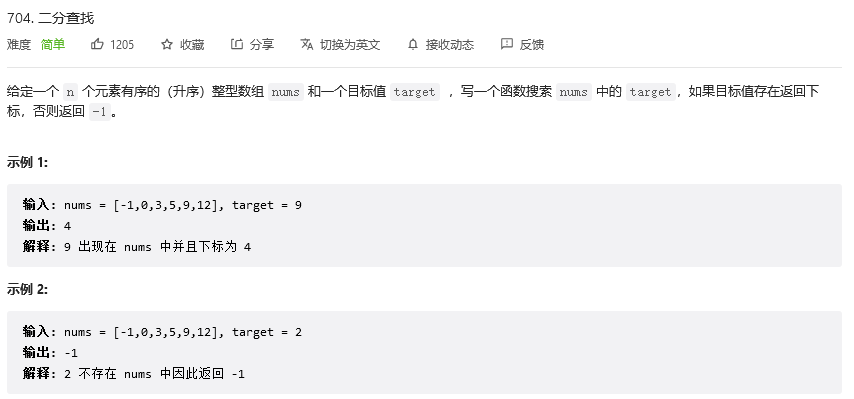
二分查找,又名折半查找,其搜索过程如下: 从数组中间的元素开始,如果元素刚好是要查找的元素,则搜索过程结束如果搜索元素大于或小于中间元素,则排除掉不符合条件的那一半元素,在剩下的数组中进行查找由于每次需要排除掉一半不符合要求的元素,这需要数组是已经排好序的或者是有…...

大学四年..就混了毕业证的我,出社会深感无力..辞去工作,从头开始
时间如白驹过隙,一恍就到了2023年,今天最于我来说是一个值得纪念的日子,因为我收获了今年的第一个offer背景18年毕业,二本。大学四年,也就将就混了毕业证和学位证。毕业后,并未想过留在湖南,就回…...

C语言数据结构初阶(6)----链表常见OJ题
CSDN的uu们,大家好!编程能力的提高不仅需要学习新的知识,还需要大量的练习。所以,C语言数据结构初阶的第六讲邀请uu们一起来看看链表的常见oj题目。移除链表元素原题链接:203. 移除链表元素 - 力扣(Leetcod…...

关键字 const
目录 一、符号常量与常变量 二、const的用法 2.1 const常用方法 2.2 const用于指针 2.2.1 p指针所指的对象值不能改变,但是p指针的指向可以改变 2.2.2 常指针p的指向不能改变,但是所指的对象的值可以改变 2.2.3 p所指对象的指向以及对象的值都不可…...
MybatisPlus------MyBatisX插件:快速生成代码以及快速生成CRUD(十二)
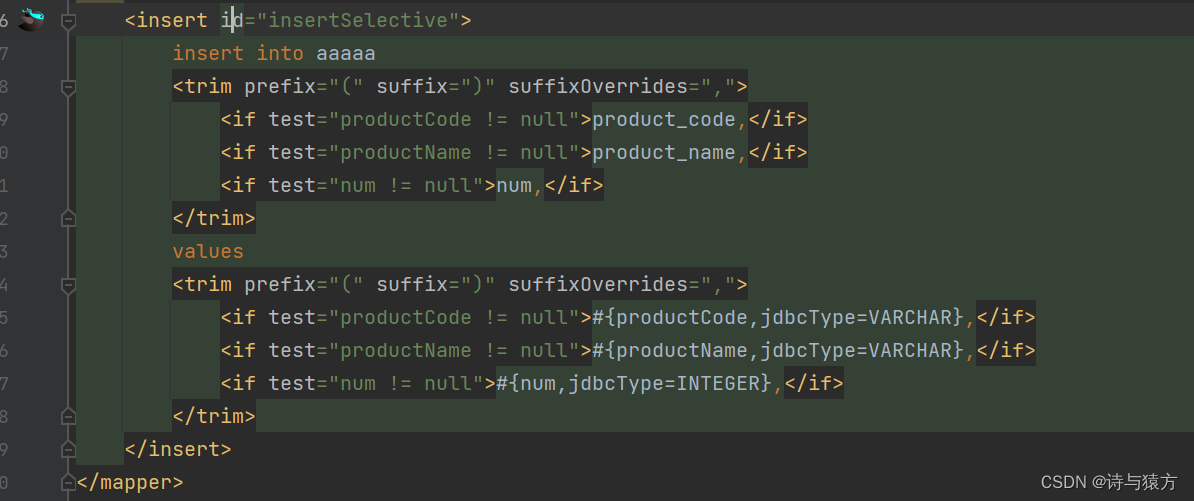
MybatisPlus------MyBatisX插件(十二) MyBatisX插件是IDEA插件,如果想要使用它,那么首先需要在IDEA中进行安装。 安装插件 搜索"MyBatisX",点击Install,之后重启IDEA即可。 插件基本用途&…...
Leetcode138. 复制带随机指针的链表
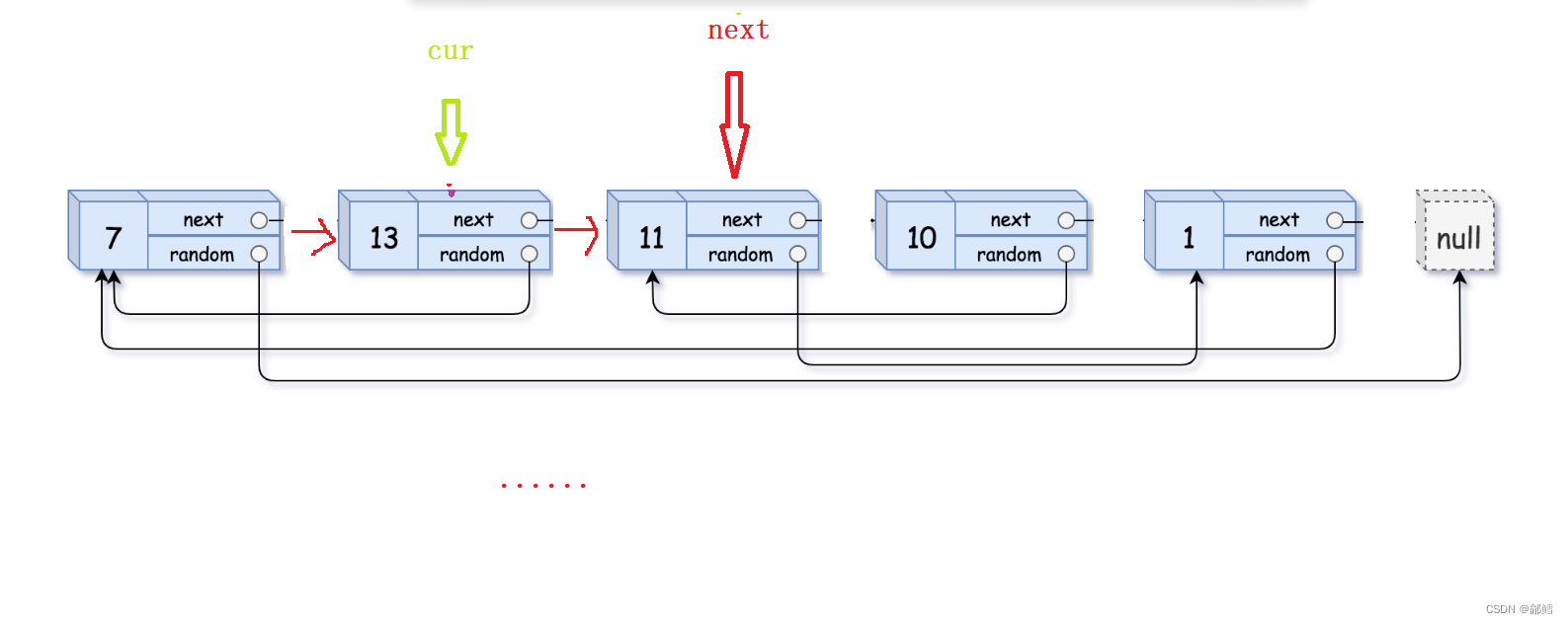
复制带随机指针的链表 第一步 拷贝节点链接在原节点的后面 第二步拷贝原节点的random , 拷贝节点的 random 在原节点 random 的 next 第三步 将拷贝的节点尾插到一个新链表 ,并且将原链表恢复 从前往后遍历链表 ,将原链表的每个节点进行复制,并l链接到原…...
python并发编程多线程
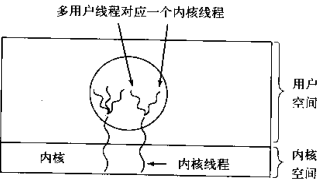
在传统操作系统中,每个进程有一个地址空间,而且默认就有一个控制线程 线程顾名思义,就是一条流水线工作的过程,一条流水线必须属于一个车间,一个车间的工作过程是一个进程 车间负责把资源整合到一起,是一个…...

使用Maven实现Servlet程序
创建Maven项目我们打开idea的新建项目,选中里面Maven即可,如下图:创建完成之后,会看到这样的目录结构其中,main目录存放业务代码,其中的java目录存放的就是java代码,而resources目录存放是程序中依赖的文件,比如:图片,视频等.然后是 test目录,test目录存放的是测试代码.最后一个…...
百度的文心一言 ,没有想像中那么差
robin 的演示 我们用 robin 的演示例子来对比一下 文心一言和 ChatGPT 的真实表现(毕竟发布会上是录的)。 注意,我使用的 GPT 版本是 4.0 文学创作 1 三体的作者是哪里人? 文心一言: ChatGPT: 嗯&a…...

文心一言发布的个人看法
文心一言发布宣传视频按照发布会上说的,文心一言并非属于百度赶工抄袭Chat-GPT的作品,而是十几年一直布局AI产业厚积薄发的成果,百度在芯片,机器学习,自然语言处理,知识图谱等方面均有相对深厚的积累。 国…...
【C5】111
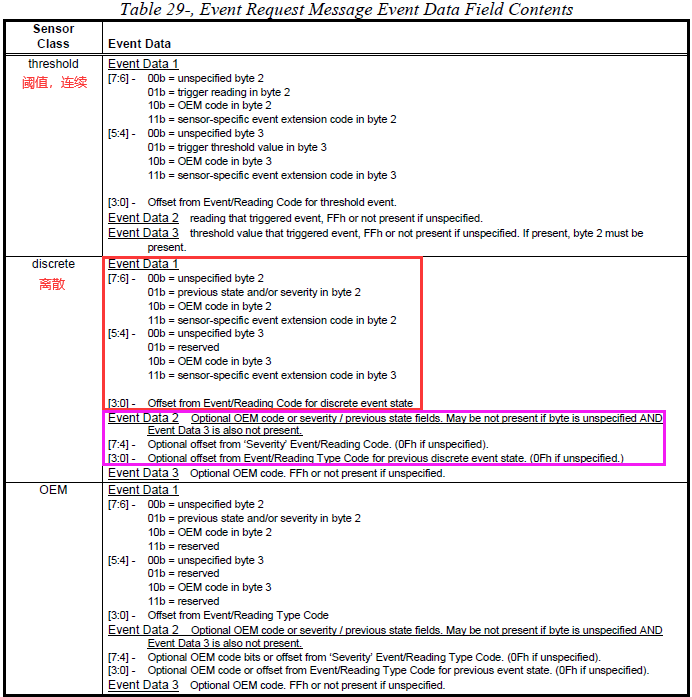
文章目录bmc_wtd:syscpld.c中wd_en和wd_kick节点对应寄存器,crontab,FUNCNAMEAST2500/2600 WDT切换主备:BMC用WDT2作为主备切换的watchdog控制器AC后读取:bmc处于主primary flash(设完后:实际主…...

静态成员,友元函数
🐶博主主页:ᰔᩚ. 一怀明月ꦿ ❤️🔥专栏系列:线性代数,C初学者入门训练,题解C,C的使用文章,「初学」C 🔥座右铭:“不要等到什么都没有了,才下…...
:函数)
数学分析课程笔记(张平):函数
01 函数 \quad作为数学分析的第一节课,首先深入了解一下函数。 \quad翻看一些教材可以发现,有些教材将“函数”与“映射”区分为两个概念,有些教材(尤其是前苏联时期的一些教材)则将其视为一个概念。实际上,…...

spring事务 只读此文
文章目录一. 事务概述1.1. MySQL 数据库事务1.2 spring的事务支持:1.2.1 编程式事务:1.2.2 声明式事务1.2.3 事务传播行为:1.2.4 事务隔离级别1.2.5 事务的超时时间1.2.6 事务的只读属性1.2.7 事务的回滚策略二. spring事务(注解 Transaction…...
业务系统对接大模型的基础方案:架构设计与关键步骤
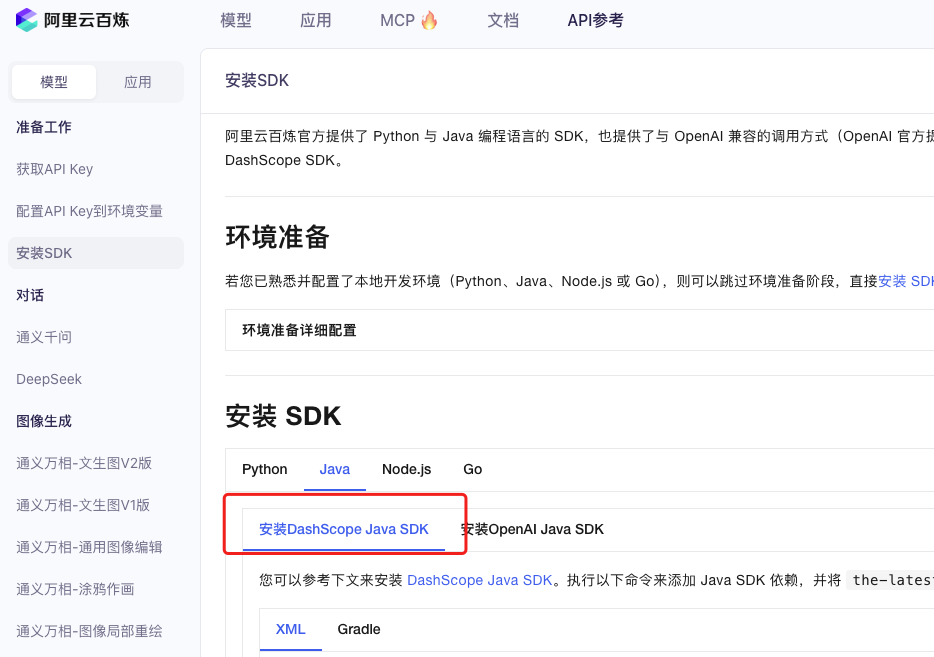
业务系统对接大模型:架构设计与关键步骤 在当今数字化转型的浪潮中,大语言模型(LLM)已成为企业提升业务效率和创新能力的关键技术之一。将大模型集成到业务系统中,不仅可以优化用户体验,还能为业务决策提供…...
Day131 | 灵神 | 回溯算法 | 子集型 子集
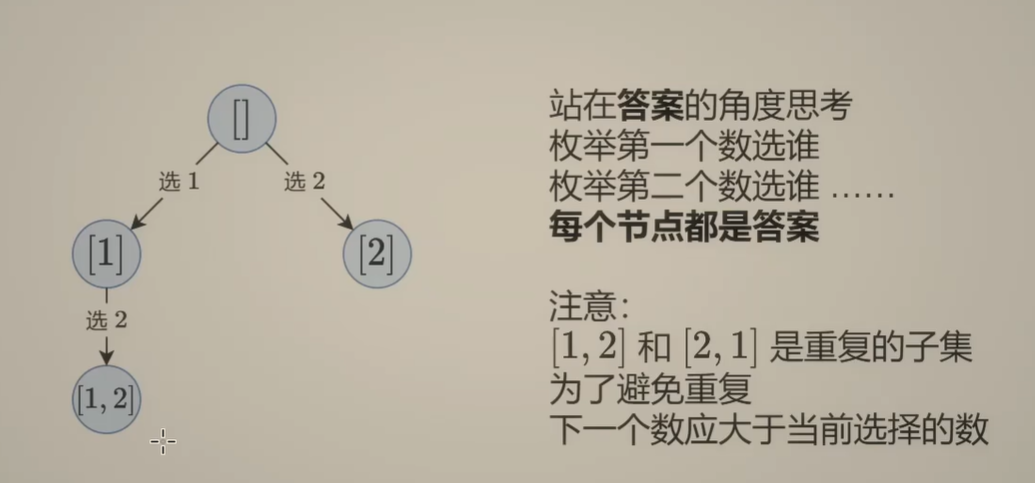
Day131 | 灵神 | 回溯算法 | 子集型 子集 78.子集 78. 子集 - 力扣(LeetCode) 思路: 笔者写过很多次这道题了,不想写题解了,大家看灵神讲解吧 回溯算法套路①子集型回溯【基础算法精讲 14】_哔哩哔哩_bilibili 完…...

java 实现excel文件转pdf | 无水印 | 无限制
文章目录 目录 文章目录 前言 1.项目远程仓库配置 2.pom文件引入相关依赖 3.代码破解 二、Excel转PDF 1.代码实现 2.Aspose.License.xml 授权文件 总结 前言 java处理excel转pdf一直没找到什么好用的免费jar包工具,自己手写的难度,恐怕高级程序员花费一年的事件,也…...

江苏艾立泰跨国资源接力:废料变黄金的绿色供应链革命
在华东塑料包装行业面临限塑令深度调整的背景下,江苏艾立泰以一场跨国资源接力的创新实践,重新定义了绿色供应链的边界。 跨国回收网络:废料变黄金的全球棋局 艾立泰在欧洲、东南亚建立再生塑料回收点,将海外废弃包装箱通过标准…...
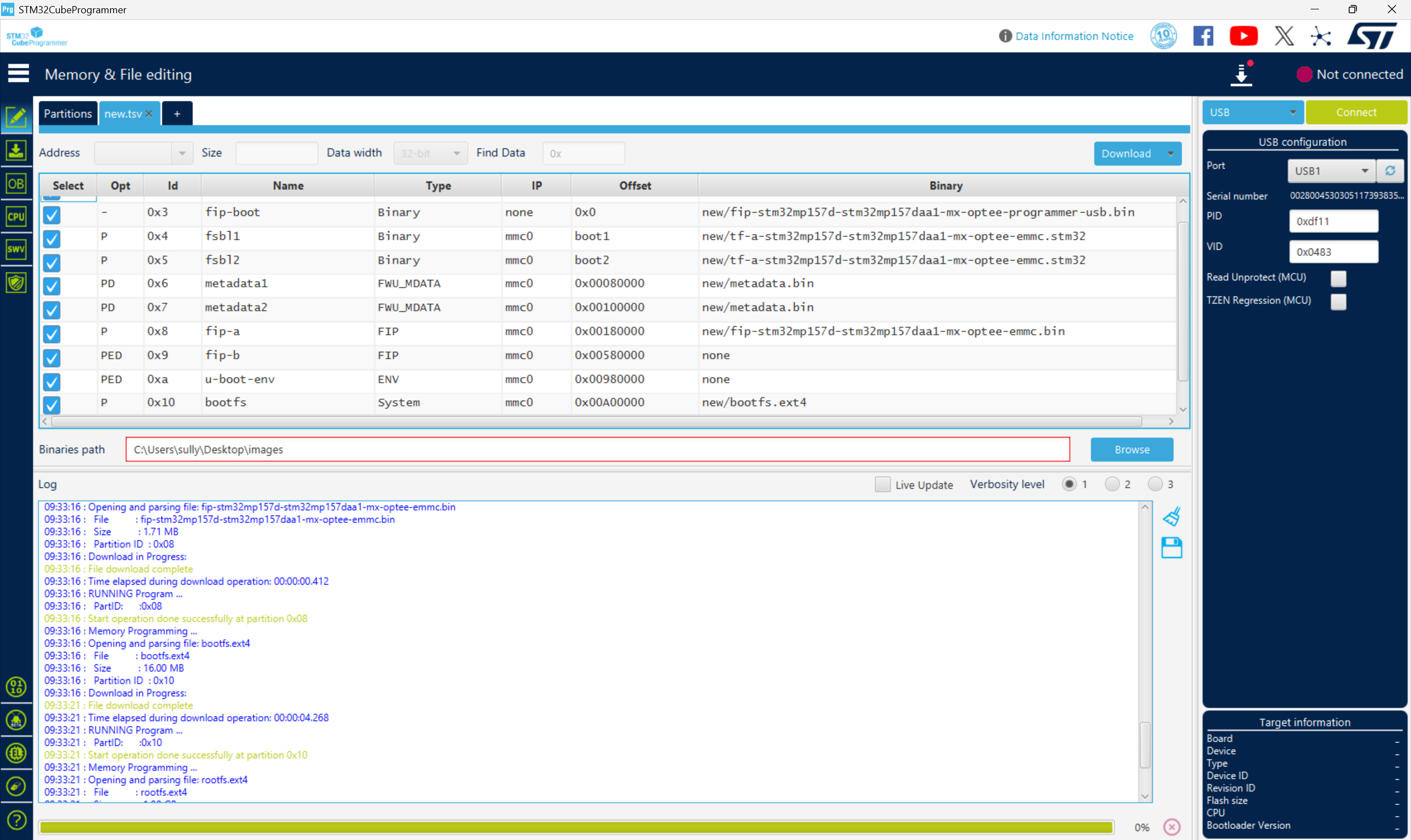
从零开始打造 OpenSTLinux 6.6 Yocto 系统(基于STM32CubeMX)(九)
设备树移植 和uboot设备树修改的内容同步到kernel将设备树stm32mp157d-stm32mp157daa1-mx.dts复制到内核源码目录下 源码修改及编译 修改arch/arm/boot/dts/st/Makefile,新增设备树编译 stm32mp157f-ev1-m4-examples.dtb \stm32mp157d-stm32mp157daa1-mx.dtb修改…...
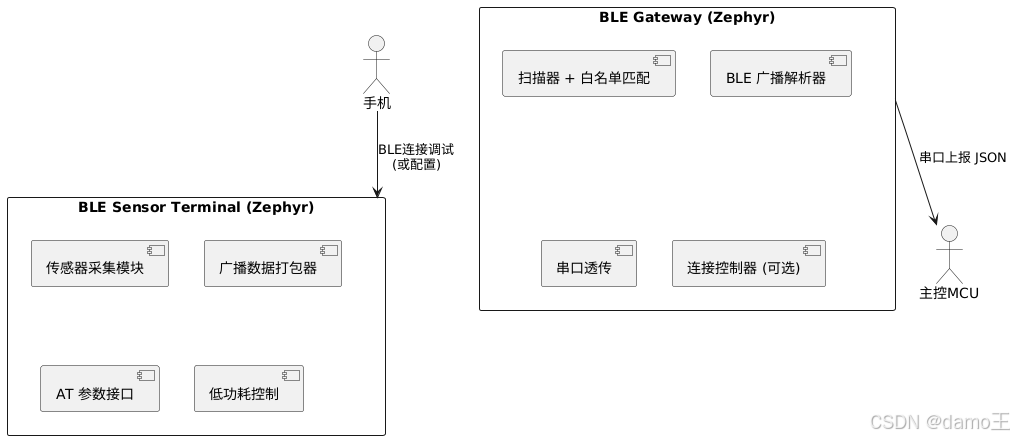
【Zephyr 系列 10】实战项目:打造一个蓝牙传感器终端 + 网关系统(完整架构与全栈实现)
🧠关键词:Zephyr、BLE、终端、网关、广播、连接、传感器、数据采集、低功耗、系统集成 📌目标读者:希望基于 Zephyr 构建 BLE 系统架构、实现终端与网关协作、具备产品交付能力的开发者 📊篇幅字数:约 5200 字 ✨ 项目总览 在物联网实际项目中,**“终端 + 网关”**是…...
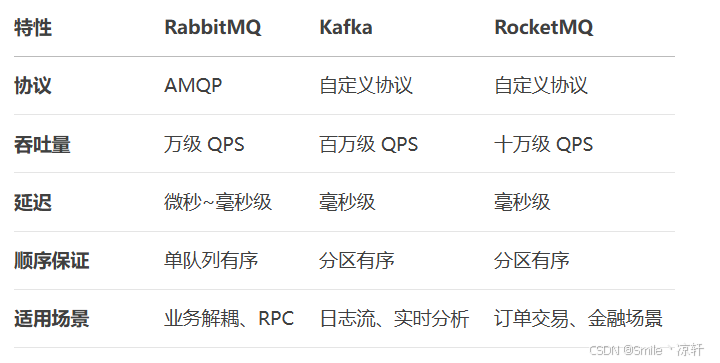
技术栈RabbitMq的介绍和使用
目录 1. 什么是消息队列?2. 消息队列的优点3. RabbitMQ 消息队列概述4. RabbitMQ 安装5. Exchange 四种类型5.1 direct 精准匹配5.2 fanout 广播5.3 topic 正则匹配 6. RabbitMQ 队列模式6.1 简单队列模式6.2 工作队列模式6.3 发布/订阅模式6.4 路由模式6.5 主题模式…...
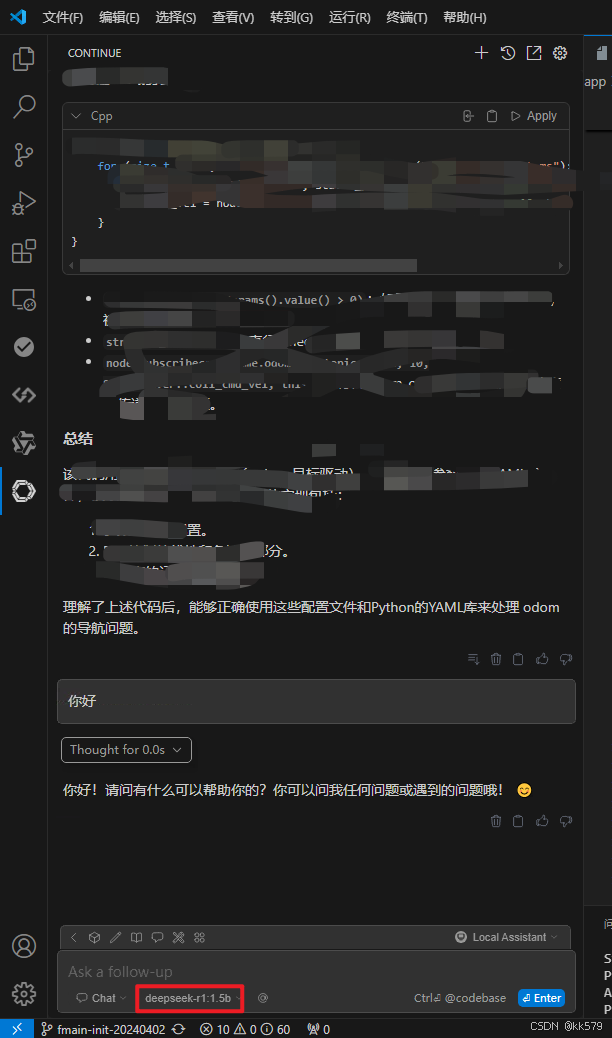
保姆级教程:在无网络无显卡的Windows电脑的vscode本地部署deepseek
文章目录 1 前言2 部署流程2.1 准备工作2.2 Ollama2.2.1 使用有网络的电脑下载Ollama2.2.2 安装Ollama(有网络的电脑)2.2.3 安装Ollama(无网络的电脑)2.2.4 安装验证2.2.5 修改大模型安装位置2.2.6 下载Deepseek模型 2.3 将deepse…...

Java毕业设计:WML信息查询与后端信息发布系统开发
JAVAWML信息查询与后端信息发布系统实现 一、系统概述 本系统基于Java和WML(无线标记语言)技术开发,实现了移动设备上的信息查询与后端信息发布功能。系统采用B/S架构,服务器端使用Java Servlet处理请求,数据库采用MySQL存储信息࿰…...

C++ 设计模式 《小明的奶茶加料风波》
👨🎓 模式名称:装饰器模式(Decorator Pattern) 👦 小明最近上线了校园奶茶配送功能,业务火爆,大家都在加料: 有的同学要加波霸 🟤,有的要加椰果…...