
SpringSecurity-授权示例
用户基于权限进行授权
定义用户与权限
authorities()。
package com.cms.config;import org.springframework.context.annotation.Bean;
import org.springframework.context.annotation.Configuration;
import org.springframework.security.core.userdetails.User;
import org.springframework.security.core.userdetails.UserDetails;
import org.springframework.security.core.userdetails.UserDetailsService;
import org.springframework.security.crypto.password.NoOpPasswordEncoder;
import org.springframework.security.crypto.password.PasswordEncoder;
import org.springframework.security.provisioning.InMemoryUserDetailsManager;/*** @author: coffee* @date: 2024/6/27 20:33* @description: ...*/
@Configuration
public class UserConfig {@Beanpublic UserDetailsService userDetailsService () {InMemoryUserDetailsManager userDetailsManager = new InMemoryUserDetailsManager();UserDetails user1 = User.withUsername("john").password("123456").authorities("READ").build();UserDetails user2 = User.withUsername("jane").password("123456").authorities("WRITE").build();userDetailsManager.createUser(user1);userDetailsManager.createUser(user2);return userDetailsManager;}@Beanpublic PasswordEncoder passwordEncoder () {return NoOpPasswordEncoder.getInstance();}}
权限维度授权配置
package com.cms.config;import org.springframework.context.annotation.Configuration;
import org.springframework.security.config.annotation.web.builders.HttpSecurity;
import org.springframework.security.config.annotation.web.configuration.WebSecurityConfigurerAdapter;/*** @author: coffee* @date: 2024/6/27 20:37* @description: 基于用户权限限制所有端点的访问*/
@Configuration
public class ProjectConfig extends WebSecurityConfigurerAdapter {/*** 指定用户可以访问端点的条件:1.hasAuthority() 2.hasAnyAuthority()  3.access()*/@Overrideprotected void configure (HttpSecurity httpSecurity) throws Exception {httpSecurity.httpBasic();// permitAll()方法修改授权配置,无需凭据(用户名密码)也可以直接调用接口。   curl http://localhost:8080/hello// httpSecurity.authorizeRequests().anyRequest().permitAll();// 指定用户可以访问端点的条件-hasAuthority 。 发现john报403、jane正常;// httpSecurity.authorizeRequests().anyRequest().hasAuthority("WRITE");// 允许具有WRITE或者READ权限的用户访问端点-hasAnyAuthority。  发现john报正常、jane正常;httpSecurity.authorizeRequests().anyRequest().hasAnyAuthority("WRITE","READ");// access() - 为配置访问提供了无限的可能性,因为应用程序会基于SPEL构建授权规则。但是,他会让代码更难阅读和调试。所以作为次要解决方案,仅在不能使用hasAuthority和hasAnyAuthority时才使用}
}
用户基于角色进行授权
定义用户与角色
roles()。
package com.cms.config;import org.springframework.context.annotation.Bean;
import org.springframework.context.annotation.Configuration;
import org.springframework.security.core.userdetails.User;
import org.springframework.security.core.userdetails.UserDetails;
import org.springframework.security.core.userdetails.UserDetailsService;
import org.springframework.security.crypto.password.NoOpPasswordEncoder;
import org.springframework.security.crypto.password.PasswordEncoder;
import org.springframework.security.provisioning.InMemoryUserDetailsManager;/*** @author: coffee* @date: 2024/6/27 20:33* @description: ...*/
@Configuration
public class UserConfig {@Beanpublic UserDetailsService userDetailsService () {InMemoryUserDetailsManager userDetailsManager = new InMemoryUserDetailsManager();// authorities:使用"ROLE_"前缀,GrantedAuthority现在就表示一个角色UserDetails user1 = User.withUsername("john").password("123456").authorities("ROLE_ADMIN").build();// roles:不需要添加"ROLE_"前缀// UserDetails user1 = User.withUsername("john").password("123456").roles("ADMIN").build();UserDetails user2 = User.withUsername("jane").password("123456").authorities("ROLE_MANAGER").build();// UserDetails user2 = User.withUsername("jane").password("123456").roles("MANAGER").build();userDetailsManager.createUser(user1);userDetailsManager.createUser(user2);return userDetailsManager;}@Beanpublic PasswordEncoder passwordEncoder () {return NoOpPasswordEncoder.getInstance();}}
角色维度授权配置
package com.cms.config;import org.springframework.context.annotation.Configuration;
import org.springframework.security.config.annotation.web.builders.HttpSecurity;
import org.springframework.security.config.annotation.web.configuration.WebSecurityConfigurerAdapter;/*** @author: coffee* @date: 2024/6/27 20:37* @description: 基于用户权限限制所有端点的访问*/
@Configuration
public class ProjectConfig extends WebSecurityConfigurerAdapter {/*** 指定用户可以访问端点的条件:1.hasAuthority() 2.hasAnyAuthority()  3.access()*/@Overrideprotected void configure (HttpSecurity httpSecurity) throws Exception {httpSecurity.httpBasic();// permitAll()方法修改授权配置,无需凭据(用户名密码)也可以直接调用接口。   curl http://localhost:8080/hello// httpSecurity.authorizeRequests().anyRequest().permitAll();// 指定用户可以访问端点的条件-hasRole 。 hasRole()方法现在会指定允许访问端点的角色。请注意,这里没有出现ROLE_前缀// httpSecurity.authorizeRequests().anyRequest().hasRole("ADMIN");// 允许具有ADMIN或者MANAGER角色权限的用户访问端点-hasAnyRole。httpSecurity.authorizeRequests().anyRequest().hasAnyRole("ADMIN","MANAGER");// access() - 为配置访问提供了无限的可能性,因为应用程序会基于SPEL构建授权规则。但是,他会让代码更难阅读和调试。所以作为次要解决方案,仅在不能使用hasRole和hasAnyRole时才使用}
}
相关文章:

SpringSecurity-授权示例
用户基于权限进行授权 定义用户与权限 authorities()。 package com.cms.config;import org.springframework.context.annotation.Bean; import org.springframework.context.annotation.Configuration; import org.springframework.security.core.userdetails.User; import…...

选哪个短剧系统源码好:全面评估与决策指南
在短剧内容创作和分享日益流行的今天,选择合适的短剧系统源码对于构建一个成功的短剧平台至关重要。短剧系统源码不仅关系到平台的稳定性和用户体验,还直接影响到内容创作者和观众的互动质量。本文将提供一份全面的评估指南,帮助您在众多短剧…...

AI时代的软件工程:挑战与改变
人工智能(AI)正以惊人的速度改变着我们的生活和工作方式。作为与AI关系最为密切的领域之一,软件工程正经历着深刻的转变。 1 软件工程的演变 软件工程的起源 软件工程(Software Engineering)是关于如何系统化、规范化地…...

Zuul介绍
Zuul 是 Netflix 开源的一个云平台网络层代理,它主要用于路由、负载均衡、中间件通信和动态路由。Zuul 本质上是一个基于 JVM 的网关,它提供了以下功能: 1.路由:Zuul 允许客户端和服务器之间的所有入站和出站请求通过一个中心化的…...
7-1作业
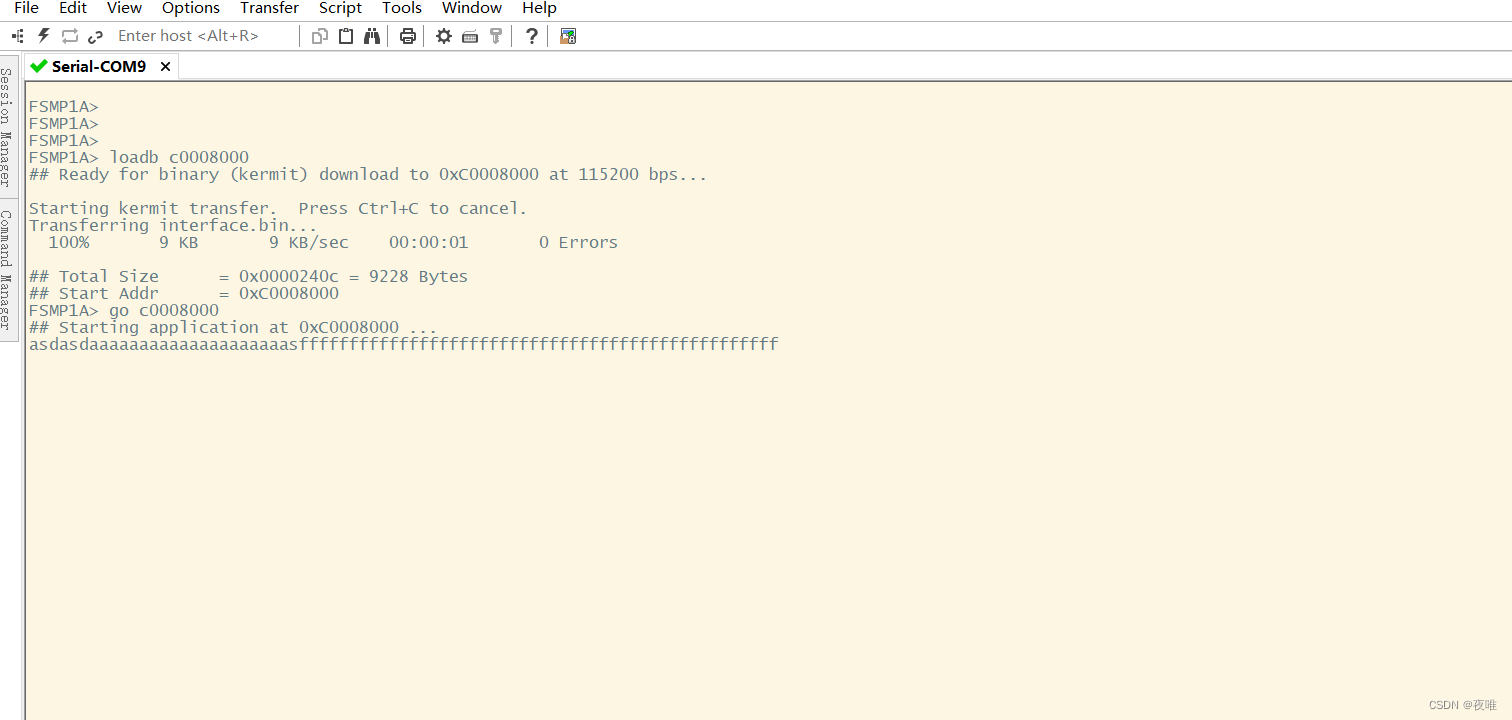
1.实验目的:完成字符收发 led.h #ifndef __GPIO_H__ #define __GPIO_H__#include "stm32mp1xx_rcc.h" #include "stm32mp1xx_gpio.h" #include "stm32mp1xx_uart.h"//RCC,GPIO,UART初始化 void init();//字符数据发送 void set_tt…...

ElasticSearch安装、配置详细步骤
一、环境及版本介绍 操作系统: Windows 10 软件版本: elasticsearch-7.17.22、kibana-7.17.22、IK-7.17.22 开发环境选择软件版本应提前考虑正式系统环境,否则会产生软件与服务器环境不兼容的问题出现,ElasticSearch与环境支持…...
【Mybatis 与 Spring】事务相关汇总
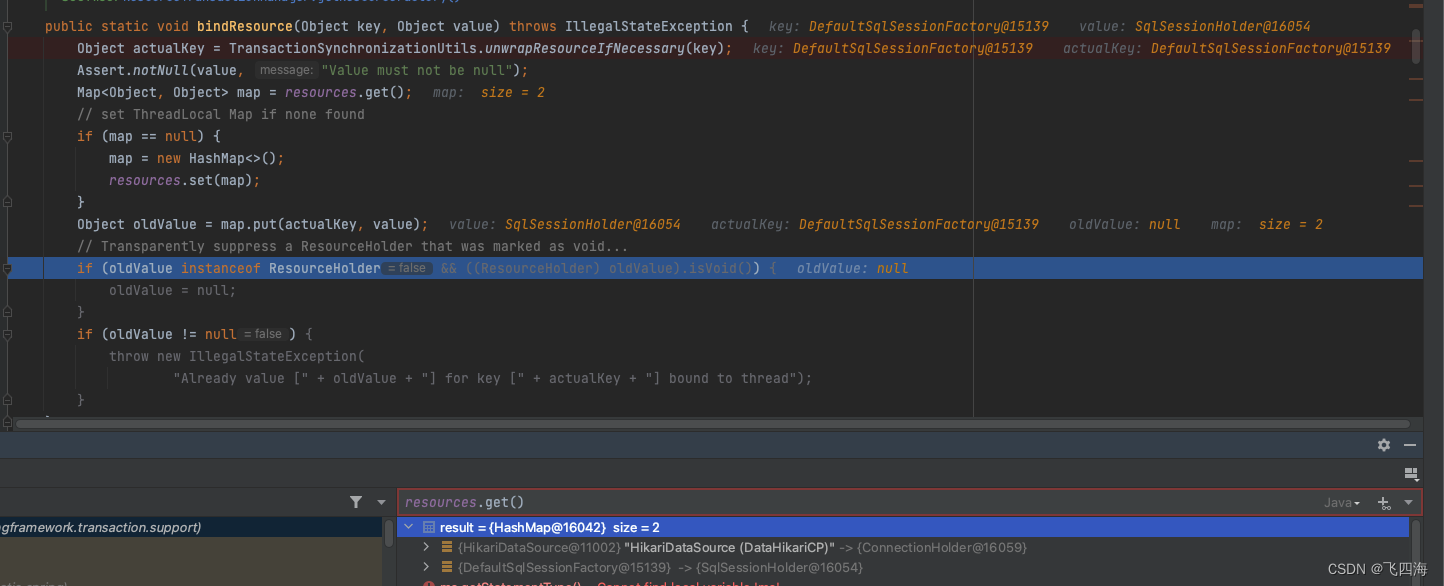
之前分享的几篇文章可以一起看,形成一个体系 【Mybatis】一级缓存与二级缓存源码分析与自定义二级缓存 【Spring】Spring事务相关源码分析 【Mybatis】Mybatis数据源与事务源码分析 Spring与Mybaitis融合 SpringManagedTransaction: org.mybatis.spri…...
)
Leetcode 2065. 最大化一张图中的路径价值(DFS / 最短路)
Leetcode 2065. 最大化一张图中的路径价值 暴力DFS 容易想到,从0点出发DFS,期间维护已经走过的距离(时间)和途径点的权值之和,若访问到0点则更新答案,若下一步的距离与已走过的距离和超出了maxTime&#…...
SeeSR: Towards Semantics-Aware Real-World Image Super-Resolution
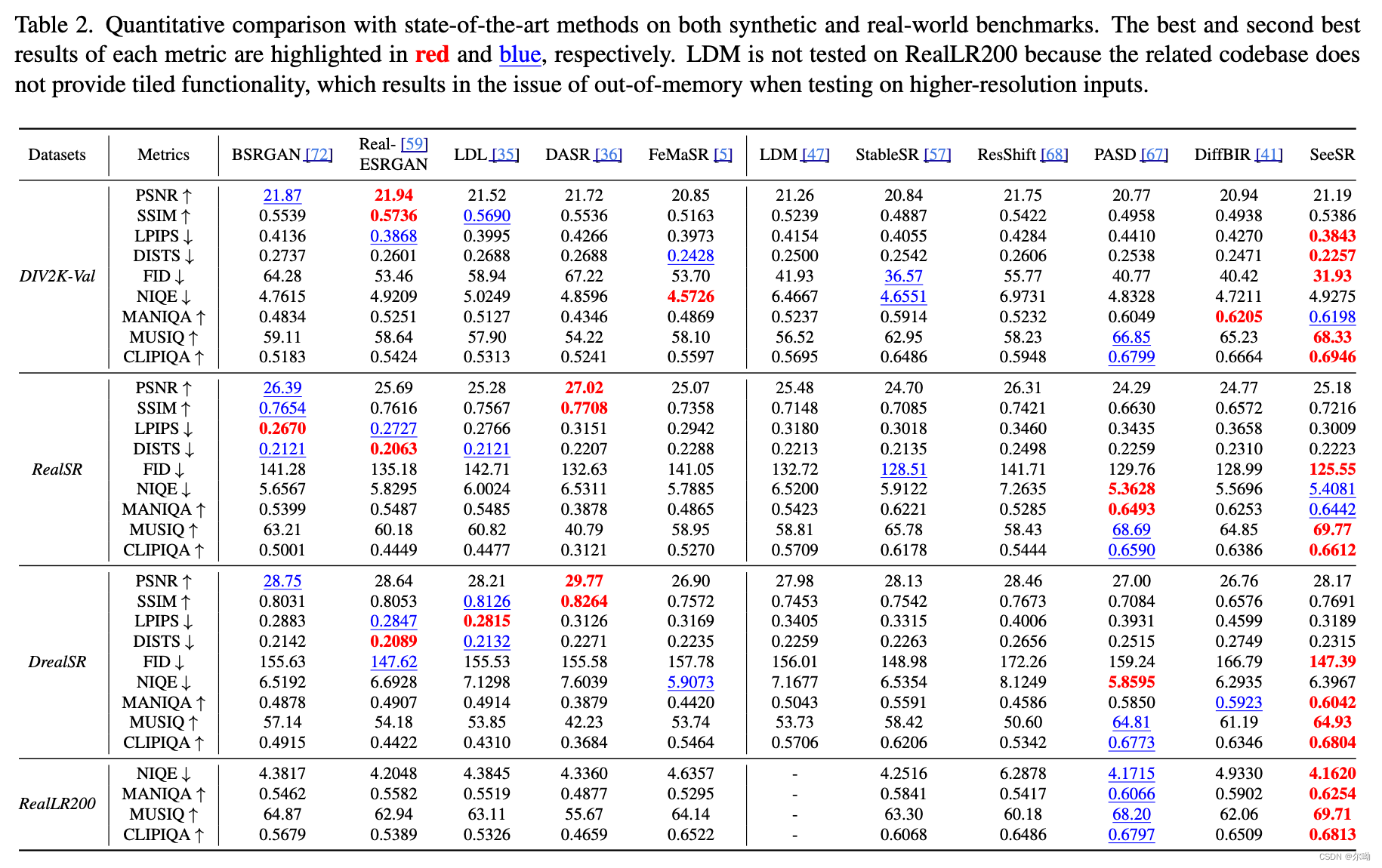
CVPR2024 香港理工大学&OPPO&bytedancehttps://github.com/cswry/SeeSR?tabreadme-ov-file#-licensehttps://arxiv.org/pdf/2311.16518#page5.80 问题引入 因为有些LR退化情况比较严重,所以超分之后的结果会出现语义的不一致的情况,所以本文训…...
七月论文审稿GPT第5版:拿我司七月的早期paper-7方面review数据集微调LLama 3
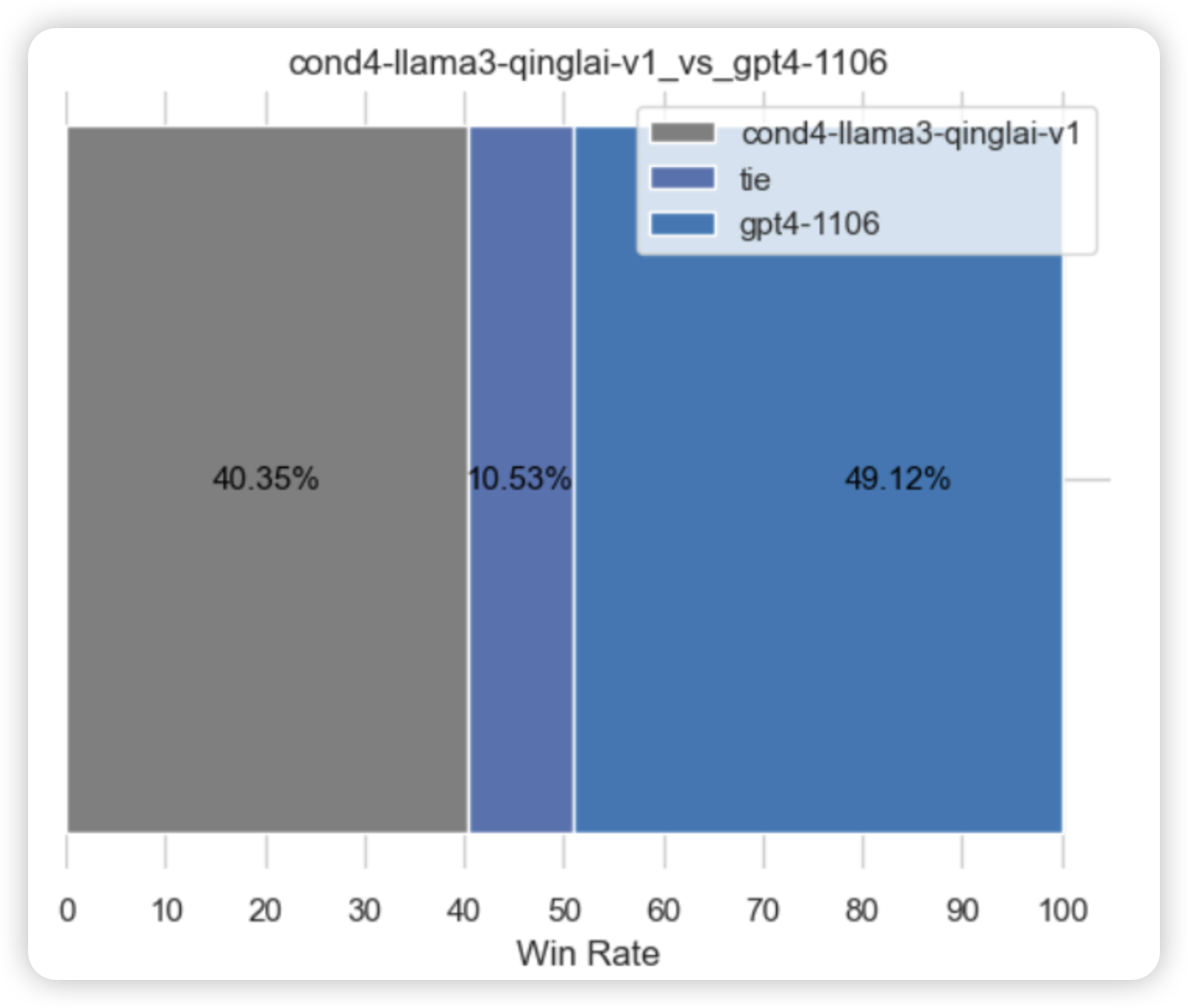
前言 llama 3出来后,为了通过paper-review的数据集微调3,有以下各种方式 不用任何框架 工具 技术,直接微调原生的llama 3,毕竟也有8k长度了 效果不期望有多高,纯作为baseline通过PI,把llama 3的8K长度扩展…...
盘古5.0,靠什么去解最难的题?
文|周效敬 编|王一粟 当大模型的竞争开始拼落地,商业化在B端和C端都展开了自由生长。 在B端,借助云计算向千行万业扎根;在C端,通过软件App和智能终端快速迭代。 在华为,这家曾经以通信行业起…...
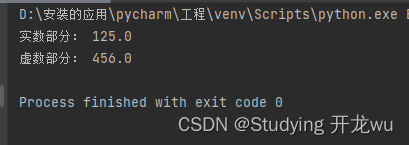
2.3章节Python中的数值类型
1.整型数值 2.浮点型数值 3.复数 Python中的数值类型清晰且丰富,主要分为以下几种类型,每种类型都有其特定的用途和特性。 一、整型数值 1.定义:整数类型用于表示整数值,如1、-5、100等。 2.特点: Python 3中的…...
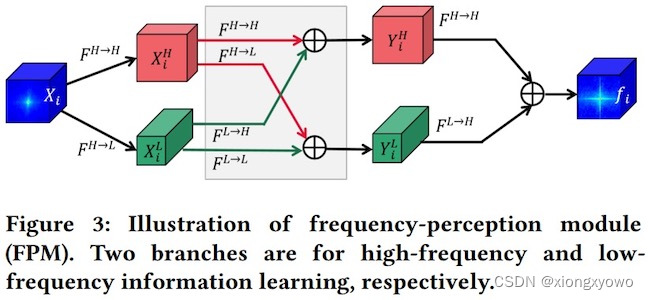
每日Attention学习7——Frequency-Perception Module
模块出处 [link] [code] [ACM MM 23] Frequency Perception Network for Camouflaged Object Detection 模块名称 Frequency-Perception Module (FPM) 模块作用 获取频域信息,更好识别伪装对象 模块结构 模块代码 import torch import torch.nn as nn import to…...
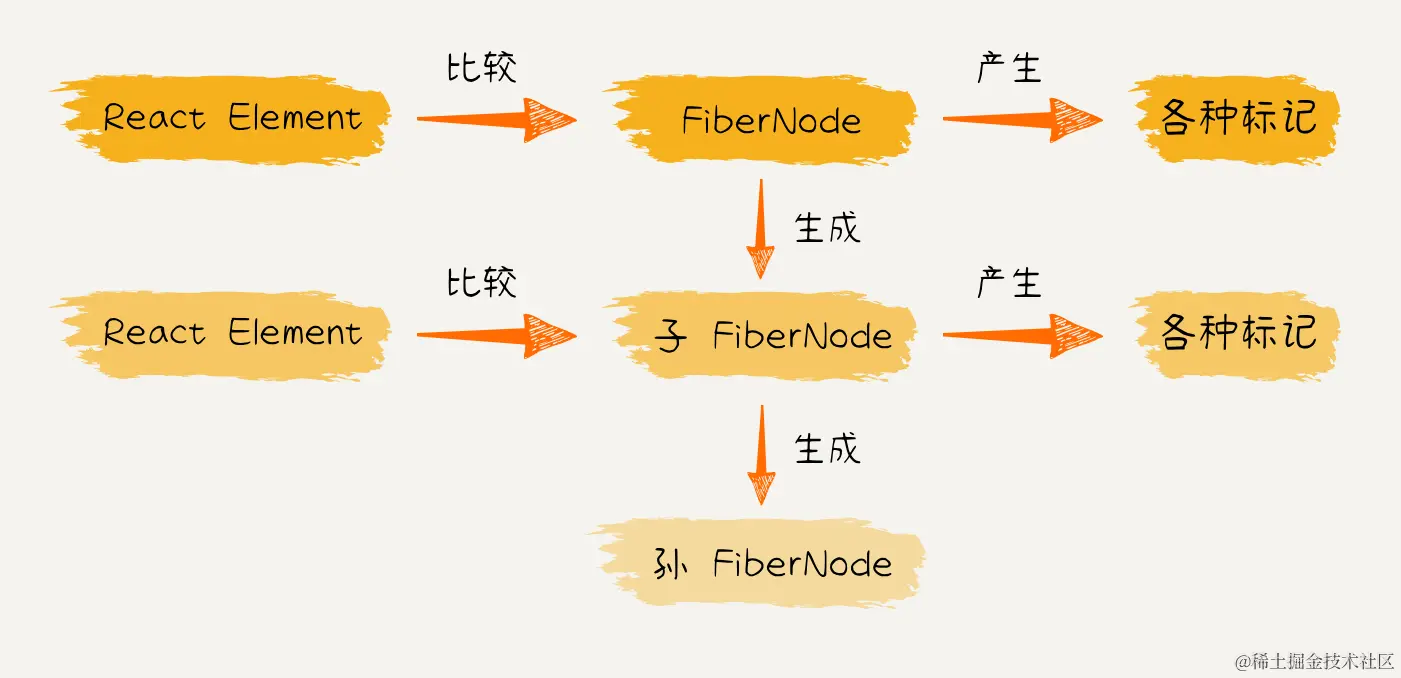
【从0实现React18】 (五) 初探react mount流程 完成核心递归流程
更新流程的目的: 生成wip fiberNode树标记副作用flags 更新流程的步骤: 递:beginWork归:completeWork 在 上一节 ,我们探讨了 React 应用在首次渲染或后续更新时的整体更新流程。在 Reconciler 工作流程中ÿ…...
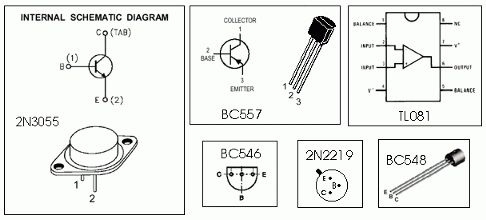
0-30 VDC 稳压电源,电流控制 0.002-3 A
怎么运行的 首先,有一个次级绕组额定值为 24 V/3 A 的降压电源变压器,连接在电路输入点的引脚 1 和 2 上。(电源输出的质量将直接影响与变压器的质量成正比)。变压器次级绕组的交流电压经四个二极管D1-D4组成的电桥整流。桥输出端…...

HTML5+CSS3+JS小实例:图片九宫格
实例:图片九宫格 技术栈:HTML+CSS+JS 效果: 源码: 【HTML】 <!DOCTYPE html> <html lang="zh-CN"> <head><meta charset="UTF-8"><meta name="viewport" content="width=device-width, initial-scale=1…...

湘潭大学软件工程数据库总结
文章目录 前言试卷结构给学弟学妹的一些参考自己的一些总结 前言 自己可能很早很早之前就准备复习了,但是感觉还是没有学到要点,主要还是没啥紧迫的压力,我们是三月份开学,那时候实验室有朋友挺认真开始学习数据库了,…...

Codeforces Testing Round 1 B. Right Triangles 题解 组合数学
Right Triangles 题目描述 You are given a n m nm nm field consisting only of periods (‘.’) and asterisks (‘*’). Your task is to count all right triangles with two sides parallel to the square sides, whose vertices are in the centers of ‘*’-cells. …...

怎样将word默认Microsoft Office,而不是WPS
设置——>应用——>默认应用——>选择"word"——>将doc和docx都选择Microsoft Word即可...

C语言之进程的学习2
Env环境变量(操作系统的全局变量)...
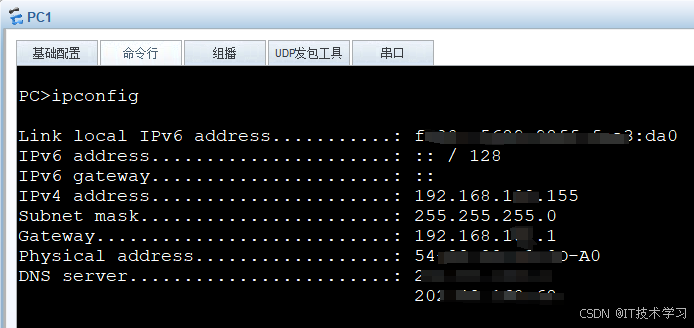
eNSP-Cloud(实现本地电脑与eNSP内设备之间通信)
说明: 想象一下,你正在用eNSP搭建一个虚拟的网络世界,里面有虚拟的路由器、交换机、电脑(PC)等等。这些设备都在你的电脑里面“运行”,它们之间可以互相通信,就像一个封闭的小王国。 但是&#…...

【Linux】C语言执行shell指令
在C语言中执行Shell指令 在C语言中,有几种方法可以执行Shell指令: 1. 使用system()函数 这是最简单的方法,包含在stdlib.h头文件中: #include <stdlib.h>int main() {system("ls -l"); // 执行ls -l命令retu…...
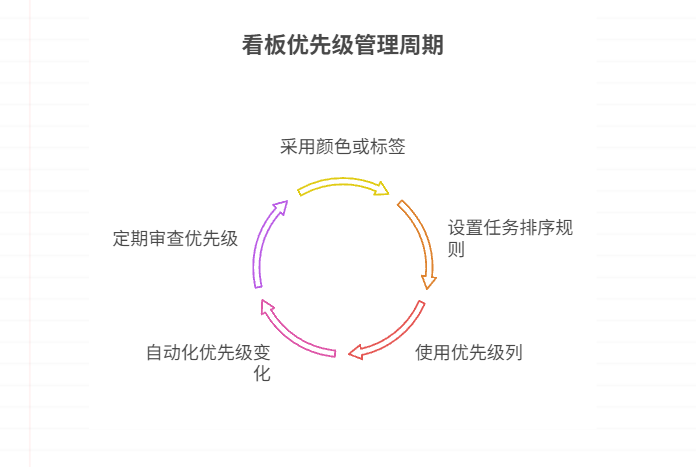
如何在看板中体现优先级变化
在看板中有效体现优先级变化的关键措施包括:采用颜色或标签标识优先级、设置任务排序规则、使用独立的优先级列或泳道、结合自动化规则同步优先级变化、建立定期的优先级审查流程。其中,设置任务排序规则尤其重要,因为它让看板视觉上直观地体…...
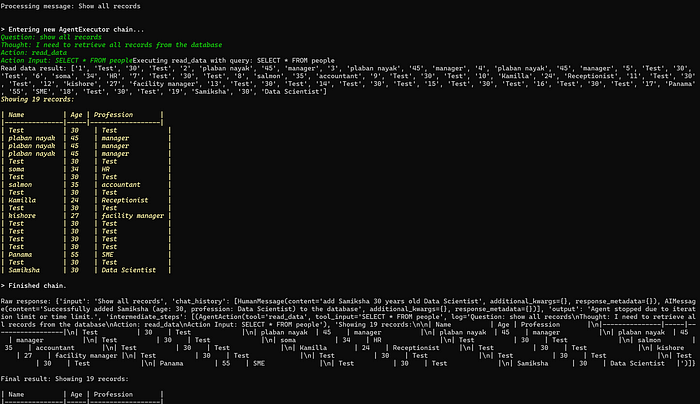
理解 MCP 工作流:使用 Ollama 和 LangChain 构建本地 MCP 客户端
🌟 什么是 MCP? 模型控制协议 (MCP) 是一种创新的协议,旨在无缝连接 AI 模型与应用程序。 MCP 是一个开源协议,它标准化了我们的 LLM 应用程序连接所需工具和数据源并与之协作的方式。 可以把它想象成你的 AI 模型 和想要使用它…...

解锁数据库简洁之道:FastAPI与SQLModel实战指南
在构建现代Web应用程序时,与数据库的交互无疑是核心环节。虽然传统的数据库操作方式(如直接编写SQL语句与psycopg2交互)赋予了我们精细的控制权,但在面对日益复杂的业务逻辑和快速迭代的需求时,这种方式的开发效率和可…...

Linux简单的操作
ls ls 查看当前目录 ll 查看详细内容 ls -a 查看所有的内容 ls --help 查看方法文档 pwd pwd 查看当前路径 cd cd 转路径 cd .. 转上一级路径 cd 名 转换路径 …...

条件运算符
C中的三目运算符(也称条件运算符,英文:ternary operator)是一种简洁的条件选择语句,语法如下: 条件表达式 ? 表达式1 : 表达式2• 如果“条件表达式”为true,则整个表达式的结果为“表达式1”…...

macOS多出来了:Google云端硬盘、YouTube、表格、幻灯片、Gmail、Google文档等应用
文章目录 问题现象问题原因解决办法 问题现象 macOS启动台(Launchpad)多出来了:Google云端硬盘、YouTube、表格、幻灯片、Gmail、Google文档等应用。 问题原因 很明显,都是Google家的办公全家桶。这些应用并不是通过独立安装的…...

Unit 1 深度强化学习简介
Deep RL Course ——Unit 1 Introduction 从理论和实践层面深入学习深度强化学习。学会使用知名的深度强化学习库,例如 Stable Baselines3、RL Baselines3 Zoo、Sample Factory 和 CleanRL。在独特的环境中训练智能体,比如 SnowballFight、Huggy the Do…...
多模态大语言模型arxiv论文略读(108)
CROME: Cross-Modal Adapters for Efficient Multimodal LLM ➡️ 论文标题:CROME: Cross-Modal Adapters for Efficient Multimodal LLM ➡️ 论文作者:Sayna Ebrahimi, Sercan O. Arik, Tejas Nama, Tomas Pfister ➡️ 研究机构: Google Cloud AI Re…...